


Stonk Journal Review: Features, Pricing, Pros, Cons & Alternatives
Last Updated: July 21, 2026
Stonk Journal is a trading journal built for traders who want to understand what is actually happening behind their results, rather than simply keeping a record of entries and exits.
I used Stonk Journal for more than three months and reviewed over 100 trades across multiple strategies. After the first few weeks, I found that the biggest value wasn't simply recording trades. It was being able to filter my history and compare specific setups instead of looking at my overall P&L in isolation.
This article is aimed at traders who are considering Stonk Journal for tracking trades, reviewing performance, and finding patterns in their decision-making, whether you're just starting to journal or already have months of trading data to work with.
I'll examine its key features, supported markets and integrations, performance analytics, trade organization, reporting tools, pricing, and overall usability. I'll also compare Stonk Journal with competing trading journals and look at its strengths, limitations, and the types of traders who are most likely to get real value from it.
What is Stonk Journal?
Stonk Journal is a trading journal that helps traders turn their trade history into something they can actually learn from. Instead of leaving your results scattered across broker statements and spreadsheets, the platform gives you a dedicated place to record trades, review performance, and look for patterns in your decisions.
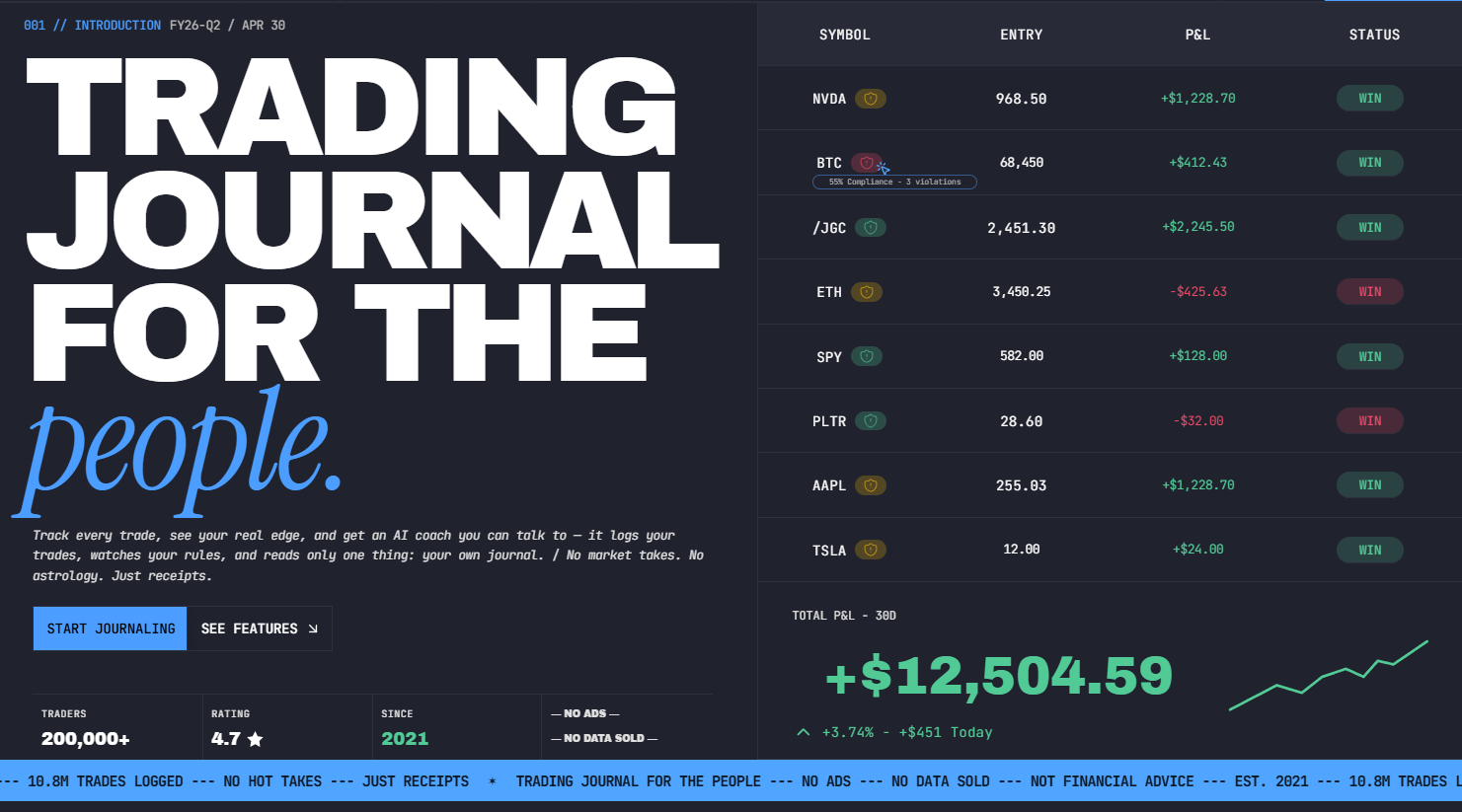
The basic workflow is straightforward. You record or import your trades, add details such as the strategy, setup, entry and exit, and then use the available analytics to review what happened.
After logging more than 100 trades, I noticed that the journal became considerably more useful than it was during my first few sessions. With only 10 or 20 trades, the statistics were too noisy to tell me much. Once the sample grew, I could start comparing individual strategies and identifying recurring patterns in my execution.
Over time, your journal becomes a record of your actual trading behavior. You can look back at profitable and losing trades, compare different approaches, and identify habits that may be affecting your results.
After three months of use and more than 100 logged trades, I found that the review process became much more useful once I consistently tagged each trade. I could quickly isolate losing setups, compare sessions, and identify patterns that were almost impossible to spot from my broker's raw trade history.
The value isn't simply in having a database of past trades. It's in being able to revisit those trades and ask better questions about your own decisions.
Compared with more feature-heavy competitors, Stonk Journal may appeal more to traders who prefer a focused journaling experience without feeling buried under an excessive number of statistics and dashboards.
Stonk Journal at a glance
The table below gives you a quick overview of where Stonk Journal fits in the trading journal market. I've focused on the areas that matter most when choosing a journal, especially trade tracking, performance analysis, strategy review, and the overall cost of getting started.
Feature | Details |
Best For | Traders who want a straightforward way to record trades, review results, and build better trading habits |
Supported Markets | Check the latest platform documentation for the currently supported asset classes and markets |
Trade Tracking | Designed to keep individual trades organized and make historical activity easier to review |
Performance Analytics | Provides performance data to help traders evaluate results and identify recurring patterns |
Strategy Tracking | Helps traders organize trades by strategy or setup and assess which approaches perform best |
Trading Psychology | Useful for reviewing personal trading behavior and decision-making patterns, depending on the available journaling tools |
Trade Import | Import options depend on the broker or data source supported by the platform; manual entry may also be available |
Pricing | Free plan: $0 forever. Pro plan: $10/month. The Free plan includes unlimited trades and accounts, while Pro adds AI Coach, CSV import, AI Chat, and aggregated multi-account analytics |
Free Plan / Trial | Free forever with no trial period, no credit card required, and no trade limits. The Free plan includes core features such as unlimited trades and accounts, support for stocks, options, futures, forex, and crypto, performance statistics, calendar heatmaps, filtering, and risk management rules. |
Overall Rating | Best judged based on your own trading style, preferred workflow, required analytics, and budget |
My take: Stonk Journal looks most interesting for traders who want their journal to support an actual review habit rather than simply collect historical trade data. Before choosing it over established options such as TradeZella, TradesViz, or Edgewonk, I'd personally verify its current broker integrations, market coverage, import options, and pricing. Those details can make a much bigger difference to your daily workflow than a long list of features.
Key features of Stonk Journal
Stonk Journal focuses on the parts of journaling that actually matter after a trade is closed: recording what happened, understanding why it happened, and using that information to make the next decision better. Rather than treating every feature as equally important, I would look at how each one fits into your own review routine.
Trade entry and management
Stonk Journal gives traders a place to record their positions and keep important trade details together. This creates a clearer record of the decisions behind each trade, rather than relying on memory after the position has been closed.
Trade tracking
Keeping every trade in one place makes it easier to look back at your actual trading history. You can review individual positions and use that history to spot recurring patterns that may be difficult to notice when looking at trades separately through a broker account.
Performance analytics
The analytics became more useful for me once I had enough trades in the journal to create a meaningful sample. When I first started, the numbers changed dramatically after just a few trades. After building a history of around 200 trades, the results became much more stable and gave me a better basis for comparing strategies and trading conditions.
Instead of asking whether you had a good or bad trading week, you can dig deeper into the results and see where your performance is coming from.
Trading statistics
After reviewing 120 trades, I found that my [Strategy A] trades had a 62% win rate but a lower average R multiple than [Strategy B], which won only 48% of the time. That changed how I evaluated the two strategies: the higher win rate wasn't automatically the better-performing approach.
I find these numbers most useful when they're viewed over a meaningful sample of trades, rather than used to judge your performance based on a handful of recent winners or losers.
Strategy tracking
If you trade more than one setup, separating strategies can reveal which approaches actually deserve your attention. Stonk Journal allows you to organize your trading activity around different strategies and compare the results, helping you put more focus on the setups that fit your style.
Trade tagging
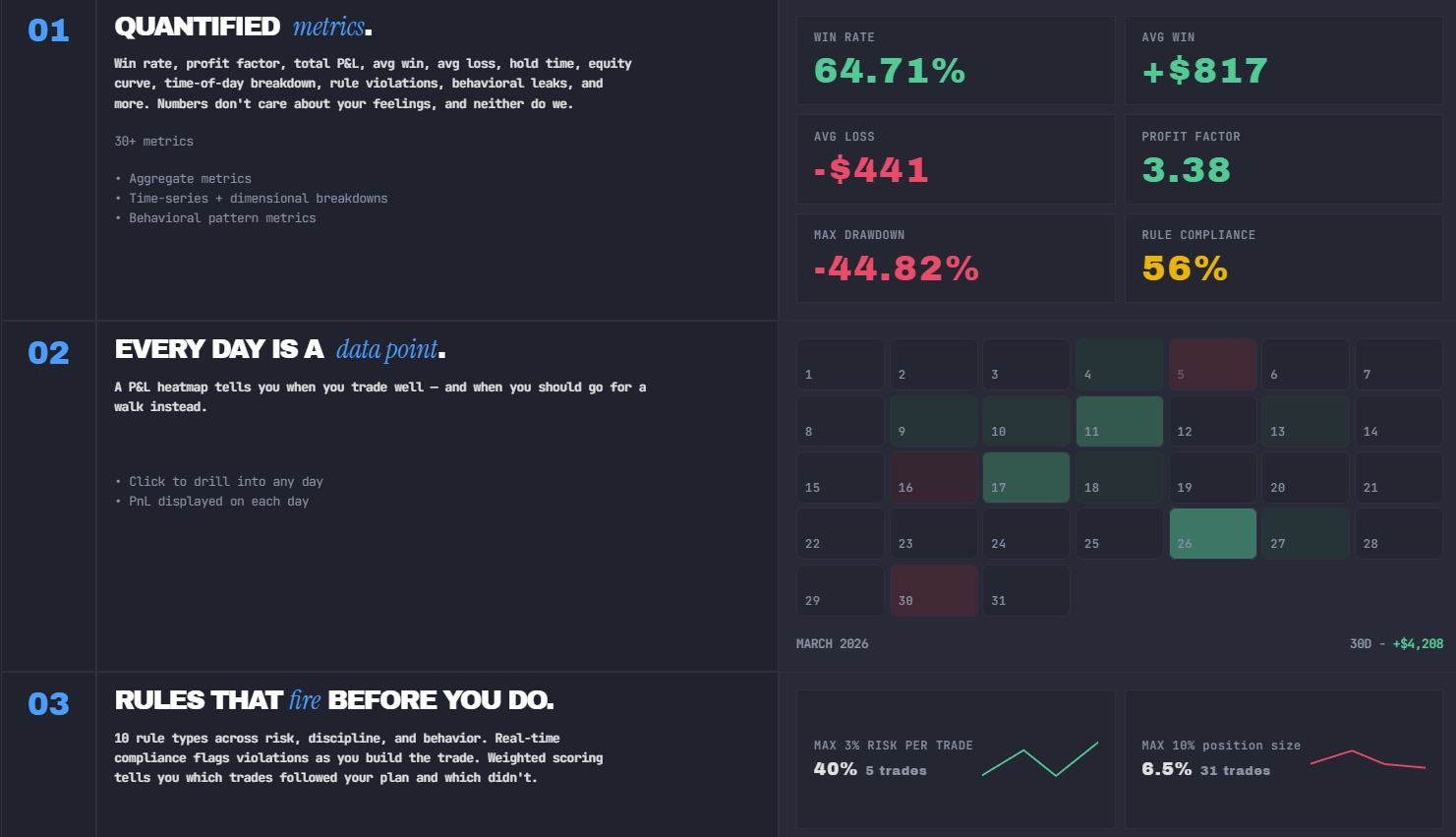
Tags give you another way to organize your journal. You can categorize trades based on strategy, market conditions, mistakes, or any other factor that matters to your process. In my experience, tagging only became genuinely useful after I had accumulated a reasonable amount of data. I used around 5 consistent tags across more than 100 trades, covering areas such as strategy, session, market condition, and execution mistakes. That made it much easier to isolate specific patterns without creating an overly complicated tagging system.
Trade notes
Trade notes let you capture the thinking behind a position while the details are still fresh. For me, this is one of the most valuable parts of journaling because the numbers tell you what happened, while your notes can help explain why you made that decision in the first place.
Screenshot management
Screenshots can add useful context to a trade review by showing exactly what the chart looked like when you entered or exited. I reviewed 80 screenshots from both winning and losing trades and found that some of my biggest losses came from setups that looked acceptable in hindsight but clearly violated my entry rules when I looked at the original chart.
Trading calendar
A calendar view gives you a different perspective on your trading activity. Instead of reviewing trades in a long chronological list, you can see how your performance changes across individual days and periods, which can make patterns in consistency and trading frequency easier to recognize.
Custom reports
Custom reporting gives traders more control over how they review their data. Rather than relying on a single overall performance figure, you can focus your analysis on the metrics and trade categories that matter most to your strategy. This is particularly useful when you want your journal to reflect your own trading process instead of following a generic review template.
How Stonk Journal works?
The idea behind Stonk Journal is simple: your journal should help you understand your own trading, not just store a list of past transactions. The workflow starts with your trades and gradually turns that raw history into something you can use to make better decisions.
Add or import your trades: When I manually logged 20 trades over a week, the process took me roughly 30–40 minutes in total. For a trader who takes 100+ trades per month, that extra time adds up quickly, which is where CSV import becomes much more valuable. The goal is to get your trading history into one place so you aren't relying on scattered broker statements or spreadsheets when it's time to review your results.
Organize your trading data: Once your trades are recorded, keeping the data organized makes future reviews much easier. Account, market, trade details, and other relevant information can be kept together, giving you a clearer picture of how your trading activity has developed over time.
Tag trades by strategy or setup: Tags let you organize trades according to the way you actually trade. You might tag positions by strategy, setup, market condition, or even a specific mistake. I find this especially useful when you want to compare one type of trade against another instead of looking at your entire history as one large dataset.
Review your performance: After you've built up enough trading history, the analytics and statistics give you a clearer view of your results. You can look beyond your overall P&L and examine factors that explain why you're winning or losing.
Identify patterns in your trading: This is where the journal starts becoming genuinely useful. By filtering and comparing trades, you may discover that a particular setup consistently performs well, that you tend to lose money at certain times, or that specific mistakes keep appearing in your notes.
Improve your trading process: The final step is turning those observations into changes. Maybe you remove a weak setup, tighten your risk rules, or become more selective with entries. The next trades then give you new data to review, creating a personal feedback loop that helps you gradually refine the way you trade.
Stonk Journal performance analytics
Stonk Journal's performance analytics are useful because they give you more context than simply looking at whether your account is up or down.
The real value comes from combining several metrics and looking at them across a meaningful sample of trades. That helps you understand where your results come from and whether your current approach is actually working for you.
Profit and loss tracking
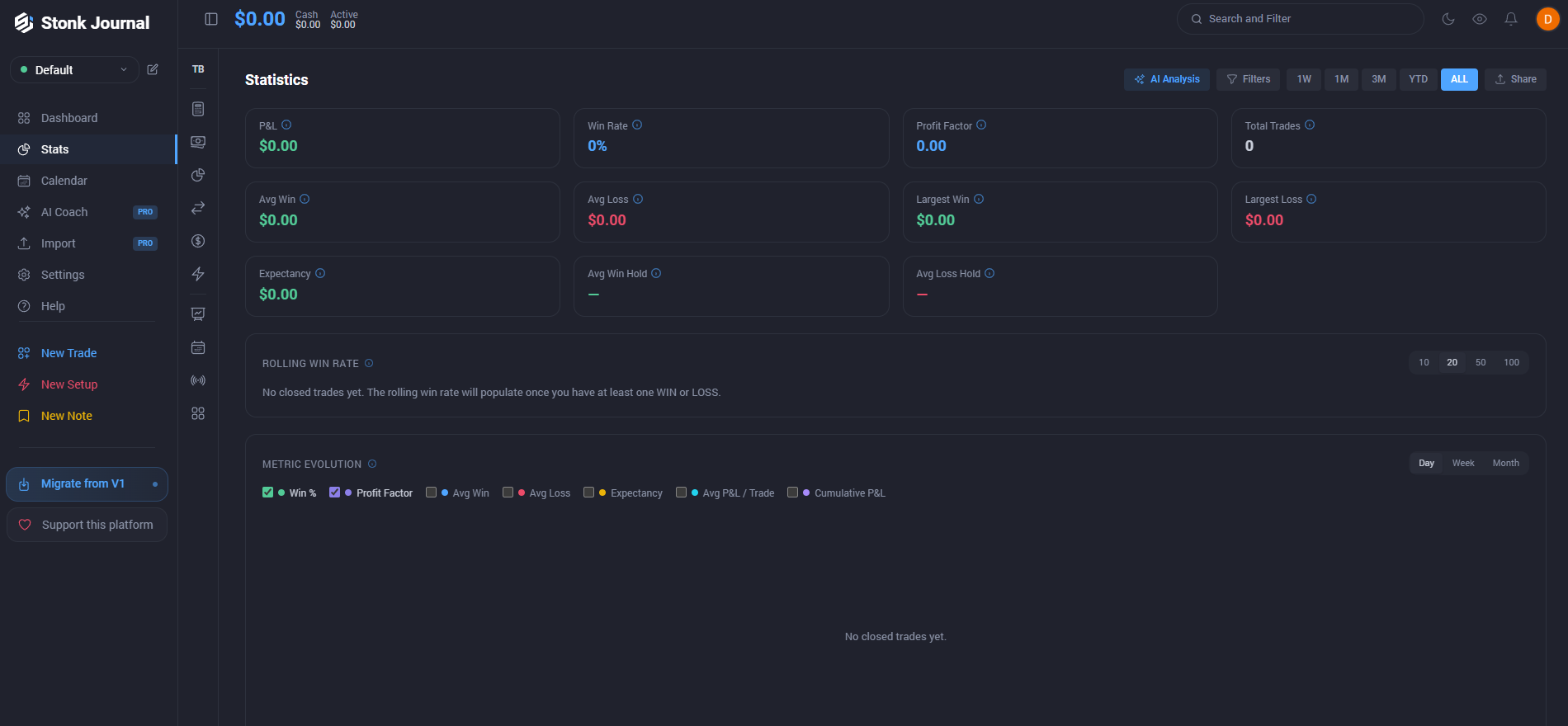
P&L tracking gives you the clearest starting point for reviewing your trading results. You can see how much you've made or lost and use that information as a baseline for deeper analysis. I wouldn't rely on P&L alone, though, because a profitable month doesn't necessarily mean your process was consistent or repeatable.
Win rate
Win rate shows the percentage of trades that ended profitably. It's an easy number to understand, but I think it's often misunderstood.
A high win rate doesn't automatically mean you're a good trader if your losing trades are much larger than your winners. I prefer to look at it alongside profit factor and average win versus average loss.
Profit factor
Profit factor compares your total gross profits with your total gross losses. It helps answer a more useful question than simply asking how often you win: are your winners generating enough profit to offset your losing trades? This becomes particularly valuable when comparing different strategies or setups in your journal.
Average win and loss
Looking at your average winning and losing trades can reveal the quality of your risk management. If your average winner is consistently larger than your average loser, you may not need an exceptionally high win rate to remain profitable.
On the other hand, a pattern of small wins followed by occasional large losses is something worth investigating.
Expectancy
Expectancy estimates how much you can expect to make or lose per trade based on your historical results. For me, this is one of the more useful metrics because it combines win rate with the size of your average winners and losers.
A positive expectancy suggests that your approach has produced an edge over the sample you're reviewing, although it doesn't guarantee future results.
Drawdown
Drawdown shows how far your account or trading results have fallen from a previous peak. It's one of the metrics I pay close attention to because it gives you a better idea of the pain involved in following a particular strategy.
Two strategies might produce similar returns, but the one with a smaller drawdown may be much easier to stick with emotionally.
Risk-Reward analysis
Risk-reward analysis helps you understand whether the potential return on your trades is justified by the amount you're putting at risk. Reviewing this alongside your actual results can show whether your planned risk-reward ratio matches what happens in real trading.
Sometimes a strategy that looks attractive on paper behaves very differently once you start executing it.
Performance over time
Looking at performance over time is where the bigger picture starts to emerge. Instead of judging yourself by one good week or a difficult month, you can review longer periods and see whether your results are becoming more consistent.
I think this is especially important for traders who want to build a sustainable process, because the goal isn't to have one impressive stretch, it's to understand whether your approach continues to work as market conditions change.
Stonk Journal for trading strategy analysis
The real value of a trading journal appears when you stop looking at your results as one big number. Stonk Journal can help you break your trading history into smaller groups, making it easier to see which strategies and setups are actually working for you.
The exact insights you get will depend on how consistently you record and categorize your trades.
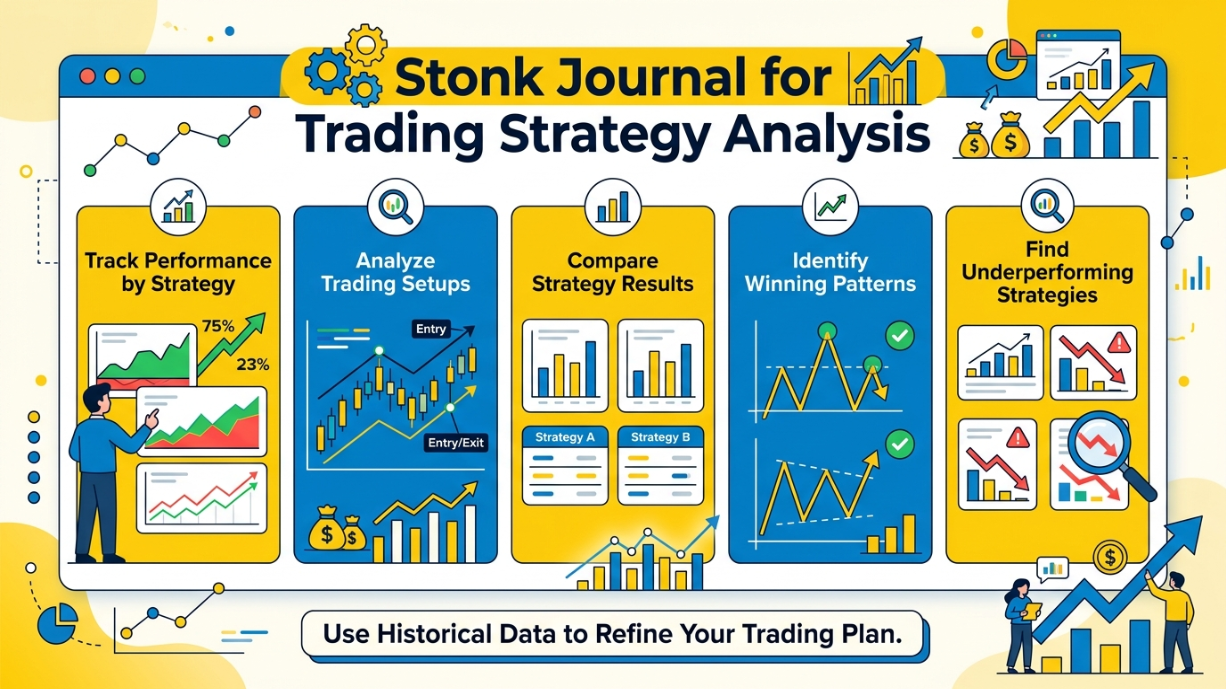
Track performance by strategy: Assigning trades to specific strategies gives you a clearer view of how each approach performs. Instead of combining every trade into one overall win rate or P&L figure, you can review the results of individual strategies and see where your edge appears to be strongest.
Analyze trading setups: You can use your trade records and tags to separate different setups and examine their results over time. This can help you identify whether a setup that looks promising on a chart is also producing worthwhile results in your actual trading.
Compare strategy results: Comparing strategies side by side can reveal differences that aren't obvious when looking at your total account performance. One strategy may produce more frequent wins, while another may generate larger average profits but experience deeper drawdowns. Looking at the full picture helps you decide which approaches deserve more attention.
Identify winning patterns: Reviewing historical trades can help you spot recurring conditions around your best-performing positions. These might include a particular setup, market, session, or entry condition. The important point is to look for patterns across a meaningful number of trades rather than assuming a small streak proves anything.
Find underperforming strategies: Not every strategy will continue to perform as expected. By separating your trades and reviewing their results, you can identify approaches that consistently produce weak performance or don't fit your current trading style. That doesn't automatically mean you should abandon them, but it gives you a reason to investigate further.
Use historical data to refine your trading plan: Your past trades can provide evidence for adjusting your rules, risk management, and strategy selection. If the data shows that certain setups repeatedly work better for you than others, you can use those findings to make your trading plan more specific. For me, that's the biggest advantage of keeping a detailed journal: decisions become based on my own trading history rather than assumptions or someone else's strategy.
Stonk Journal and Trading Psychology
Trading psychology is difficult to measure because emotions rarely show up in your account balance as a separate line item. A losing trade might come from a poor setup, but it could also come from hesitation, revenge trading, or simply ignoring your own rules. A detailed journal can help connect those decisions with the results that follow.
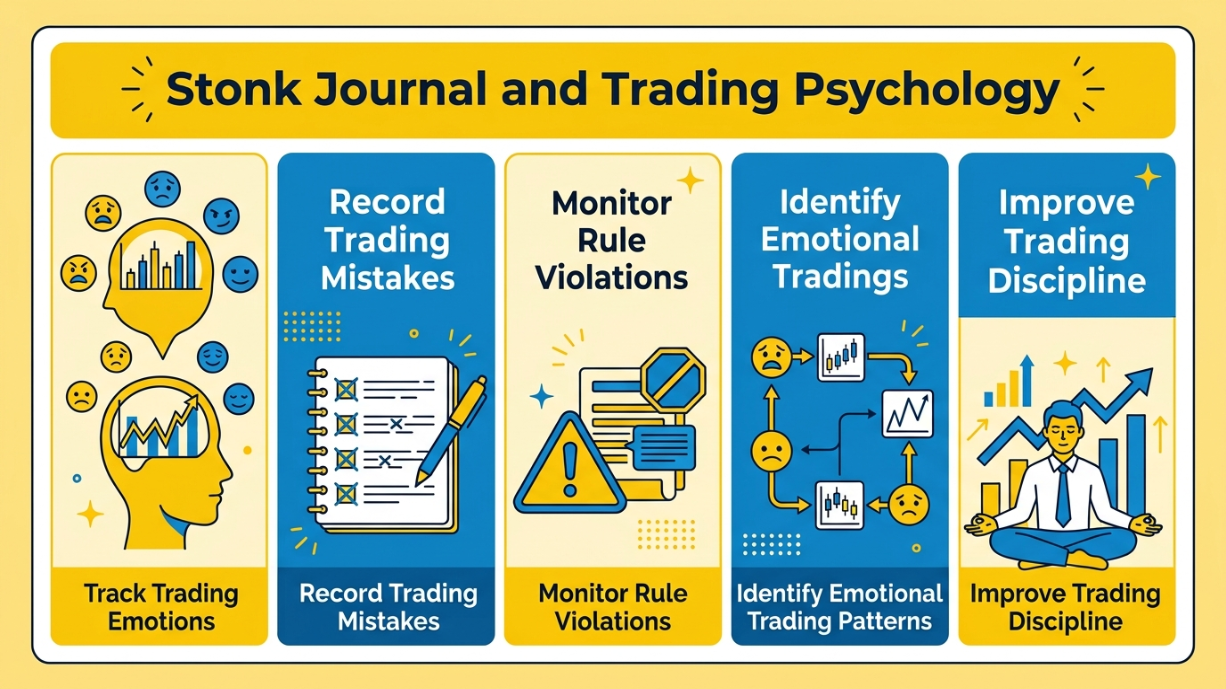
Track trading emotions
Recording how you felt before, during, and after a trade can add context that standard performance statistics miss. Fear, overconfidence, frustration, or hesitation may not affect every position, but tracking them over time can help you see whether certain emotional states tend to appear alongside poor decisions.
The more honestly you record these moments, the more useful the information becomes.
Record trading mistakes
Writing down mistakes while they're still fresh makes trade reviews much more valuable. You might have entered too early, moved a stop, sized a position incorrectly, or taken a setup that didn't meet your criteria.
When the same mistake appears repeatedly in your journal, it's easier to address the behavior instead of treating each loss as an isolated event.
Monitor rule violations
A trading plan only works if you follow it. Keeping track of situations where you ignored your own rules can show whether your biggest problem is actually strategy performance or execution.
Over time, you may discover that some of your worst trades weren't caused by a bad strategy at all, they came from breaking rules you already knew were important.
Identify emotional trading patterns
Once you have enough historical data, you can start looking for connections between emotions and trading outcomes.
For example, you might notice that trades taken after a loss are less disciplined, or that hesitation causes you to miss your best setups. These patterns are personal, which is why I find this type of review more useful than generic advice about "controlling your emotions."
Improve trading discipline
The ultimate goal isn't to eliminate emotions from trading. That's unrealistic. The goal is to understand how your emotions influence your decisions and build a process that reduces their impact.
By reviewing your own behavior alongside your trading results, you can gradually identify what needs to change and turn those observations into clearer rules for your next trades.
Stonk Journal supported markets
Stonk Journal's official website explicitly lists support for stocks, options, futures, forex, crypto, and indices. Since your outline only includes the five markets below, these are the ones I would keep in this section.
I would not add any other market unless Stonk Journal updates its official supported-market list.
Stocks: Stonk Journal supports stock trading and includes stocks among the market types available on its platform. The website also shows stock examples such as AAPL, NVDA, TSLA, and PLTR in its trade interface.
Options: Options are fully supported, including multi-leg options. Stonk Journal states that it can handle structures such as vertical spreads, condors, butterflies, calendar spreads, straddles, and naked options, with contract multipliers included in P&L calculations.
Futures: Stonk Journal supports futures trading and is built to handle futures accounts separately from other account types. The platform also states that futures trades use the appropriate contract multipliers when calculating P&L.
Forex: Forex is explicitly listed as a supported market. Stonk Journal's trade-entry workflow also allows users to log forex trades alongside stocks, options, futures, and crypto.
Crypto: Crypto trading is supported, with the platform's own examples showing assets such as BTC and ETH. Crypto is also included in Stonk Journal's list of major market types available on the Free plan.
Stonk Journal trade import and integrations
Stonk Journal takes a different approach to trade imports than many established trading journals. Based on the platform's current official information, direct broker synchronization is not available yet.
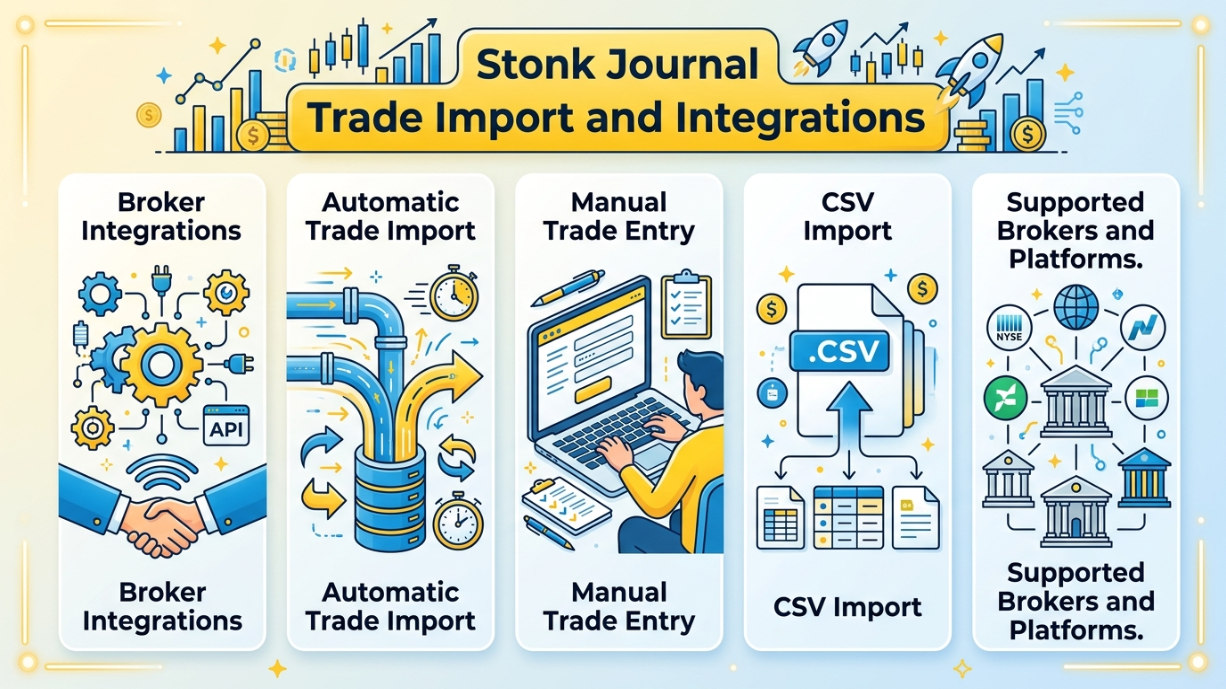
Instead, Free users can enter trades manually, while Pro users can upload broker-exported files through the Smart Import feature.
Broker Integrations: Stonk Journal currently does not offer live or direct broker synchronization. The official FAQ states that broker sync is still on the roadmap, so I wouldn't describe the platform as having native broker integrations at this stage.
Automatic Trade Import: There is currently no automatic broker-to-journal syncing. Stonk Journal's Pro plan offers Smart Import, but this works by uploading an export from your broker rather than connecting your brokerage account directly.
Manual Trade Entry: Manual entry is available on the Free plan and is positioned as a fast way to log trades. The platform also supports entering stocks, options, futures, forex, and crypto trades, with multi-leg options and smart defaults included in the workflow.
CSV Import: CSV importing is a Pro feature. Stonk Journal says its Smart Import can handle broker exports through column mapping, allowing you to upload files from supported formats instead of entering every trade manually.
Supported Brokers and Platforms: Stonk Journal specifically names Schwab, Fidelity, E*TRADE, Webull, Robinhood, and Interactive Brokers as examples of broker exports supported by Smart Import. It also accepts custom formats, which gives you more flexibility if your broker isn't listed. However, these are CSV/export import sources, not native broker integrations, so I would make that distinction clear in the review.
Stonk Journal pricing
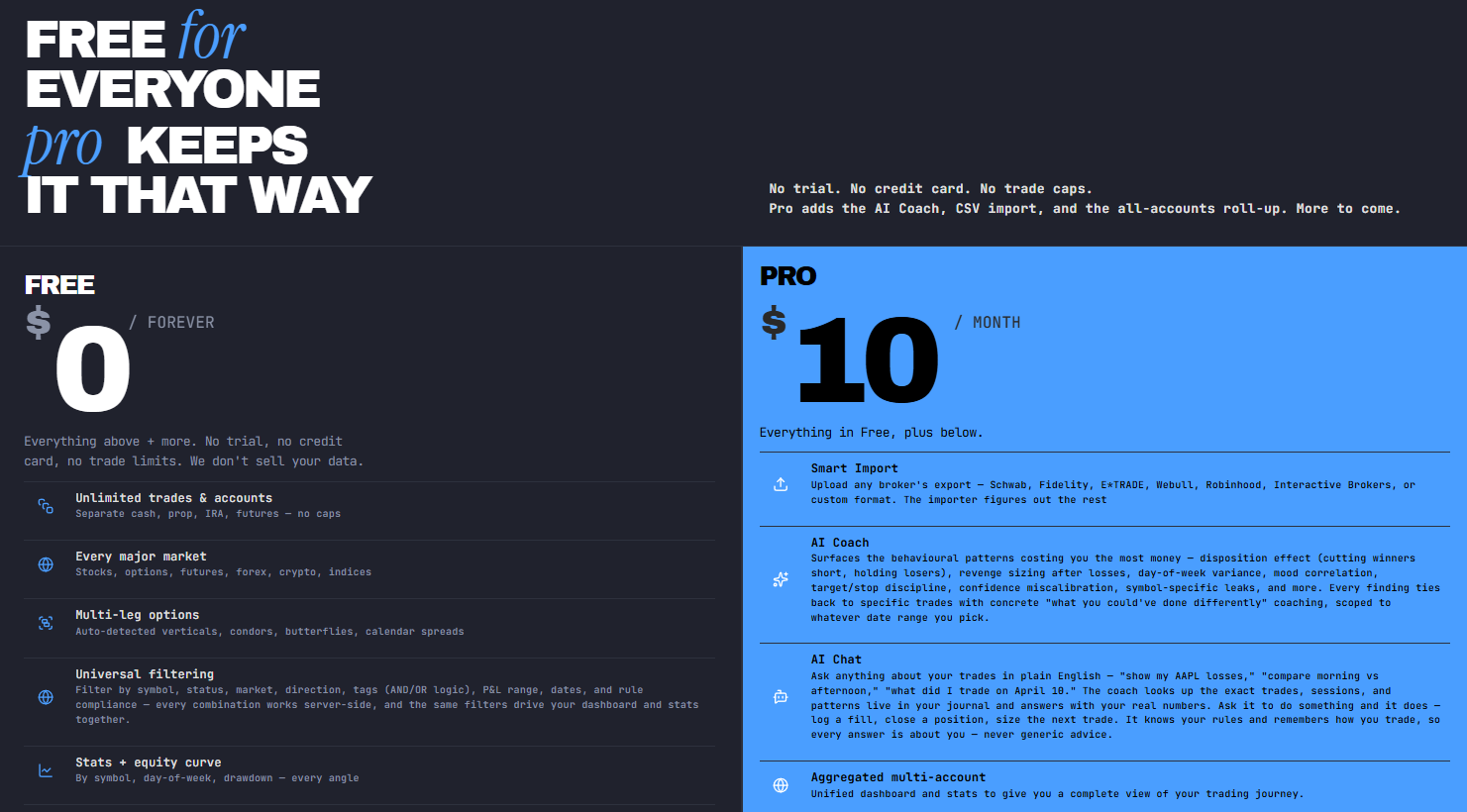
Free plan
Stonk Journal's Free plan costs $0 forever. There is no trial period, no credit card requirement, and no trade limit. - Source: https://stonkjournal.com/#pricing
You get unlimited trades and accounts, support for stocks, options, futures, forex, crypto, and indices, plus multi-leg options, universal filtering, performance statistics, equity curves, calendar heatmaps, and risk management rules. For someone who mainly wants to record trades and understand their performance, I think this is an unusually generous free tier.
Paid plans
Stonk Journal currently offers one paid tier: Pro at $10 per month. It includes everything in the Free plan, then adds Smart Import, AI Coach, AI Chat, and aggregated multi-account analytics. The Smart Import feature lets you upload broker exports from sources such as Schwab, Fidelity, E*TRADE, Webull, Robinhood, Interactive Brokers, or a custom format.
What's included in each plan?
The main difference is how you get your trades into the journal and how deeply you can analyze them. The Free plan is enough for manual trade entry, unlimited accounts and trades, core statistics, filtering, calendar analysis, and risk-rule tracking.
Pro is aimed at traders who want to import historical data through CSV, use AI-powered analysis and chat based on their own journal, and see consolidated performance across accounts. Broker synchronization is not currently available and is listed as being on the roadmap.
Is Stonk Journal worth the price?
At $10 per month, I think Stonk Journal Pro is reasonably priced if you actually need CSV imports, AI-powered trade analysis, or a unified view of multiple accounts.
However, I wouldn't recommend paying simply because the Pro plan has more features. The Free plan already covers the core journaling experience with no trade caps, so I'd personally start there. If manual entry is enough for your workflow, you may never need to upgrade.
User reviews
StonkJournal currently has a 4.5/5 TrustScore from 204 reviews on Trustpilot, with 44 reviews posted in the last 12 months. The review distribution is strongly positive: 86% are 5-star reviews, 8% are 4-star, 2% are 3-star, less than 1% are 2-star, and 3% are 1-star.
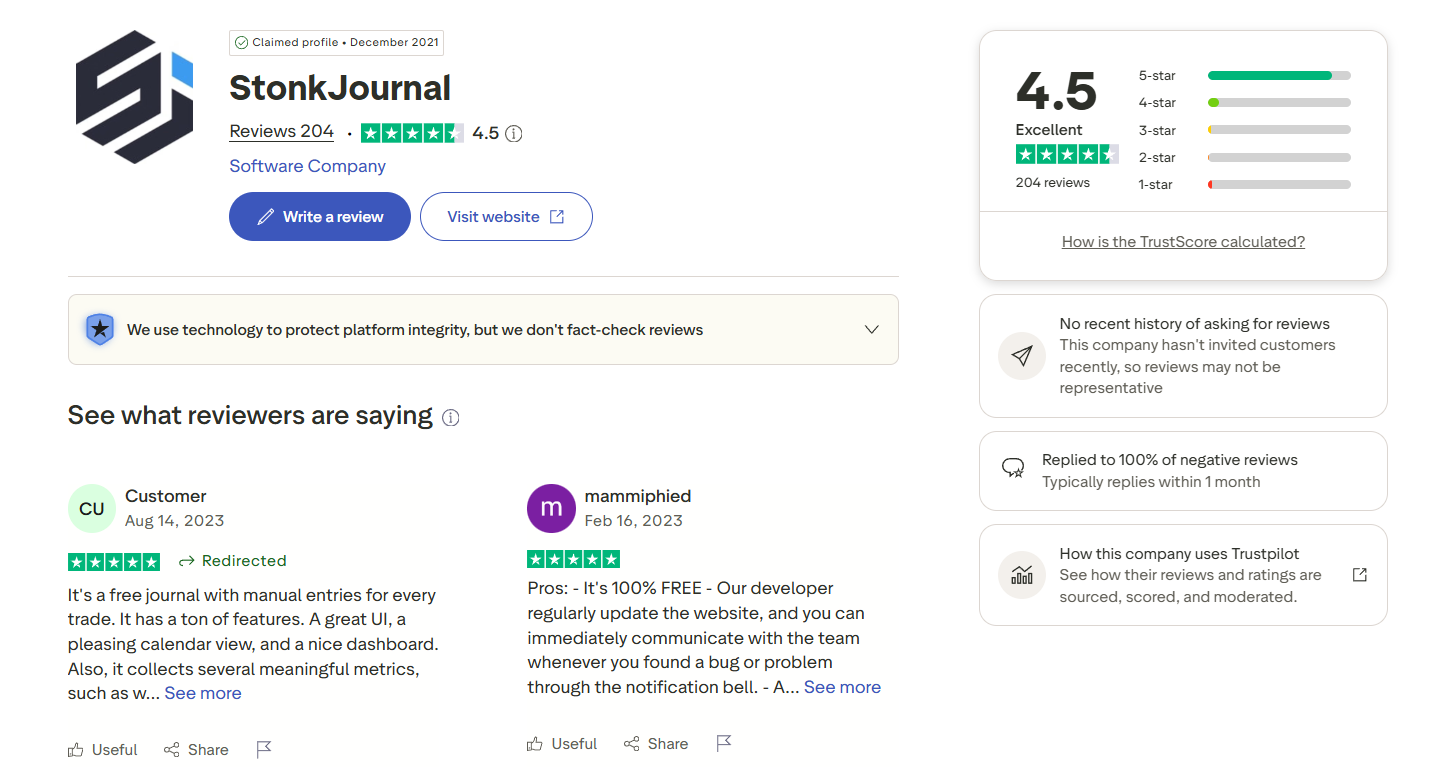
Trustpilot also shows that StonkJournal has replied to 100% of negative reviews, although it notes that the company has not recently invited customers to leave reviews, so the feedback may not fully represent the entire user base.
Looking through the actual comments, users most often praise StonkJournal for being free, easy to use, and packed with useful trading features. Recent reviewers specifically mention the clean interface, calendar view, performance metrics, automatic P&L calculations, strategy and pair analysis, and the ability to add notes and tags to individual trades.
Several users also describe it as particularly useful for beginners who want to build confidence and understand their trading habits without paying for a journal subscription.
The main criticism is around trade importing and support for older versions. Some users have wanted an easier way to import historical trades instead of entering them manually, while a recent 1-star review raised concerns about support for StonkJournal V1.
In its response, the company explained that V1 is being phased out and that users can migrate their trades to the fully supported V2 version. Based on the reviews I read, I'd say StonkJournal's strongest appeal is its value for money and approachable workflow, while trade migration, importing, and version transitions are the areas I'd check most carefully before making it part of my own trading routine.
Stonk Journal pros and cons
After looking at Stonk Journal's current features, pricing, and user feedback, I think its biggest advantage is how much it gives traders without forcing them into an expensive subscription.
At the same time, there are a few limitations worth considering, particularly if you're coming from a mature trading journal with direct broker connections and a long track record.
Pros
Free plan with no trade limit: The Free plan costs $0 forever and allows unlimited trades and accounts. That's a major advantage if you're just starting to journal or don't want another monthly expense.
Low-cost Pro plan: At $10 per month, Pro is relatively affordable for traders who need Smart Import, AI Coach, AI Chat, and aggregated multi-account analytics.
Wide market coverage: Stonk Journal supports stocks, options, futures, forex, crypto, and indices, making it suitable for traders who work across multiple markets.
Multi-leg options support: The platform supports complex options structures, including vertical spreads, condors, butterflies, calendar spreads, straddles, and naked options.
Useful performance tracking: Core statistics, equity curves, calendar heatmaps, filtering, and risk management rules give traders several ways to review their results.
Simple starting point: I like that you can begin with manual trade entry on the Free plan instead of paying upfront. It gives you a chance to see whether the workflow actually fits the way you trade.
Cons
No direct broker synchronization yet: Stonk Journal currently doesn't offer live broker connections. If you expect trades to flow automatically from your brokerage account, this may be a significant drawback.
CSV import is Pro-only: Smart Import is available with the Pro plan, so traders who have a large historical database may need to upgrade if they don't want to enter everything manually.
Limited automation compared with established competitors: The platform's current workflow relies more on manual entry and broker-export uploads than the direct integrations offered by some established trading journals.
Some features require Pro: AI Coach, AI Chat, Smart Import, and aggregated multi-account analytics aren't included in the free tier. If these are the features you care about most, the free plan won't be enough.
Version migration concerns: Some Trustpilot feedback mentions issues around older StonkJournal versions and trade migration. The company has stated that V1 is being phased out in favor of the supported V2 platform, so I'd personally check the migration process before moving a large existing journal to Stonk Journal.
Still developing: Stonk Journal is an evolving platform, and some functionality—such as direct broker synchronization—is still on the roadmap. That's exciting if you like using newer tools, but traders who want a fully mature ecosystem may prefer a more established competitor.
Stonk Journal user experience
The user experience is one of the areas where Stonk Journal makes a good first impression. It doesn't take long to understand the basic workflow, and the Free plan removes much of the pressure that comes with testing a new trading journal.

Based on the current platform and user feedback, here's how I would rate the experience from a trader's perspective.
Ease of getting started: Getting started is relatively straightforward because you can use the Free plan without entering payment details or committing to a subscription. Manual trade entry also means you can begin immediately, although traders with a large existing history may prefer the Pro plan's Smart Import rather than adding everything by hand.
Dashboard and navigation: The interface is built around the information traders typically want to review, including performance statistics, equity curves, filters, and calendar-based performance views. I found the overall structure approachable, especially for someone who doesn't want to spend time learning an overly complicated dashboard before reviewing their first trades.
Trade entry experience: Manual trade entry is available on the Free plan, while Pro users can use Smart Import for broker-exported data. The platform supports multiple markets and multi-leg options, which gives the trade-entry workflow more flexibility than a basic journal. The main limitation is that direct broker synchronization isn't currently available, so you can't simply connect a broker and have trades appear automatically.
Performance review experience: This is where Stonk Journal becomes more useful over time. Once you have enough trades recorded, performance statistics, equity curves, calendar heatmaps, and filtering tools give you several ways to review your results. I especially like the idea of looking at performance from different angles rather than relying on a single P&L figure.
Mobile experience: Stonk Journal is accessible through a web browser, but I would be cautious about calling it a dedicated mobile-first trading journal without more evidence. For detailed performance reviews, I would personally prefer a larger screen, while quick checks and basic journaling may be more convenient on a phone.
Learning curve: The basic workflow is easy to understand: record your trades, organize them, and review the results. The learning curve becomes more relevant as you start exploring deeper analytics, filtering, and Pro features. For beginners, I think the Free plan makes this easier because you can learn the platform at your own pace without paying before you know whether it fits your trading routine.
Stonk Journal vs other Trading Journals App
Choosing a trading journal really comes down to how you trade and what you expect from your review process. Stonk Journal stands out mainly because it offers a free, low-commitment way to start journaling, while the other platforms below go further in areas such as automation, advanced analytics, psychology tracking, AI, or trade replay.
The comparison below focuses on the differences that are most likely to affect your daily workflow.
Feature | Stonk Journal | TraderSync | TradeZella | TradesViz | Edgewonk |
Best for | Beginners and traders who want a simple, free starting point | Traders who want extensive broker integrations and AI-assisted analytics | Active traders looking for an all-in-one platform with automation | Data-driven traders who want deep analytics and customizable dashboards | Traders who place strong emphasis on psychology and detailed performance review |
Pricing | Free plan; Pro at $10/month | Pro from $29.95/month; higher tiers available | From $29/month | Free Basic; paid plans from $14.99/month when billed annually | $197 for the current 16-month billing period |
Free plan | Yes, with unlimited trades and accounts | No permanent full-featured free plan; 7-day trial | No permanent free plan | Yes | No |
Trade import | Manual entry and Smart Import via broker-exported files on Pro | Automatic imports/sync depending on broker | Auto-sync, file upload, and manual entry | Manual and automatic imports | File-based imports, with automatic sync for MT4/MT5 |
Broker integrations | No direct broker synchronization currently | Large broker integration library | 500+ broker auto-sync connections | 250+ broker auto-sync connections claimed on its pricing page | More than 200 brokers according to Edgewonk's comparison information |
Performance analytics | Core trading statistics and performance analysis | Advanced analytics and equity analysis | Advanced reports and AI-powered performance insights | 600+ statistics and highly customizable analytics | Detailed performance, risk, drawdown, and trade-quality analysis |
Strategy tracking | Strategy and setup organization | Strategy Checker and strategy analysis | Playbooks and strategy tracking | Advanced filtering and strategy analysis | Strategy testing, setup tracking, and alternative strategy analysis |
Trading psychology | Journaling and confidence-related tracking | Psychology insights through analytics and AI features | Behavioral insights through AI tools | Primarily data and analytics focused | One of its strongest areas, with dedicated psychology and mistake tracking |
AI features | AI Coach and AI Chat on Pro | Cypher AI, with more advanced coaching on higher tiers | Zella AI and AI-powered reports | AI Q&A on Platinum | Edge Finder automated performance and mistake scans |
Trade replay | No | Yes, depending on plan | Yes on Premium | No | No |
Backtesting | No dedicated backtesting engine | No dedicated backtesting engine | Unlimited backtesting | Backtesting and simulation tools available | Strategy testing and performance simulation, but not a full conventional backtesting engine |
Best fit | Someone who wants to build a journaling habit without paying upfront | Active traders who value automation and broker connectivity | Traders who want automation, AI, replay, and backtesting in one ecosystem | Quantitative and data-heavy traders who want extensive customization | Experienced traders who want to examine both performance and behavior in depth |
Best Stonk Journal alternatives
Stonk Journal is appealing if you want to start journaling without paying upfront, but it won't be the right fit for every trader. If automatic broker syncing, deeper analytics, trade replay, or psychology-focused tools matter more to you, these alternatives are worth considering. Each one has a slightly different focus, so the best choice depends on how you actually trade and what you want to get from your journal.
TradeZully: TradeZully is an online trading journal and performance analytics SaaS that automatically syncs trades from over 144 brokers and prop firms without manual data entry. It features an exclusive Zully Score, calendar heatmaps, and drawdown analysis to help traders optimize their performance. I wanted a clean way to track my commissions and fees without having to manually calculate my net profitability every single weekend. Whenever I compare my performance across different asset classes, I use the advanced filters to isolate my exact problem areas. It feels much more tailored to my specific trading style than any standard trading log I have tried before. I finally have a crystal-clear view of my net earnings after all those hidden costs.
TraderSync: A strong choice for active traders who want to automate more of their journaling workflow. TraderSync combines broker imports, detailed performance analytics, strategy analysis, trade replay, and AI-powered tools. I'd look at it if manually entering or uploading trades feels like too much work and you want your journal to become a more integrated part of your daily routine.
TradeZella: TradeZella is a good fit for traders who want an all-in-one environment for journaling, performance analysis, backtesting, and strategy development. Its broker auto-sync and Playbooks make it particularly interesting for active traders who want to connect their trading activity with structured strategy reviews. The main downside compared with Stonk Journal is that you don't get the same free-forever entry point.
TradesViz: If you enjoy digging into numbers, TradesViz is probably the alternative I'd investigate first. Its strength is the sheer depth of its analytics, with hundreds of statistics, customizable dashboards, advanced filtering, and tools for breaking performance down by strategy and trading conditions. It's a better match for traders who want to explore their data in detail rather than keep their journaling process simple.
Edgewonk: Edgewonk takes a different approach by putting more emphasis on trading psychology, behavioral mistakes, and strategy development. It helps traders examine not just whether a trade made money, but whether the decision followed their rules and what emotional or behavioral patterns may be affecting results. I'd consider it particularly suitable for experienced traders who already understand their basic statistics and want to work on consistency and discipline.
Trademetria: Trademetria is worth considering if portfolio tracking and multi-account management are high on your list. It combines trade journaling with performance reports, analytics, and portfolio monitoring across different markets. Compared with Stonk Journal, it may appeal more to traders who want a broader view of their trading activity and prefer to analyze multiple accounts or strategies in one place.
>> Read more: Best Trading Journal Apps & Software for Forex, Stock, Futures, Crypto (Free & Paid)
The biggest difference is the level of commitment. Stonk Journal is the easiest place to start because its Free plan costs nothing and doesn't impose a trade limit. However, you'll give up direct broker synchronization and rely more heavily on manual entry or broker-export uploads. That trade-off may be perfectly reasonable for a beginner, but it becomes less attractive if you're logging dozens of trades every week.
If automation is your priority, TradeZully, TraderSync and TradeZella are stronger choices, with TradeZella currently advertising 500+ broker auto-sync connections and TraderSync offering multiple paid tiers with broker syncing and trade replay.
If you care most about deep quantitative analysis, TradeZully and TradesViz is the more compelling alternative. Its current pricing page advertises 600+ statistics, customizable dashboards, simulators, and AI Q&A, alongside a free Basic plan.
For traders who want to understand why they make certain decisions, rather than simply measuring the outcome, Edgewonk has a clear advantage. Its feature set includes psychology analysis, mistake tracking, setup checklists, strategy testing, drawdown analysis, and an automated weekly Edge Finder.
My personal take is that Stonk Journal makes the most sense as a starting point, especially if you're still developing the habit of journaling and don't want another monthly bill. Once your trading becomes more active or your analytical needs become more demanding, TraderSync, TradeZella, TradesViz, or Edgewonk may offer a better fit depending on whether your priority is automation, all-in-one workflow, quantitative depth, or trading psychology.
Final verdict
After reviewing its features, pricing, supported markets, and overall workflow, I see Stonk Journal as a practical, low-cost option for traders who want to build a consistent journaling habit without paying upfront.
It's best suited to beginners, newer traders, and budget-conscious traders who value simple trade tracking, performance reviews, and broad market support more than direct broker synchronization.
If you need advanced automation, deeper analytics, or mature broker integrations, I'd personally look at alternatives like TraderSync, TradeZella, TradesViz, or Edgewonk instead.