


TraderSync Review: Features, Pricing, Pros, Cons & Alternatives
Last Updated: July 17, 2026
I've seen it recommended in YouTube reviews, trading communities, and comparison articles, but recommendations alone aren't enough to tell you whether it's the right fit for your own workflow.
For this review, I looked beyond the marketing page and focused on what actually matters in day-to-day use. I evaluated how easy it is to import trades, how useful the analytics are, which brokers it supports, how well it handles screenshots and notes, and whether the subscription cost feels justified after using the platform regularly.
I also paid close attention to the areas people tend to overlook before subscribing. Some features are genuinely useful if you review your trades every week, while others may not add much value depending on your trading style. Those trade-offs are just as important as the feature list.
In this review, I'll break down TraderSync's strengths, limitations, pricing, supported brokers, and who I believe will get the most value from it. If you're trying to decide between TraderSync and other trading journals like TradeZella or TradesViz, this guide should help you make that decision with realistic expectations rather than marketing claims.
What is TraderSync?
TraderSync is a trading journal platform built to help traders organize, review, and improve their trading performance. Instead of keeping trades in spreadsheets or handwritten notes, it automatically imports trading activity from supported brokers, calculates key performance metrics, and presents the results through interactive reports and dashboards.
What Is Trading Journal software?
A trading journal is more than a record of your wins and losses. At its best, it becomes a decision-making tool.
When I first started journaling, I relied on Excel. It worked, but as the number of trades grew, updating spreadsheets became increasingly repetitive. I spent more time entering data than reviewing it. That's the problem trading journal software is designed to solve.
Rather than asking you to calculate statistics manually, it automatically tracks metrics such as win rate, average profit, drawdown, expectancy, and strategy performance. Most platforms also let you attach screenshots, write trade notes, tag setups, and filter results by strategy, symbol, or market conditions. The goal is to spend less time maintaining records and more time understanding your trading habits.
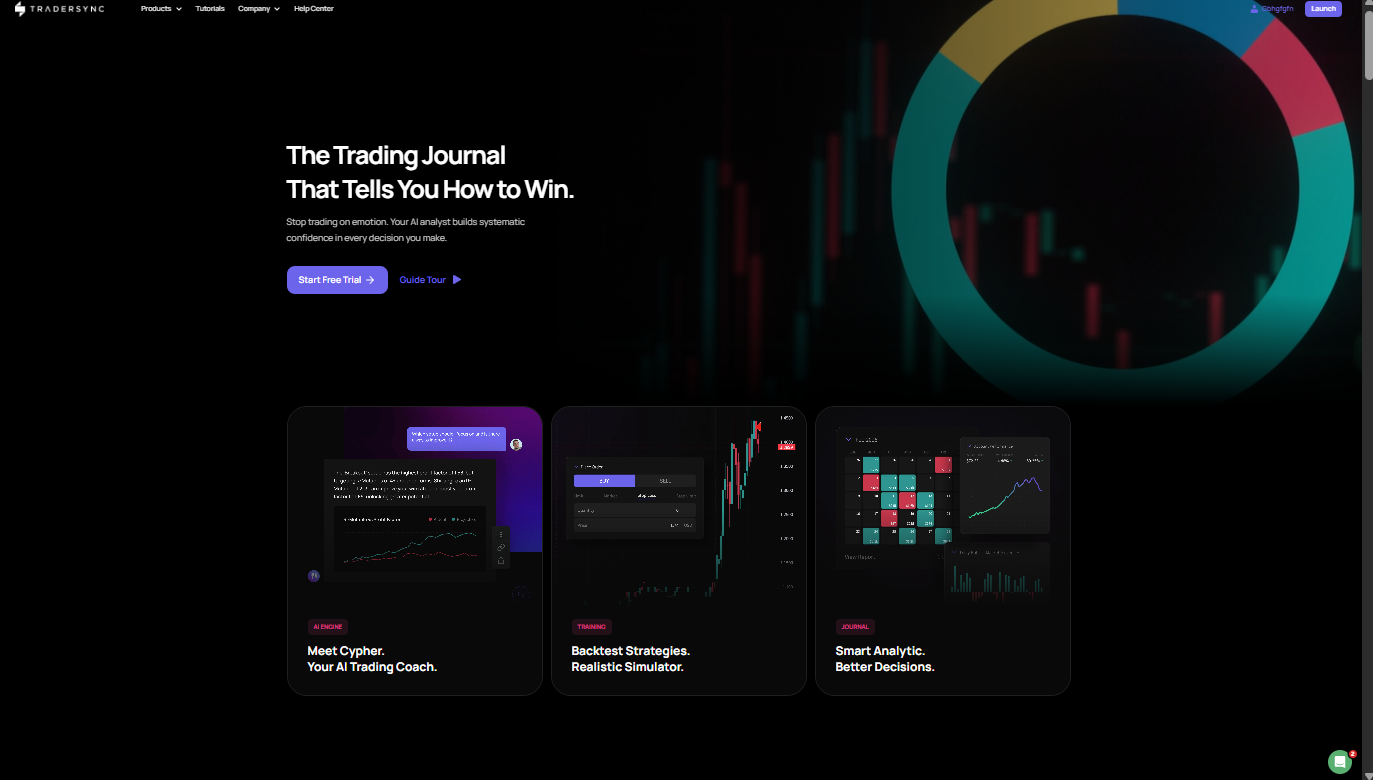
How does TraderSync work?
The workflow is straightforward. After creating an account, you connect a supported broker or import your trading history using account statements or CSV files. TraderSync processes each trade and builds a searchable database of your trading activity.
From there, you can organize trades with custom tags, group them by strategy, attach before-and-after chart screenshots, and record observations that explain why you entered or exited a position. As your journal grows, the platform automatically updates performance reports, making it easy to compare results across different setups, markets, time periods, or trading sessions.
One feature I particularly like is that you don't need to build reports yourself. Once the trades are imported, the dashboard updates automatically, allowing you to focus on identifying patterns instead of maintaining spreadsheets.
What is TraderSync designed to do?
TraderSync isn't designed to help you find your next trade. Its purpose is to help you become better at evaluating the trades you've already taken.
The platform encourages consistent post-trade reviews by bringing together performance statistics, execution data, screenshots, and personal notes in one place. Over time, that makes it easier to identify recurring mistakes, recognize your strongest setups, and see whether your trading discipline is improving.
From my perspective, TraderSync is most valuable for traders who already have a strategy and want to refine their execution. If you rarely review your trades, many of its features will go unused. But if post-trade analysis is already part of your routine, the automation can save a significant amount of time while providing insights that would be difficult to produce manually in a spreadsheet.
TraderSync at a glance
If someone asked me to describe TraderSync in one sentence, I'd call it a trading journal built for people who are serious about reviewing their performance rather than simply recording trades. Here's a quick overview of what you can expect before diving into the detailed review.
Feature | Details |
Best For | Active stock, options, futures, and forex traders who want automated journaling and detailed performance analysis |
Markets | Stocks, Options, Futures, Forex, and selected Crypto integrations |
Platform | Web-based application with cloud access |
Mobile App | Yes (iOS and Android) |
Broker Sync | Automatic imports from many supported brokers, plus manual CSV imports |
Free Trial | Yes, free trial available for new users |
Pricing | Subscription-based with multiple plans based on features and usage |
Rating | 4.8 / 5 (TradeZully editorial assessment based on features, usability, analytics, broker support, pricing, and overall value) |
From my experience, TraderSync's biggest advantage isn't the number of features, it’s how much time it saves once your trade history starts growing. If you're reviewing 50 to 200+ trades each month, automatic imports and built-in analytics can replace a meaningful amount of manual spreadsheet work.
That said, I wouldn't recommend it simply because it has more reports than its competitors. If you only place a handful of trades each month, an Excel or Google Sheets journal will probably cover everything you need. TraderSync starts to justify its subscription cost when you're actively reviewing performance, comparing strategies, and looking for recurring patterns that are difficult to spot manually.
Key features of TraderSync
The feature list is one of the main reasons TraderSync stands out, but not every tool will matter to every trader. After spending time with the platform, I found that a handful of features genuinely improved my review process, while others were useful only if I was actively tracking multiple strategies or trading at a higher volume.
Automatic trade import
This is the feature I appreciated most. Instead of copying trades into a spreadsheet at the end of the day, TraderSync imports supported broker data automatically or through uploaded statements. That removes a repetitive task and makes it much easier to keep the journal up to date. If you're someone who often postpones journaling because of manual data entry, this alone can be a major advantage.
Manual trade entry
Not every account can be connected directly, so manual entry is still available. It takes more time, but the process is straightforward. I also like having this option for recording simulated trades or positions from brokers that aren't supported yet.
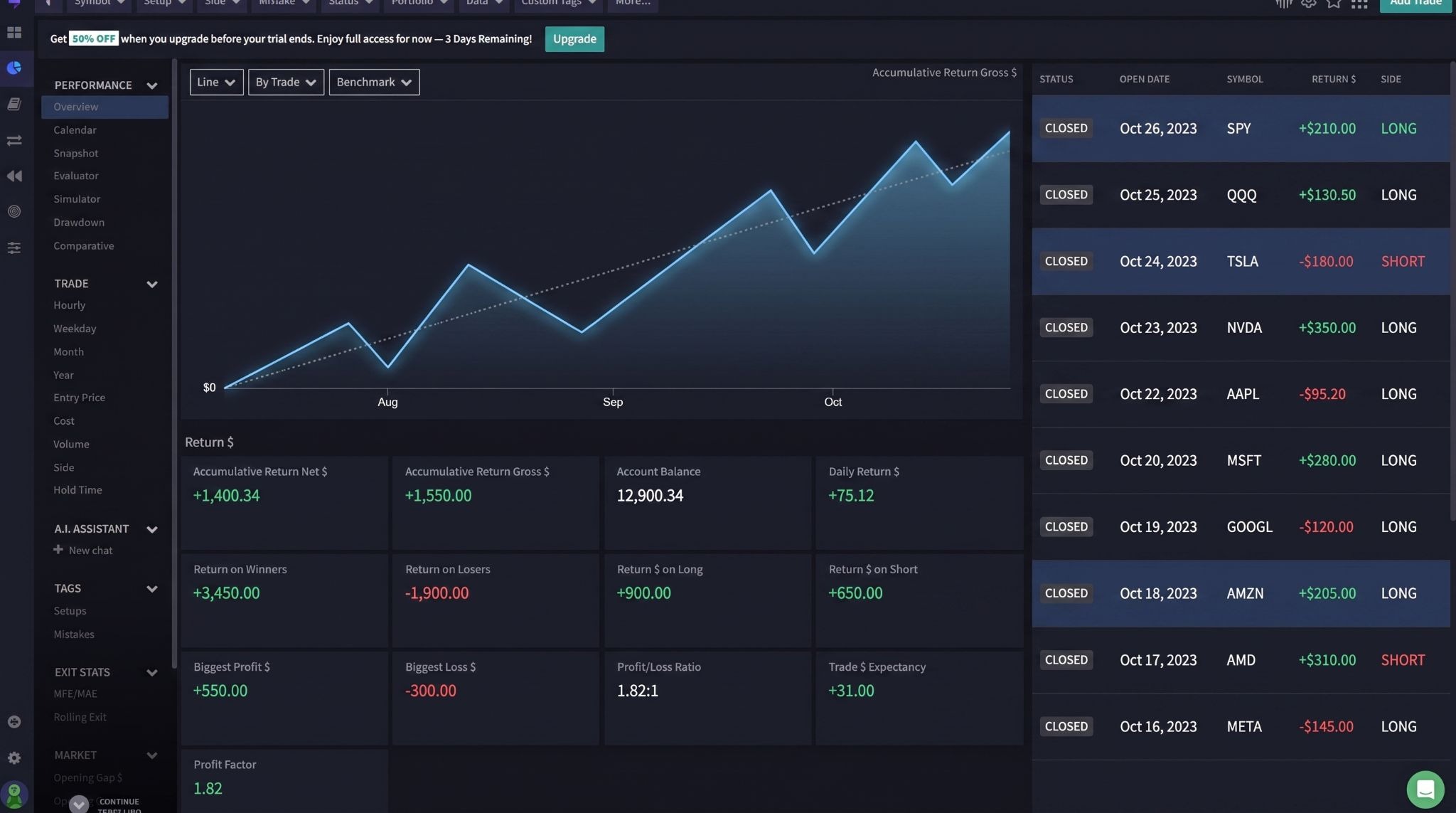
Performance dashboard
The dashboard brings together the metrics I usually check first: win rate, average gain, average loss, profit factor, drawdown, expectancy, and overall equity growth. Rather than jumping between multiple reports, I can get a clear snapshot of my trading performance in one place.
Trade tagging
Tagging trades may sound like a small feature, but it's one of the easiest ways to answer practical questions later. I regularly tag trades by setup, market condition, and mistake type. After a few months, filtering those tags makes it much easier to identify which ideas consistently produce the best results.
Screenshot management
Charts often explain a trade better than paragraphs of notes. TraderSync lets you attach screenshots before, during, and after a position, creating a complete visual record of your execution. I found this especially helpful when reviewing entries that looked obvious in hindsight but felt much less clear in real time.
Trading calendar
The calendar view organizes trades by date, making it easy to revisit a specific trading session. I mainly use it to identify streaks of strong or weak performance and compare them with what was happening in the market during that period.
Risk analysis
Good trading isn't only about finding winners. TraderSync also highlights risk-related statistics, including average risk, drawdowns, and position sizing trends. Those reports have helped me notice situations where my execution drifted away from my original risk management rules.
Strategy tracking
If you trade multiple setups, this feature becomes particularly valuable. You can group trades by strategy and compare their long-term results instead of relying on memory. I've often discovered that a strategy I enjoyed trading wasn't actually producing my strongest returns.
Trading reports
TraderSync offers detailed reports that can be filtered by symbol, strategy, tag, time period, trading session, and several other variables. I rarely use every report available, but having that level of filtering makes it much easier to investigate specific questions instead of reviewing trades one by one.
AI-Powered insights
The AI features are designed to surface patterns that might not be obvious during a manual review. In my experience, they're most useful as a starting point rather than a final conclusion. I still prefer verifying every suggestion against my own trade history, but they can save time by pointing you toward trends that deserve a closer look.
Supported markets & Broker integrations
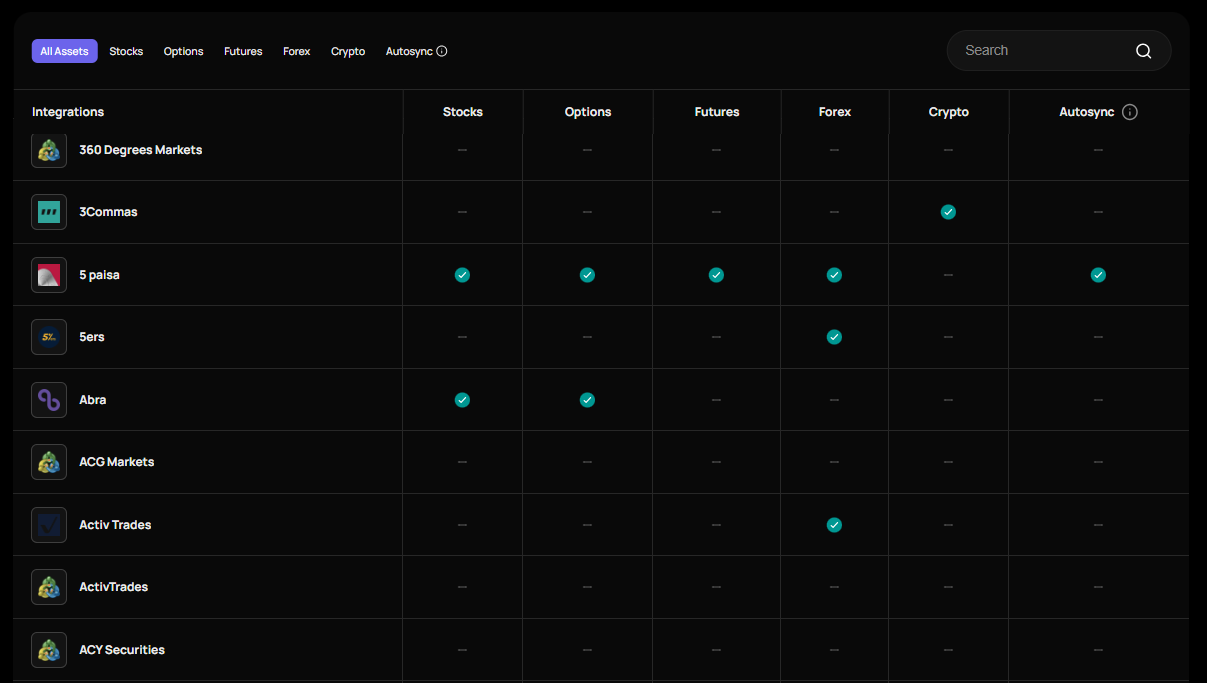
One of the biggest factors I consider in any trading journal is how easily it fits into an existing workflow. Even the best analytics lose their value if importing trades becomes a daily chore. TraderSync does a good job here by supporting several asset classes and offering multiple ways to bring your trade history into the platform. (Source: https://tradersync.com/supported-broker/)
Stocks: TraderSync works well for stock traders who want to review entries, exits, holding periods, and overall execution. Whether you're trading a few swing positions or dozens of intraday trades, the journal organizes them into reports that are much easier to review than a traditional spreadsheet.
Options: The platform also supports options trading, making it possible to analyze performance across different contracts and strategies. I found this particularly useful because options traders often need more than a simple profit-and-loss summary. Being able to review trades by setup helps identify which strategies consistently perform well over time.
Futures: Futures traders can import their trading activity and monitor performance using the same analytics available for other markets. If you're actively trading contracts throughout the week, automatic imports remove much of the repetitive data entry that usually comes with maintaining a manual journal.
Forex Support: Forex traders are also well supported. The platform makes it easy to review currency pair performance, trading sessions, and execution quality. Over time, those reports can reveal patterns that are difficult to notice when looking at individual trades in isolation.
Supported Brokers: One of TraderSync's strongest features is its growing list of supported broker integrations. Many popular brokers can connect directly, allowing trades to appear in your journal with minimal effort. Before subscribing, I still recommend checking the official compatibility list to confirm that your broker is supported, especially if you use a regional or less common platform.
CSV Import: If your broker isn't supported, you're not locked out of the platform. TraderSync allows you to import trading history through CSV files, which keeps the journal usable for a much wider range of traders. In my experience, CSV importing takes a little more preparation than a direct broker connection, but it's still considerably faster than entering every trade manually.
Performance analytics explained
TraderSync collects dozens of statistics, but I don't think every metric deserves the same amount of attention. After reviewing my own trades, I've found that a small group of numbers consistently tells the clearest story about whether my trading is actually improving. These are the reports I return to most often.
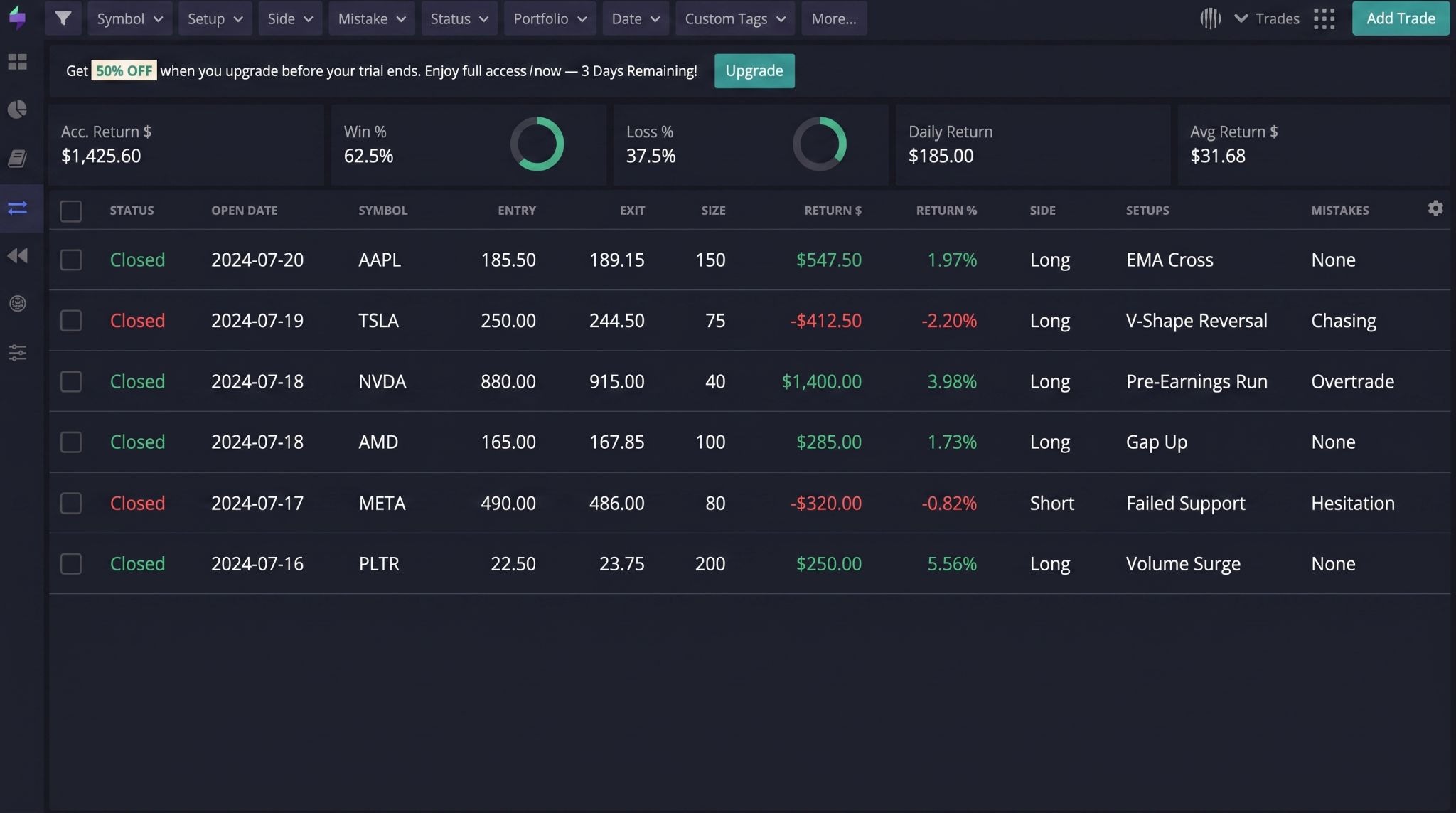
Win rate: Win rate shows the percentage of trades that finish in profit. It's a useful starting point, but I never judge a strategy on this number alone. A lower win rate can still produce excellent results if the average winning trade is much larger than the average loss.
Profit factor: Profit factor compares your total gross profit with your total gross loss. This is one of the first metrics I review after every month because it quickly shows whether my strategy has maintained a meaningful edge instead of relying on a few fortunate trades.
Expectancy: Expectancy estimates how much you can expect to gain or lose per trade over the long run. I find it especially valuable because it combines win rate with average gains and losses into a single statistic, giving a more balanced picture than either metric on its own.
Average R-Multiple: Rather than measuring results only in dollars, TraderSync can evaluate trades based on the amount of risk taken. Average R-Multiple helps me determine whether I'm consistently earning enough reward relative to the capital I risk on each position.
Average winner vs Average loser: This report compares the size of winning trades with losing ones. I've had periods where my win rate looked strong, but this metric revealed that my losses were still too large. That insight prompted changes to my exit rules that improved my overall performance.
Maximum drawdown: Every trader experiences losing streaks. Maximum drawdown measures the largest decline in your account over a given period. I consider it just as important as profitability because controlling drawdowns makes it much easier to stay disciplined during difficult market conditions.
Consecutive wins & losses: This report tracks your longest winning and losing streaks. Beyond the statistics, it helped me recognize how my decision-making changed after several losses in a row. Knowing those patterns has made it easier to avoid emotional trading during both hot streaks and drawdowns. For example, if my journal shows a pattern of 4 or 5 consecutive losses followed by impulsive trades, that's more actionable than simply knowing my monthly P&L was negative.
Strategy performance: This is probably the report I use most often. Instead of reviewing every trade together, TraderSync lets me compare results by strategy, setup, or custom tags. More than once, I've discovered that the strategy I traded most frequently wasn't actually the one producing my best returns. That kind of insight is difficult to spot without filtering your trade history over a large sample.
One thing I would add is that these metrics become more useful as your sample size grows. I wouldn't judge a strategy after 5 or 10 trades because the results can be heavily influenced by short-term variance. For my own reviews, I'd rather evaluate a setup after at least 30 trades, and ideally 50 to 100 trades, before making major changes to the strategy.
The exact sample size depends on the strategy and trading frequency, but the principle is simple: the larger the sample, the more confidence you can place in the pattern you're seeing.
How TraderSync fits into your trading workflow
One thing I appreciate about TraderSync is that it doesn't try to change the way you trade. Instead, it fits into the routine you already have.
Whether you trade every day or only a few times a week, the platform follows the same cycle: record, review, learn, and repeat. That's a workflow I found much easier to maintain than updating multiple spreadsheets manually.
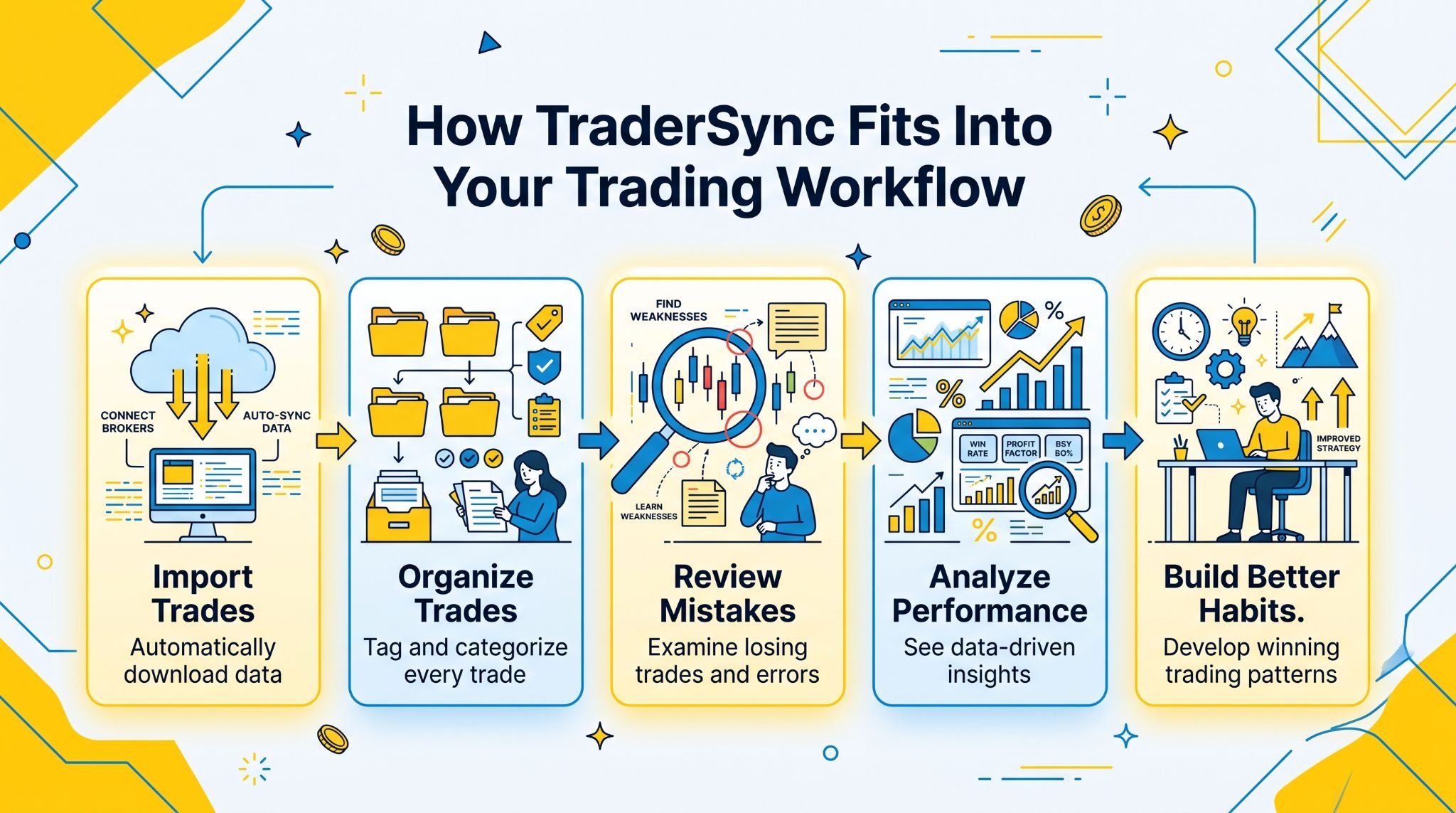
Import trades
The first step is getting your trades into the journal. If your broker is supported, this can happen automatically. Otherwise, you can upload a CSV file in just a few minutes. Either way, having your trade history available without manual calculations means you can spend your time reviewing decisions instead of entering data.
Organize trades
Once the trades are imported, I usually organize them with tags and notes. I separate positions by strategy, market condition, or setup so I can compare similar trades later. Adding screenshots and short comments takes very little time, but those details often become the most valuable part of a review a few weeks later when it's difficult to remember why a trade was taken.
Review mistakes
This is where I think TraderSync provides the most value. Instead of simply asking whether a trade made money, I can review whether I followed my own rules.
Did I move my stop-loss without a valid reason? Did I exit too early? Did I ignore my entry criteria? Looking at those mistakes over a larger sample has helped me identify habits that would have been easy to overlook after reviewing only one or two trades.
Analyze performance
After enough trades have accumulated, the reports become much more meaningful. Rather than focusing on daily profit and loss, I compare strategy performance, drawdowns, win rate, expectancy, and execution quality over longer periods.
I also like filtering results by tags because it helps answer specific questions, such as whether one setup consistently outperforms another or whether certain market conditions produce better outcomes. For example, it may highlight that one setup appears to outperform another across 50 or more trades, or that your results improve during a particular trading session.
Build better habits
The biggest change wasn't finding a new strategy, it was becoming more consistent. Knowing that every trade would be reviewed encouraged me to follow my trading plan more closely.
Over time, the journal became less about tracking results and more about improving my decision-making. In my experience, that's where TraderSync delivers its greatest value. The platform doesn't make trading easier, but it does make it much easier to recognize what you should keep doing and what you should stop repeating.
AI Insights: Are they actually useful?
AI is one of TraderSync's most talked-about features, but I don't think it should be the main reason to subscribe.
After using the platform, my impression is that the AI works best as an assistant that highlights patterns worth investigating, not as something that tells you how to trade. The final decision still belongs to the trader.
Pattern recognition: This is where the AI adds the most value. It can quickly scan a large trading history and surface recurring trends that are easy to miss during a manual review. For example, it may highlight that one setup consistently outperforms another or that your results improve during a particular trading session. I still verify those findings myself, but having the platform point me in the right direction saves time.
Mistake detection: The AI is also useful for identifying repeated execution errors. If your journal contains detailed tags and notes, it becomes much easier to spot habits such as exiting profitable trades too early, letting losing trades run longer than planned, or breaking position-sizing rules. Those observations aren't always obvious when reviewing trades individually, but they become much clearer across a larger sample.
Behavioral analysis: One feature I found more interesting than expected was the ability to connect trading behavior with performance. Reviewing my journal alongside AI-generated observations encouraged me to look beyond the numbers and ask whether impatience, overconfidence, or inconsistency played a role in certain periods. While those conclusions should never replace your own review, they can raise useful questions that deserve closer attention.
Actionable suggestions: I treat every suggestion as a starting point rather than a recommendation to follow automatically. The strongest insights usually come when the AI highlights a pattern and I confirm it by reviewing charts, notes, and trade history myself. In my experience, TraderSync's AI is most valuable for accelerating the review process. It doesn't replace discipline, market knowledge, or a well-tested strategy, but it can make post-trade analysis more focused and more efficient when used with realistic expectations.
TraderSync pricing
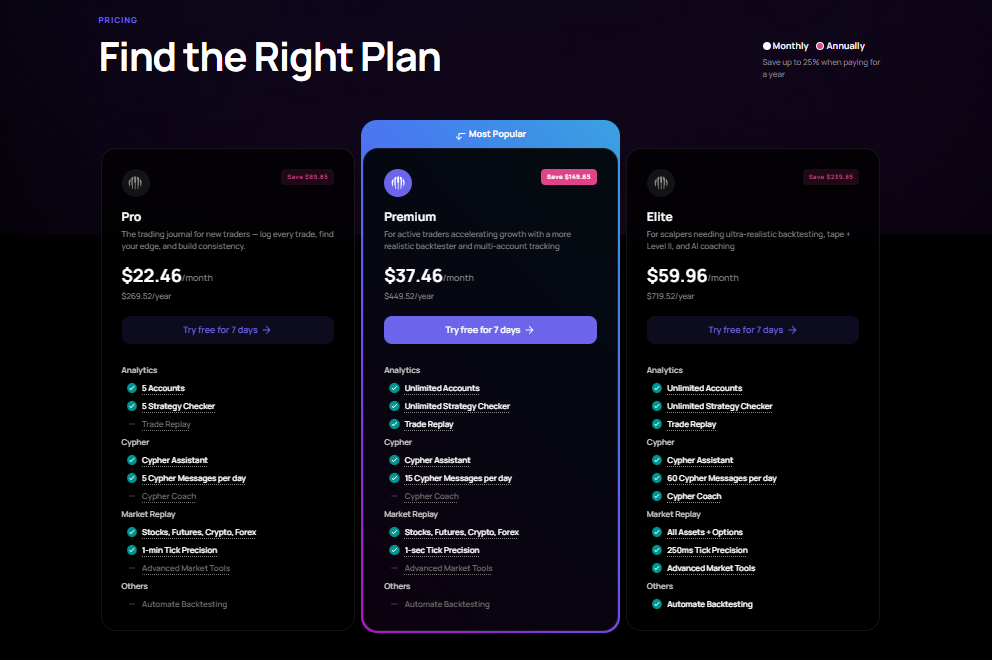
TraderSync has moved to a three-tier pricing model: Pro, Premium, and Elite (source: https://tradersync.com/pricing/). All plans include the core journaling experience, but the higher tiers unlock additional accounts, more advanced replay tools, and expanded AI capabilities.
If you're deciding between them, I'd focus less on the feature count and more on how often you'll actually use those features.
Free trial
TraderSync offers a 7-day free trial with access to virtually all Elite features, making it possible to test the platform before paying.
At the time of writing, no credit card is required to start the trial, which I always appreciate because it removes the pressure to cancel a subscription later.
Pro
The entry-level Pro plan costs $29.95/month, or $22.46/month when billed annually ($269.52/year).
It supports up to five trading accounts, automatic trade imports, performance analytics, Strategy Checker, Market Replay, and limited access to the Cypher AI assistant (5 messages per day). For most individual traders, this plan already includes the features they'll use most often.
Premium Plan
Premium costs $49.95/month, or $37.46/month with annual billing ($449.52/year). It removes the account limit, unlocks Trade Replay, expands Strategy Checker, and provides a more realistic Market Replay experience with higher replay precision.
If you're actively trading multiple accounts or reviewing large amounts of historical data, the upgrade starts to make sense.
Elite Plan
Elite is priced at $79.95/month, or $59.96/month when billed annually ($719.52/year). This plan is aimed at high-frequency traders and scalpers. It includes everything in Premium plus Cypher Coach, up to 60 AI messages per day, advanced market replay tools, Level II replay,
Time & Sales, Options support in replay, 250 ms replay precision, and automated backtesting capabilities. Most casual traders won't need everything Elite offers, but traders who spend hours reviewing executions may appreciate the additional tools.
Which Plan Offers the Best Value?
If I were paying for TraderSync myself, I'd start with Pro at $29.95 per month. For most individual traders, it covers the core requirements: trade imports, performance analytics, journaling, strategy tracking, and basic replay functionality.
Premium becomes easier to justify at $49.95 per month if you're managing multiple accounts or regularly using advanced replay features. Elite, at $79.95 per month, is a more specialized option for traders who actively use advanced replay, Level II replay, Time & Sales, expanded AI tools, and automated backtesting.
For a trader placing only 5 to 10 trades per month, I would probably stick with a spreadsheet or a lower-cost journal. For someone managing 50+ trades per month and reviewing performance weekly, the time saved through automation makes the subscription easier to justify.
TraderSync pros and cons
After spending time exploring TraderSync, I came away with a positive impression overall. The platform does exactly what it promises: it makes trade journaling faster, more organized, and far more insightful than maintaining a spreadsheet by hand.
That said, it's not the perfect solution for every trader. Whether it's worth paying for depends largely on how often you review your trades and how much value you place on automation.
Pros
Automatic trade imports significantly reduce manual data entry.
Clean, intuitive interface that's easy to navigate after a short learning period.
Detailed performance analytics, including expectancy, profit factor, drawdown, R-multiples, and strategy-level reports.
Powerful tagging and filtering tools make it easy to compare different setups, market conditions, or trading sessions.
Supports screenshots and detailed trade notes, making post-trade reviews much more meaningful.
Trading calendar provides a simple way to revisit individual trading days and identify performance trends.
Market Replay and Trade Replay are genuinely useful for reviewing execution, particularly for active traders.
Supports a wide range of brokers, with CSV import available as a fallback when direct integration isn't supported.
AI-powered insights can highlight recurring patterns and execution mistakes, helping speed up the review process.
Mobile apps for iOS and Android make it easy to review trades away from your desk.
Cons
Subscription pricing is noticeably higher than keeping a journal in Excel or Google Sheets.
Some of the most attractive features, including advanced replay tools and expanded AI capabilities, are reserved for higher-tier plans.
Traders with only a handful of positions each month may not get enough value to justify an ongoing subscription.
Direct broker support isn't universal, so some users will still need to rely on CSV imports.
The number of reports and analytics can feel overwhelming during the first few days, especially if you've never used dedicated journaling software before.
AI insights are helpful for identifying patterns, but they shouldn't replace your own review or decision-making process.
The platform focuses on post-trade analysis rather than strategy development or trade execution, so it isn't an all-in-one trading solution.
Overall, I think TraderSync's strengths outweigh its weaknesses. The automation, reporting, and review tools are genuinely useful if trade analysis is already part of your routine. On the other hand, if you rarely look back at completed trades, even the best journaling software won't improve your results. The value comes from consistently using the data to refine your process, not simply collecting it.
User reviews
No review page tells the whole story, so I spent time looking through recent TraderSync feedback on Trustpilot instead of relying only on the company's own testimonials. Overall, the sentiment is positive, but the reviews also reveal a few recurring complaints that are worth considering before you subscribe.
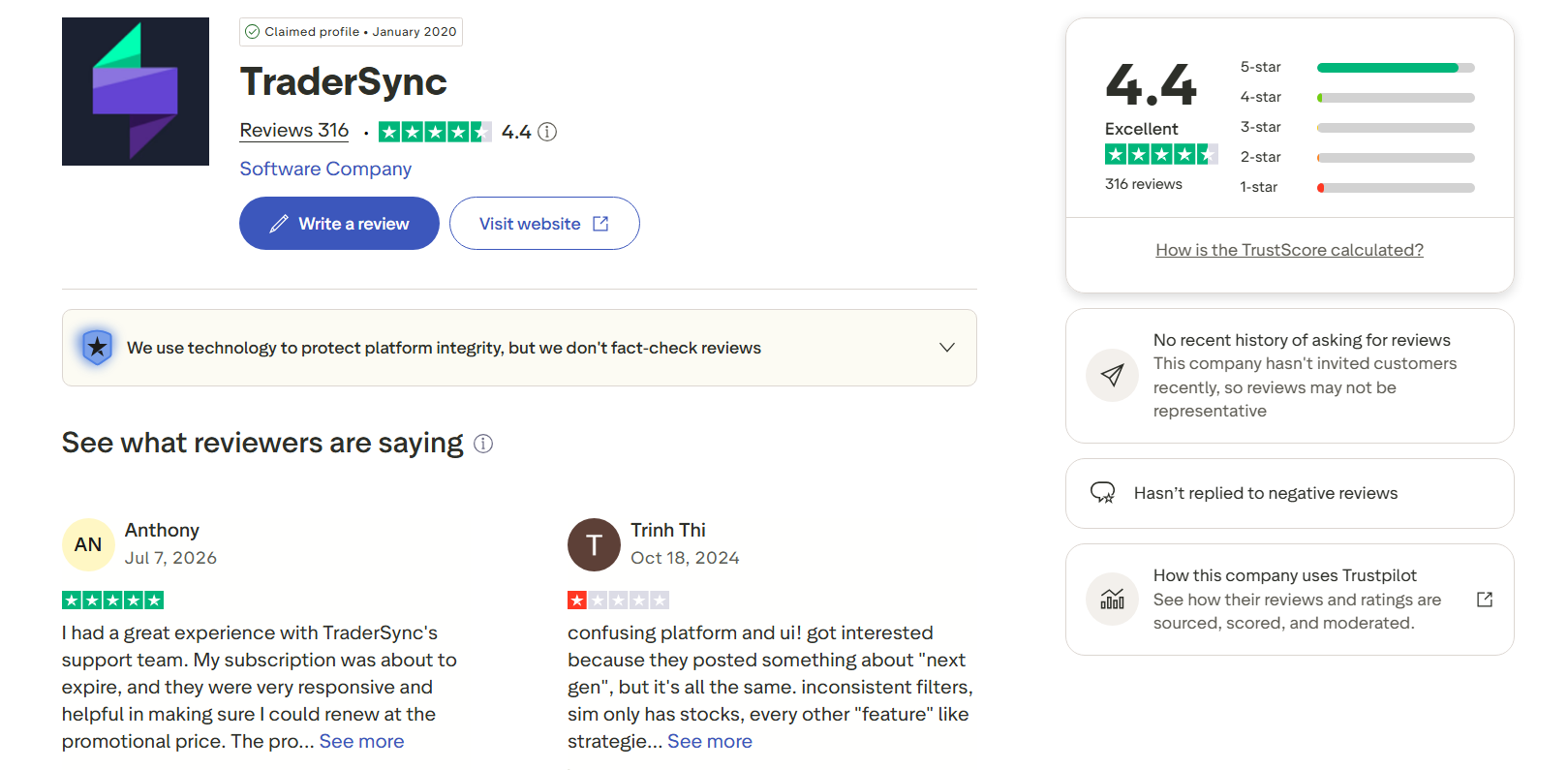
At the time of writing, TraderSync has a 4.4/5 rating from more than 300 reviews on Trustpilot, with roughly 90% of reviewers giving it five stars.
Here's what stood out to me:
What users like: The most common compliments mention automatic trade imports, detailed analytics, and responsive customer support. Many long-term users also say the platform helped them identify weaknesses they hadn't noticed while using spreadsheets. Several reviewers specifically praise the support team for resolving account and subscription issues quickly.
What users don't like: The negative reviews tend to focus on a few specific areas rather than the journal itself. Some users report synchronization issues with certain brokers, incorrect trade imports, currency conversion bugs, or delays in resolving technical support tickets. Others feel the Elite features aren't mature enough to justify the higher subscription price.
My takeaway: After comparing those reviews with my own evaluation, I think the feedback is fairly balanced. The strengths people mention, automation, reporting, and performance analysis, are exactly where TraderSync performs well. At the same time, the criticism about broker-specific sync issues appears often enough that I'd recommend taking full advantage of the free trial. Connect your broker, import real trades, and confirm that everything works correctly before committing to an annual subscription. That small step can save a lot of frustration later.
TraderSync for different types of traders
TraderSync isn't built around a single trading style. The core journaling features remain the same, but the value you get from the platform depends on how you trade and what you want to improve.
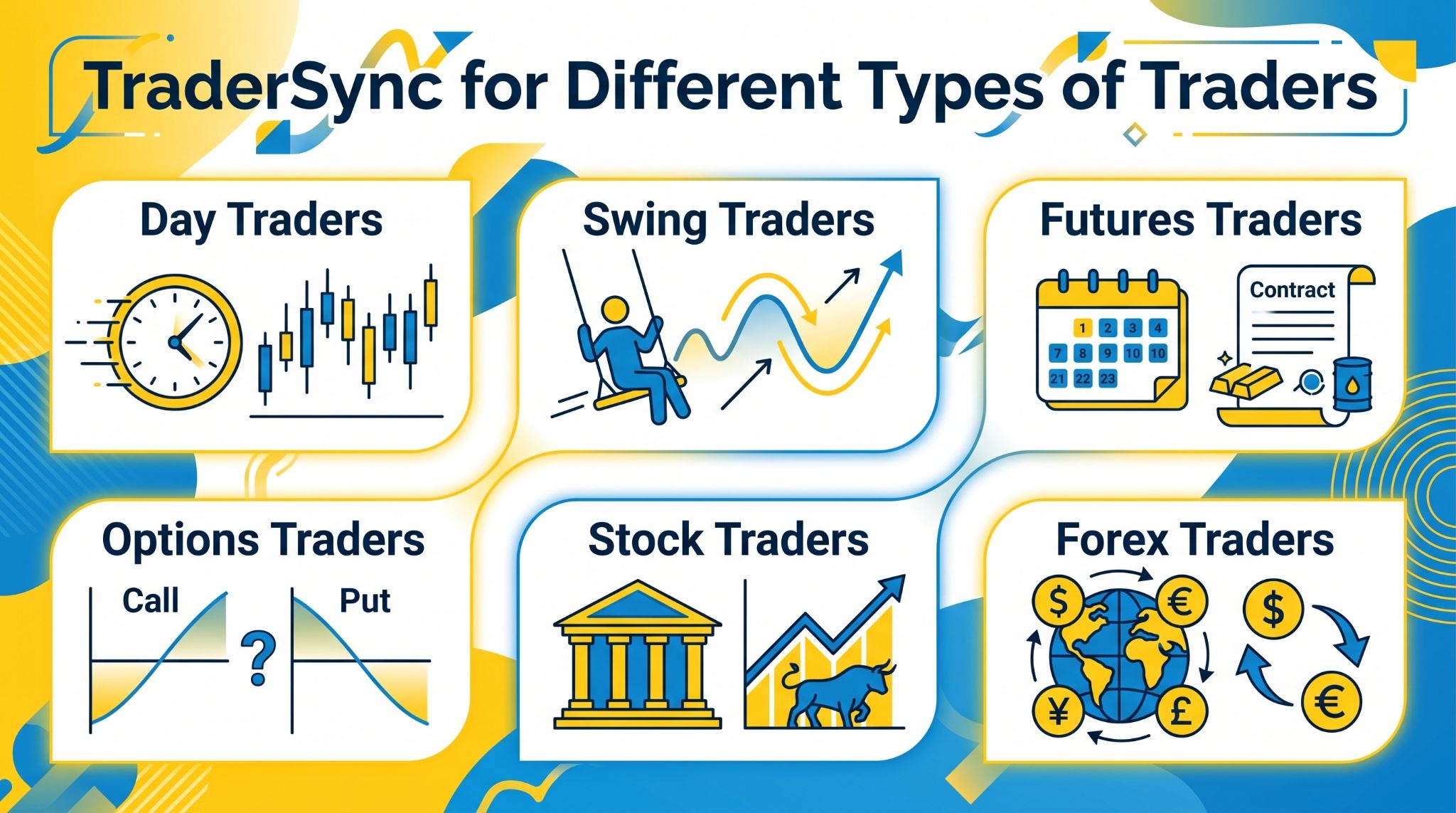
Here's how I think it fits different types of traders.
Day Traders: This is where TraderSync feels most at home. If you're placing multiple trades every day, automatic imports, trade tagging, and detailed performance reports save a significant amount of time. I also found the Trading Calendar and replay features especially useful for reviewing execution and identifying recurring intraday mistakes. If you're placing 10 to 30 trades per week or more, TraderSync's automated imports and filtering tools can save a meaningful amount of time.
Swing Traders: Swing traders usually don't generate the same trade volume as day traders, but that doesn't make journaling any less important. TraderSync makes it easy to compare setups over weeks or months, attach chart screenshots, and review whether entry, exit, and position management decisions were consistent with your trading plan. If you're taking 5 to 20 trades per month, the value comes mainly from strategy tracking, screenshots, and long-term performance analysis rather than import automation alone.
Futures Traders: Futures trading often demands strict risk management, and TraderSync provides the statistics needed to monitor it. Metrics such as expectancy, average R-Multiple, maximum drawdown, and strategy performance help reveal whether you're maintaining discipline across different market conditions instead of relying on a few strong trading sessions. Especially for active traders who execute multiple trades per session and need detailed execution and risk analysis.
Options Traders: Options strategies often involve multiple legs, adjustments, and different expiration dates, so reviewing trades manually can become complicated. TraderSync helps organize those trades and compare performance across strategies. If you regularly trade vertical spreads, iron condors, covered calls, or other options strategies, the structured reports make post-trade analysis much easier.
Stock Traders: Whether you're trading momentum stocks, growth names, or long-term swing setups, TraderSync provides a simple way to evaluate your results without building custom spreadsheets. I particularly like using tags to separate trades by setup or market condition because it quickly reveals which ideas consistently produce the best outcomes. Articularly for traders taking 20+ trades per month who want to analyze performance by ticker, setup, or market condition.
Forex Traders: Forex traders can use TraderSync to analyze results by currency pair, trading session, or strategy. Over time, those reports make it easier to answer practical questions, such as whether you're performing better during the London session than New York, or whether certain currency pairs consistently fit your trading style. For traders who review their performance every week, those insights are much easier to uncover than they are in a traditional spreadsheet. TraderSync becomes more useful when you have enough trades to compare currency pairs and sessions. I'd want at least 30 to 50 trades before drawing strong conclusions about whether the London or New York session is genuinely better for my strategy.
TraderSync vs Competitors
No trading journal is the best choice for everyone. After comparing these platforms, I found that each one has a different strength.
TraderSync focuses on automation and ease of use, TradeZella emphasizes modern analytics and trader-friendly workflows, TradesViz offers exceptional reporting depth, while Edgewonk appeals to traders who place a strong emphasis on psychology and manual journaling.
The right choice depends on what you're trying to improve rather than which platform has the longest feature list.
Feature | TraderSync | TradeZella | TradesViz | Edgewonk |
Best For | Active traders who want automated journaling | Traders focused on performance analytics and modern trade reviews | Data-driven traders who want highly customizable reports | Traders who prioritize psychology and behavioral analysis |
Automatic Trade Import | ✔ Extensive broker support | ✔ Supported brokers and imports | ✔ Extensive broker and CSV support | Limited (primarily manual imports with supported integrations) |
Trade Tagging | ✔ Advanced | ✔ Advanced | ✔ Highly customizable | ✔ Yes |
Performance Analytics | Excellent | Excellent | Excellent | Very Good |
Strategy Analysis | ✔ Yes | ✔ Yes | ✔ Yes | ✔ Yes |
Trade Replay | ✔ Available | Limited | ✖ No dedicated replay | ✖ No |
AI Features | ✔ AI insights and coaching (higher plans) | ✔ AI-assisted trade analysis | Limited | ✖ No |
Screenshot Management | ✔ Built in | ✔ Built in | ✔ Built in | ✔ Built in |
Trading Psychology Tools | Good | Good | Good | Excellent |
Learning Curve | Low | Low | Medium to High | Medium |
Pricing Model | Monthly or annual subscription | Monthly or annual subscription | Monthly, annual, or lifetime options | One-time lifetime license |
Best TraderSync alternatives
No matter how good TraderSync is, I don't think it's the right fit for every trader. Budget, trading style, and review habits all influence which journal will work best over the long term. If TraderSync doesn't match your workflow, these alternatives are worth considering.
TradeZully
I finally ditched my old spreadsheet setup because I wanted a cleaner way to log my daily market biases and execution notes. I love how I can tag my setups and instantly review my performance across multiple accounts without breaking a sweat. Whenever I make a stupid emotional trade, my custom strategy tags make it glaringly obvious on the weekly review. I can honestly say it has made my post-market routine feel much less like a chore.
TradeZella
TradeZella is the closest competitor in my opinion. The interface feels modern, reports are easy to understand, and the platform places a strong emphasis on helping traders review mistakes instead of simply displaying statistics.
I especially like how it organizes trades by setup and provides clean visual dashboards. If you're deciding between TraderSync and TradeZella, the choice often comes down to which interface you prefer and whether your broker is supported.
TradesViz
If you enjoy digging into data, TradesViz is difficult to ignore. It offers one of the deepest reporting systems I've used, with extensive filtering, custom dashboards, portfolio analytics, and support for a wide range of brokers and asset classes.
The trade-off is that it takes longer to learn. I wouldn't recommend it to someone looking for the simplest experience, but experienced traders who enjoy analyzing numbers will probably appreciate its flexibility.
Edgewonk
Edgewonk approaches journaling differently. Instead of focusing primarily on automation, it places much more attention on trading psychology, discipline, and decision-making.
Features like emotional journaling and behavioral analysis encourage you to review why you took a trade, not just how much you made or lost. If improving consistency is your main objective, Edgewonk offers a perspective that many other journals don't emphasize as strongly.
Tradervue
Tradervue has been around for many years and remains a solid option for active traders, particularly those trading stocks and intraday strategies.
The platform includes automatic trade imports, performance reports, chart annotations, and trade sharing features. Its interface isn't as modern as some newer competitors, but the core journaling experience remains reliable and easy to navigate.
Stonk Journal
If you're not ready to pay for a premium journal, Stonk Journal is worth a look. It's a browser-based trading journal with a generous free plan that covers the essentials, including trade tracking, basic analytics, and performance reports.
While it doesn't offer the same depth of analysis or automation as TraderSync, it's a practical starting point for newer traders who want to build consistent journaling habits before committing to a subscription.
Overall, I don't think there's a universal winner among these platforms. TradeZella is the closest all-around alternative, TradesViz is my pick for advanced analytics, Edgewonk stands out for trading psychology, Tradervue remains a dependable choice for active traders, and Stonk Journal offers excellent value for those looking for a capable free solution. The best journal is the one you'll actually use after every trading session.
» Read more: Best Trading Journal Apps & Software for Forex, Stock, Futures, Crypto (Free & Paid)
What i like most about TraderSync and where TraderSync could improve?
No trading journal is perfect, and I don't think TraderSync tries to be. After comparing it with platforms like TradeZella, TradesViz, and Edgewonk, I found several areas where TraderSync genuinely stands out, along with a few that could still be improved.
What i like most about TraderSync
👍 Clean, easy-to-learn UI: The interface is one of TraderSync's biggest strengths. I was able to find most features without reading documentation, and the layout stays consistent across the platform. Even with a large trade history, navigation never felt cluttered.
👍 Performance dashboard that prioritizes the right metrics: I like that the dashboard highlights practical statistics instead of overwhelming you with dozens of charts. Win rate, expectancy, profit factor, drawdown, and strategy performance are available immediately, making weekly reviews much faster.
👍 Excellent reporting and filtering: This is where I spent most of my time. Filtering trades by strategy, symbol, tag, market session, or date range makes it much easier to answer specific questions. Instead of guessing why performance changed, I could narrow the data until a pattern became obvious.
👍 Reliable broker synchronization: Automatic imports eliminate one of the biggest frustrations of maintaining a trading journal. Once the connection is configured, trades appear with very little effort. For supported brokers, the process is smooth enough that I rarely thought about it afterward.
👍 Replay features add real value: Market Replay and Trade Replay aren't features I expected to use frequently, but they became surprisingly useful when reviewing execution. Being able to revisit trades in context provides much more insight than looking at a static chart.
👍 Mobile access works well for reviews: I wouldn't use the mobile app for deep analysis, but it's convenient for checking recent trades, adding notes, or reviewing statistics while away from my desk. It complements the desktop experience rather than trying to replace it.
where TraderSync could improve
👎 Pricing can be difficult to justify for casual traders: This is probably my biggest criticism. If you're placing only a handful of trades each month, it's difficult to extract enough value from the subscription. A well-designed spreadsheet may be all you need at that stage.
👎 Some advanced features are locked behind higher plans: Several of the most interesting capabilities, particularly advanced replay tools and expanded AI functionality, aren't included in the entry-level plan. I would have preferred to see a few more of those features available to Pro subscribers.
👎 Forex support could be broader: TraderSync works well for forex journaling, but the overall experience still feels more polished for stock and futures traders. I'd like to see broader broker coverage and additional forex-specific reporting options over time.
👎 Customization has practical limits: The platform offers plenty of filters and reports, but you can't customize every dashboard or metric exactly the way you can in a fully self-built spreadsheet. Most traders won't notice this limitation, though advanced users who enjoy building highly personalized workflows might.
👎 The learning curve increases as you explore advanced features: Recording trades is simple, but mastering every report, filter, replay feature, and AI tool takes time. I don't see this as a major weakness, yet new users should expect to spend a few weeks learning where the platform delivers the most value.
Overall, my impression is positive. TraderSync doesn't try to impress with flashy features alone, it succeeds because it removes repetitive work and makes trade reviews much easier to maintain. If I could change only one thing, it would be lowering the entry cost or bringing more premium features into the base plan. Everything else feels well thought out and aligned with the needs of active traders.
Is TraderSync worth it?
Whether TraderSync is worth paying for depends less on the platform itself and more on how you trade. After spending time with it, I don't think there's a single answer that applies to everyone.
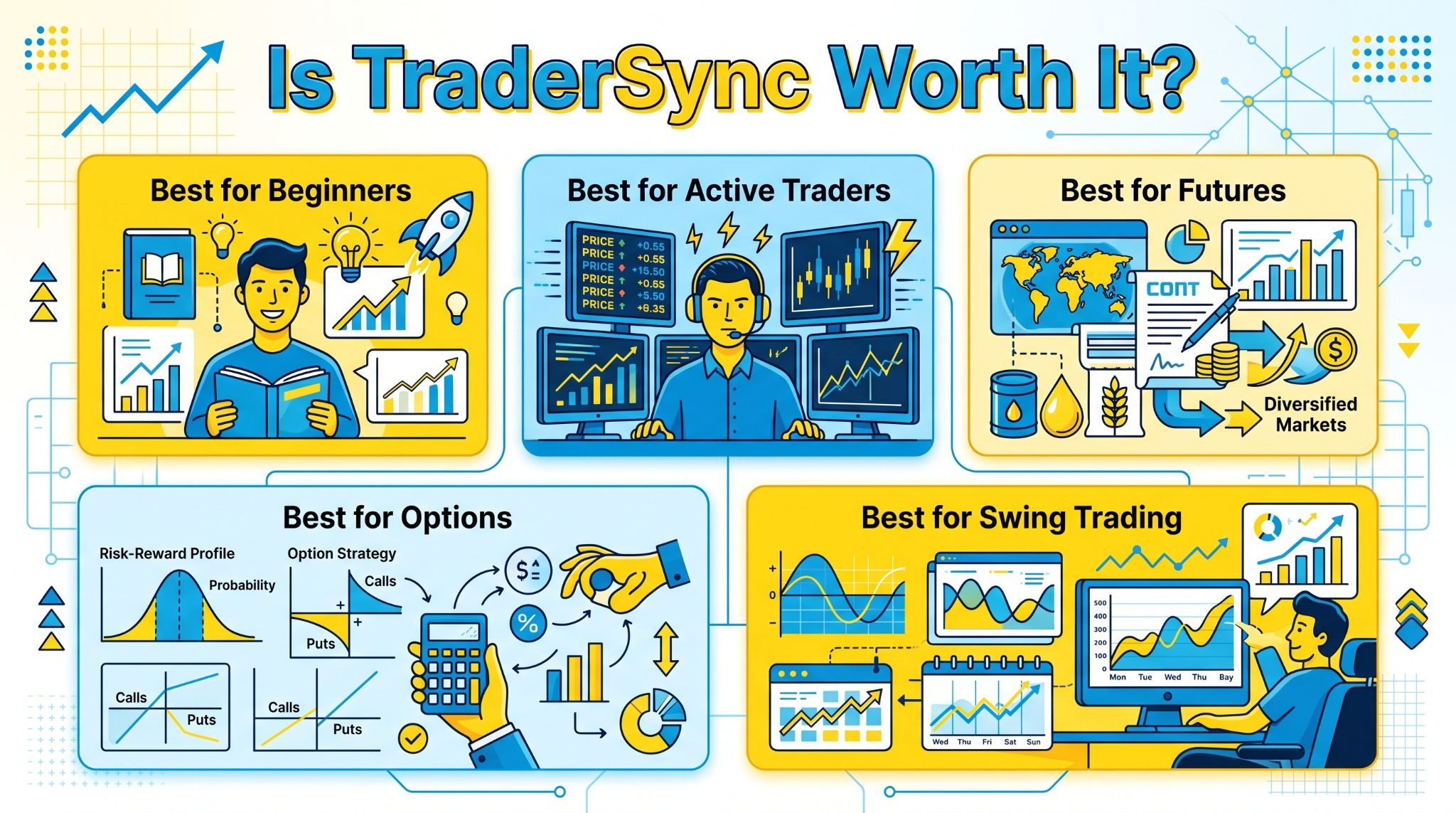
Here's how I'd evaluate it for different types of traders.
Best for beginners: If you're completely new to trading, I wouldn't rush into a paid journal. A spreadsheet is usually enough while you're learning the basics. That said, beginners who are committed to reviewing every trade and building good habits from day one can benefit from TraderSync's structure. I just wouldn't recommend paying for features you won't use yet.
Best for active traders: This is where TraderSync delivers the strongest value. If you're placing dozens or even hundreds of trades each month, automatic imports, detailed analytics, and organized trade reviews save a tremendous amount of time. In my opinion, active traders are the group most likely to recover the subscription cost through improved efficiency alone.
Best for futures traders: I'd comfortably recommend TraderSync for futures traders. The platform's performance reports, drawdown analysis, R-Multiple tracking, and replay tools make it much easier to evaluate execution across large samples of trades. If disciplined risk management is a priority, the reporting tools are genuinely useful.
Best for options traders: TraderSync works well for options traders, especially if you regularly trade multiple strategies. Being able to organize trades, compare setups, and review performance over time is much more practical than maintaining a complex spreadsheet. If your workflow involves frequent adjustments and multi-leg positions, the automation becomes increasingly valuable.
Best for swing trading: Swing traders should think about trade frequency before subscribing. If you're holding only a few positions each month, the advanced automation may be more than you actually need. On the other hand, if you actively review charts, document your decisions, and compare strategies over longer periods, TraderSync provides enough reporting to justify the investment.
Overall, I'd recommend TraderSync most confidently to traders who already treat journaling as part of their routine. The platform doesn't magically improve your results, but it removes much of the manual work that often causes traders to stop reviewing their performance. If you're willing to learn from your trade history, that's where TraderSync earns its value.
Final verdict
After using TraderSync and comparing it with several other trading journals, I think it earns its place among the strongest options on the market. Its automatic trade imports, detailed analytics, and well-designed review tools make it particularly valuable for traders who consistently analyze their performance.
That said, it isn't the right choice for everyone. If you only trade occasionally, a spreadsheet may be enough. But if reviewing your trades is already part of your routine, TraderSync can save time, uncover patterns that are easy to miss, and make the entire journaling process much easier to maintain over the long run.
Trader Type | Recommendation |
Beginner | ⭐⭐⭐⭐☆ |
Day Trader | ⭐⭐⭐⭐⭐ |
Swing Trader | ⭐⭐⭐⭐☆ |
Futures Trader | ⭐⭐⭐⭐⭐ |
Options Trader | ⭐⭐⭐⭐⭐ |
Forex Trader | ⭐⭐⭐☆☆ |