


TradeZella Review: Features, Pricing, Pros, Cons & Alternatives
Last Updated: July 18, 2026
It combines automatic trade imports, detailed performance analytics, strategy tracking, and trade review tools in a modern interface that's designed to make journaling feel less like administrative work and more like a natural part of your trading routine.
Whether you trade stocks, options, futures, forex, or crypto, TradeZella aims to help you understand not just what happened in your trades, but why it happened.
This review is written for traders who are considering TradeZella as their first trading journal, thinking about switching from another platform, or simply wondering whether it's worth paying for instead of using a spreadsheet. If you're trying to build better trading habits through consistent performance reviews, you'll likely find this guide useful.
Throughout this review, I'll take a close look at TradeZella's core features, analytics, broker integrations, pricing, Playbooks, AI capabilities, user experience, and overall value. I'll also compare it with several popular alternatives and share where I think the platform performs well, where it still has room to improve, and which types of traders will benefit from it the most.
What is TradeZella?
TradeZella is a cloud-based trading journal designed to help traders record, review, and improve their trading performance. Instead of manually updating spreadsheets after every session, you can import trades automatically, organize them by strategy, and analyze your results through interactive dashboards.
The platform supports multiple asset classes, including stocks, options, futures, forex, and crypto, making it suitable for traders with different styles and markets.
At its core, TradeZella works like any modern trading journal software, but it goes well beyond storing a list of trades. Once your trades are imported, the platform calculates key performance metrics such as win rate, profit factor, expectancy, and drawdown.

It also lets you tag trades, upload screenshots, group setups into Playbooks, and compare strategy performance over time. Rather than asking you to build reports yourself, most of the analysis is generated automatically, allowing you to spend more time reviewing your decisions instead of organizing data.
What stood out to me is that TradeZella isn't trying to become another charting platform or broker. Its entire focus is on the review process. Every feature, from trade tagging to Playbooks, is built around answering simple but important questions: Which setups consistently make money? Which mistakes keep repeating? Am I following my trading plan?
I also like that the platform encourages structured reviews instead of chasing individual winning trades. During my evaluation, it felt less focused on daily profit and more focused on long-term consistency. That's an approach I generally agree with because sustainable improvement usually comes from refining your process rather than celebrating a few good trades.
Ultimately, the goal of TradeZella is straightforward: help traders make better decisions by learning from their own trading history. If you already review your trades regularly, it can save a significant amount of time. If you don't have a review routine yet, it provides a structured framework that's much easier to maintain than a spreadsheet once your trading activity begins to grow.
TradeZella at a glance
If you just want the highlights before diving into the full review, the table below covers the essentials.
TradeZella checks nearly every box I'd expect from a premium trading journal, but its biggest strengths are its intuitive interface, structured review workflow, and strong strategy management through Playbooks.
Feature | Details |
Best for | Active traders, prop firm traders, and anyone looking to replace spreadsheets with a dedicated trading journal |
Supported markets | Stocks, options, futures, forex, and crypto |
Platform | Web-based application with cloud synchronization |
Broker integrations | Direct integrations with a growing list of brokers, plus CSV imports for unsupported brokers |
Automatic imports | Yes, via broker sync and file upload |
Free trial | No traditional free trial, but a 14-day refund policy is available for new subscriptions (Source: TradeZella) |
Starting price | $29/month or $288/year ($24/month billed annually) for the Essential plan (Source: TradeZella) |
Overall rating | 4.8/5 |
Looking at the specifications alone, TradeZella competes well with every major trading journal I've tested. It supports all major asset classes, automates much of the journaling process, and includes features that many traders eventually look for, such as Playbooks, trade replay, AI-powered insights, and detailed performance analytics.
The more interesting question isn't whether it has enough features, it does. The real question is whether those features actually improve your trading workflow, and that's what I'll evaluate throughout the rest of this review.
Key features of TradeZella
TradeZella includes nearly every feature I'd expect from a modern trading journal. What impressed me most wasn't the number of tools available, but how well they fit together into a consistent review workflow.
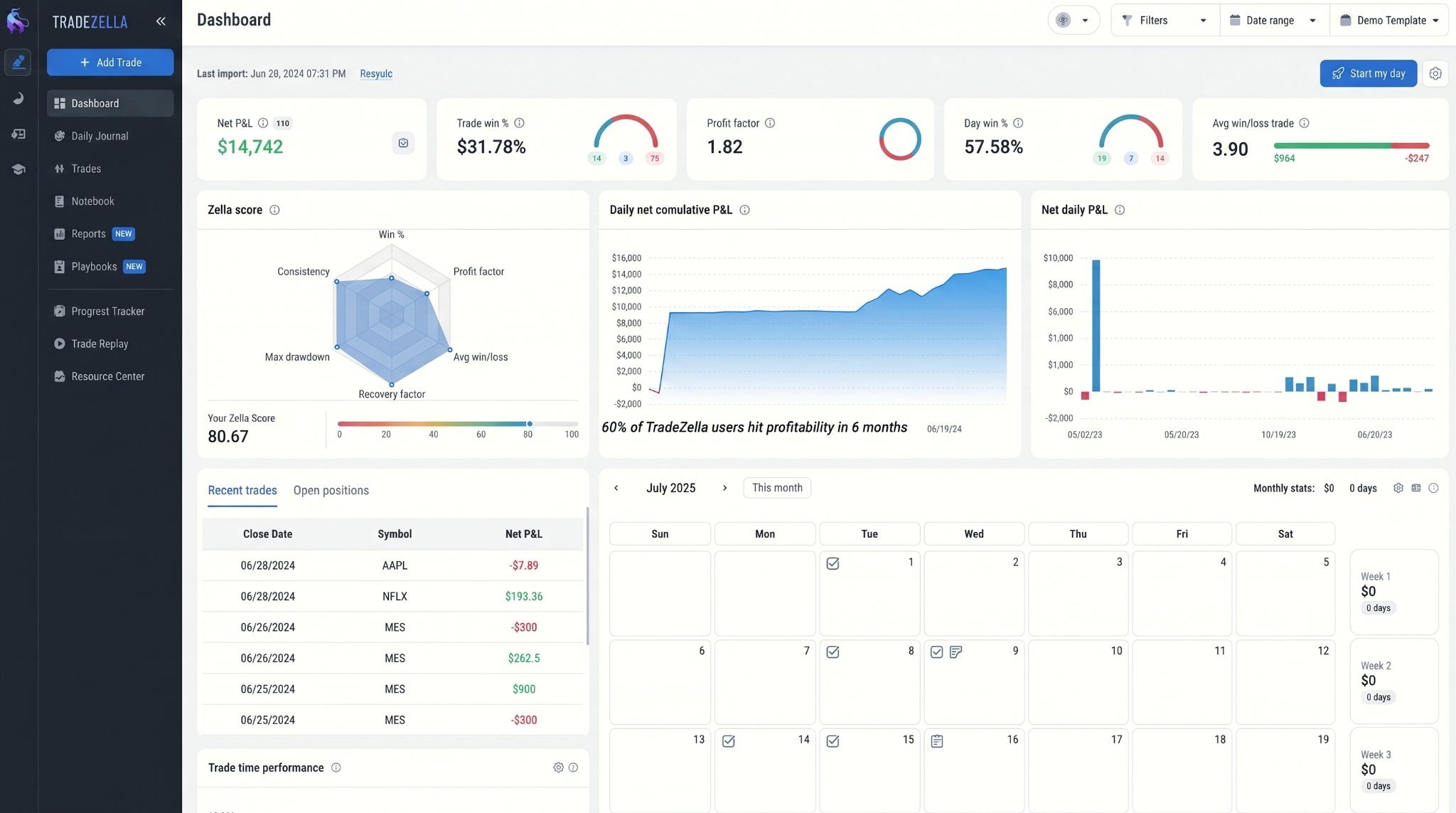
Automatic trade import: Connecting a supported broker is the fastest way to get started. Once trades are imported automatically, you can spend your time reviewing setups instead of entering data manually. In my experience, this is one of the biggest reasons to move beyond a spreadsheet.
Manual trade entry: If your broker isn't supported, manual entry is still straightforward. You can record entries, exits, position size, notes, screenshots, and custom tags without feeling like you're filling out a complicated spreadsheet.
Performance dashboard: The dashboard gives you a clear overview of your trading performance with metrics such as win rate, profit factor, expectancy, average return, and drawdown. I like that the charts are easy to read without sacrificing useful detail.
Trade tagging: Custom tags make it easy to organize trades by strategy, setup, market condition, or any category that matters to your trading plan. After building a meaningful tagging system, comparing similar trades becomes much faster.
Strategy tracking: Instead of evaluating your account as a whole, TradeZella lets you measure the performance of individual strategies. I find this much more useful because it quickly shows which setups deserve more attention and which ones consistently underperform.
Playbooks: This is the feature that separates TradeZella from many competitors. Playbooks let you document each setup with entry rules, exit criteria, examples, and notes. During reviews, you can compare every trade against your predefined process instead of relying on memory alone.
Screenshot management: Attaching before-and-after chart screenshots takes only a few seconds, but it adds valuable context during later reviews. I almost always learn more from a chart with notes than from performance statistics alone.
Trading reports: TradeZella automatically generates reports that break down performance by strategy, symbol, time period, direction, and other filters. I rarely felt the need to export data because most of the insights I wanted were already available inside the platform.
Risk analytics: Beyond tracking profits and losses, TradeZella helps you understand how much risk you're taking to achieve those results. You can review metrics like average risk-to-reward ratio, drawdown, expectancy, and R-Multiple across different strategies. I found these insights far more useful than simply looking at account balance growth because they highlight whether your risk management is actually improving.
Supported markets & broker integrations
One of the first things I check before recommending any trading journal is whether it fits into an existing workflow.
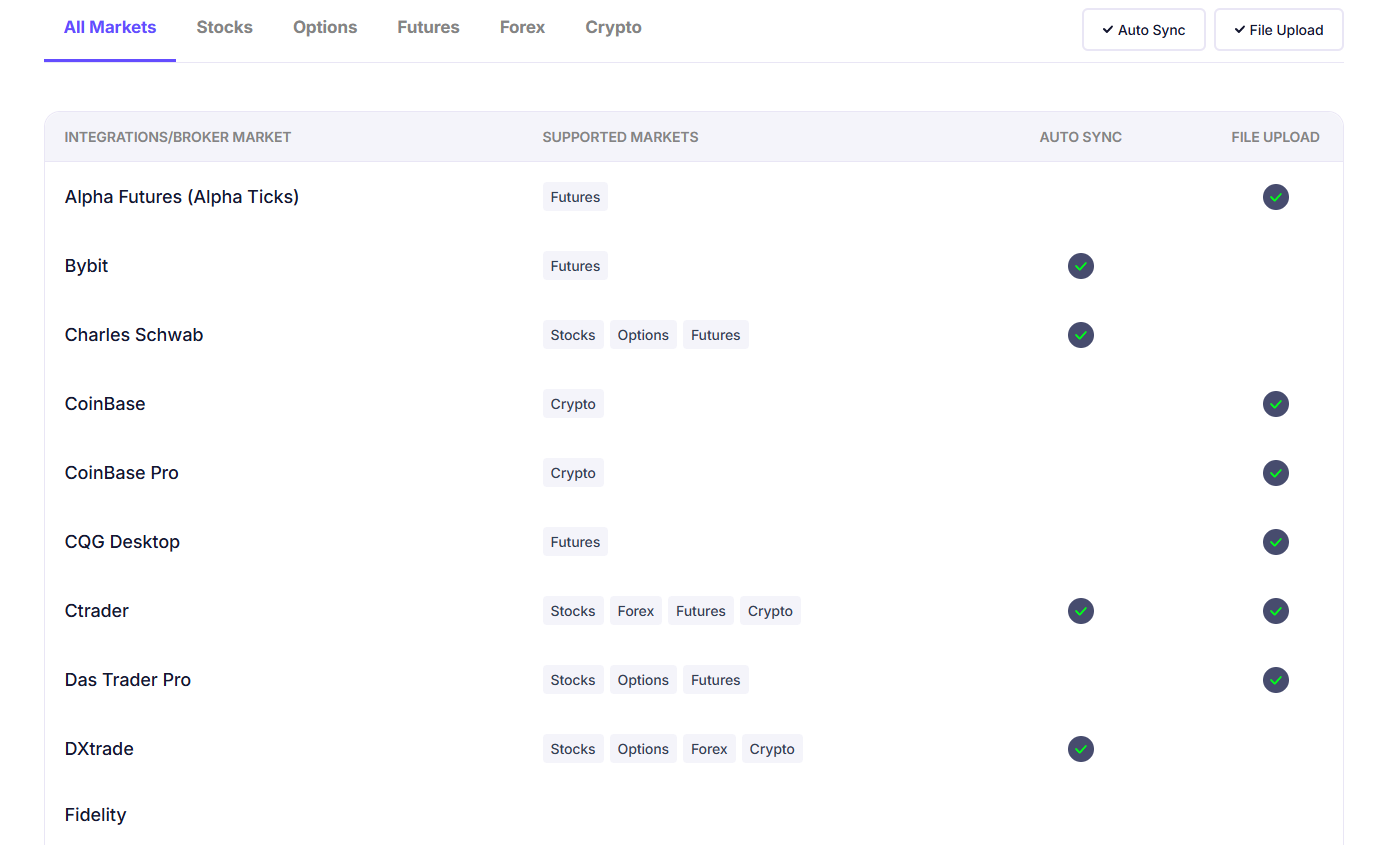
A platform can have excellent analytics, but if it doesn't support your market or broker, you'll spend unnecessary time importing trades manually. Fortunately, TradeZella performs well in this area. (Source: https://www.tradezella.com/brokersupport)
Stocks: TradeZella fully supports stock traders, including both long and short positions. Once trades are imported, you can analyze your performance by ticker, strategy, sector, trading session, and many other filters. For anyone actively trading equities, I don't think you'll run into any major limitations.
Options: Options trading is another area where TradeZella stands out. It supports multi-leg strategies, allowing you to review complex positions alongside simpler trades. Combined with Playbooks and strategy tracking, I found it much easier to evaluate whether specific options setups were consistently profitable.
Futures: Futures traders are well supported through compatible brokers and imported trade history. You can monitor metrics like win rate, profit factor, expectancy, R-Multiple, and drawdown across different contracts or strategies. If you trade futures daily, the automated journaling process saves a considerable amount of time.
Forex support: Forex trading is supported through broker integrations and CSV imports. After importing your trades, the platform lets you compare performance across currency pairs, trading sessions, and individual strategies. The review process feels just as polished as it does for stocks and futures.
Supported brokers: TradeZella integrates directly with a growing list of popular brokers and proprietary trading platforms. If your broker is supported, importing trades is usually a one-time setup. I always recommend checking the current integration list before subscribing, but I found coverage to be strong for most active retail traders.
CSV import: Even if your broker isn't supported yet, you're not locked out of the platform. TradeZella allows you to import trades using CSV files, making it compatible with many brokers and exchanges that don't yet offer direct synchronization. It's slightly less convenient than automatic imports, but it works reliably and keeps all of your trading history in one place.
Playbooks: TradeZella's standout feature
If there's one feature that makes TradeZella feel different from most trading journals I've used, it's Playbooks.
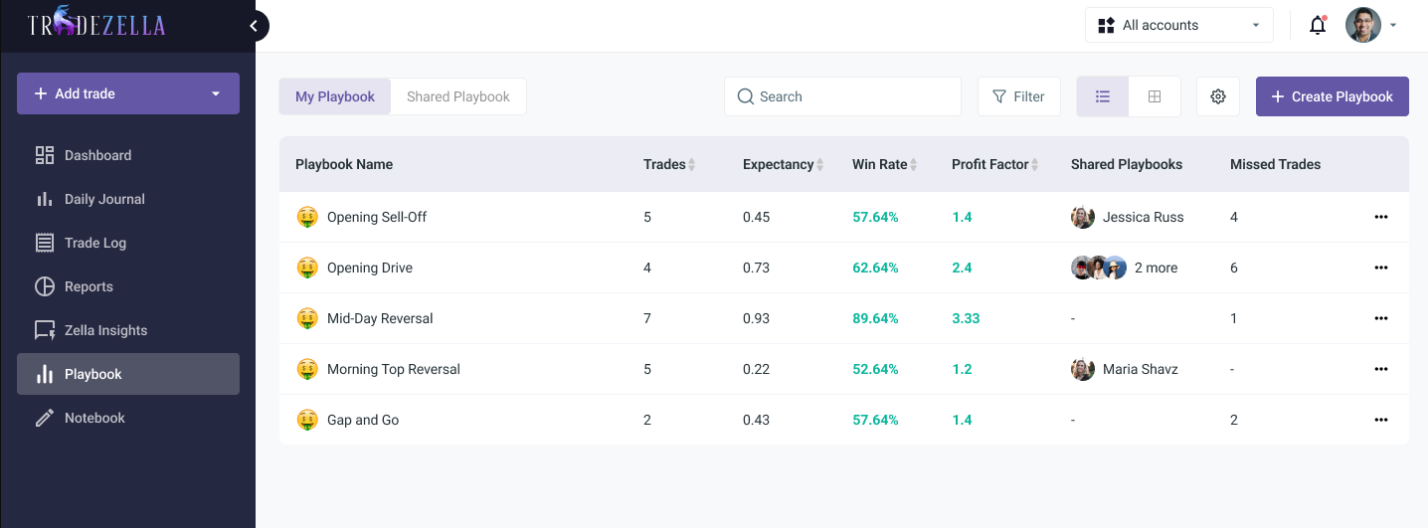
Plenty of platforms help you review trades after they're closed. Playbooks encourage you to define what a high-quality trade looks like before you ever click the Buy or Sell button. That shift in mindset can have a bigger impact than adding another performance metric to your dashboard.
What are Playbooks?
A Playbook is a documented trading setup. Instead of keeping strategy notes in a notebook or scattered across different documents, you create a structured template inside TradeZella. Each Playbook can include your entry conditions, exit rules, ideal market environment, risk parameters, screenshots, and additional notes.
I like this approach because every trade can be compared against a predefined standard. Rather than asking, "Did this trade make money?" you start asking, "Did I execute my setup correctly?" Those are very different questions.
I wouldn't recommend creating 10 or 20 Playbooks at the beginning. Start with 3 to 5 core setups that you actually trade regularly. Once you have at least 20 to 30 trades associated with each setup, you'll have a more useful sample for comparing performance than you would with only a handful of trades.
How to build a Playbook
Creating a Playbook doesn't take long, but it's worth spending time on the details. I usually start by giving each setup a clear name, then document exactly what needs to happen before entering a trade. That includes the market context, confirmation signals, risk management rules, target levels, and examples of valid setups.
The more specific your Playbook becomes, the more useful it is during reviews. Vague rules make it difficult to judge whether a trade truly followed your plan.
Track setup performance
Once trades are linked to a Playbook, TradeZella begins tracking their collective performance. Instead of reviewing hundreds of trades individually, you can evaluate one strategy at a time.
This quickly answers questions like which setup produces the highest expectancy, which one has the best risk-to-reward profile, and which strategy simply isn't performing well enough to justify your attention. I found this far more actionable than looking only at overall account performance.
Improve execution consistency
For me, this is where Playbooks deliver the most value. They create accountability. Every review becomes a comparison between your written trading plan and your actual execution.
Over time, it's much easier to identify recurring habits, whether that's entering too early, skipping confirmation, or moving stop losses without a valid reason.
Improving execution often has a bigger impact than constantly searching for new strategies, and Playbooks reinforce that idea exceptionally well.
Common Playbook mistakes
The biggest mistake I see is trying to create too many Playbooks. I recommend starting with 3 to 5 clearly defined setups rather than creating a separate Playbook for every minor variation. If you split your trades across 10 or more Playbooks, you may end up with too little data in each category to draw meaningful conclusions.
How TradeZella fits into your trading workflow?
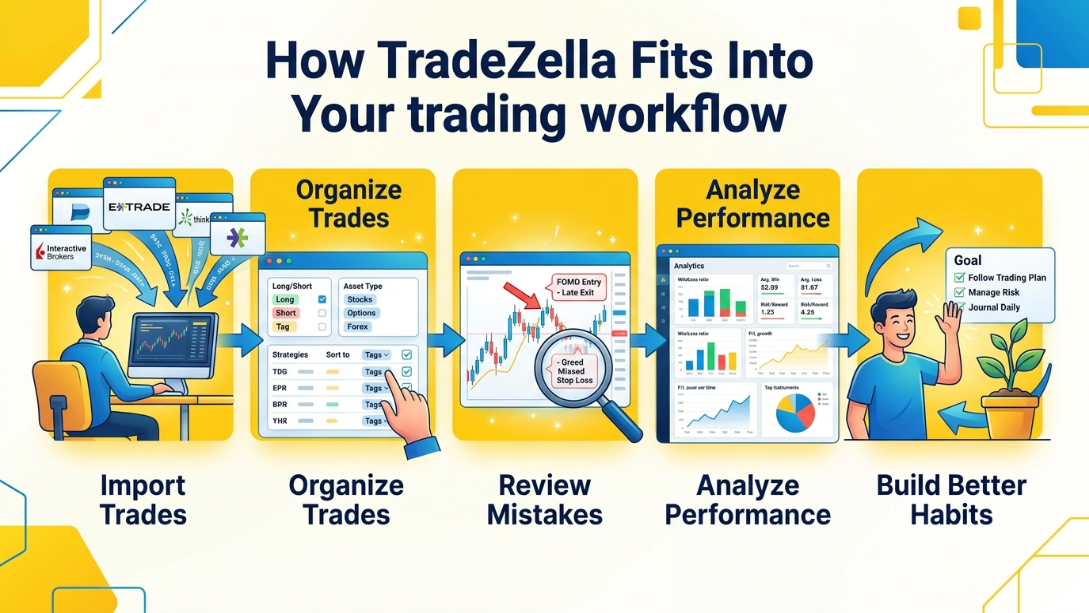
TradeZella isn't designed to change how you trade, it fits around the routine you already have. What I noticed after using it is that it reduces the friction between placing trades and reviewing them. Instead of juggling spreadsheets, screenshots, and handwritten notes, everything stays in one place.
Import trades
The workflow starts with importing your trades. If your broker is supported, this step is largely automatic.
Otherwise, you can upload a CSV file in just a few minutes. Either way, your trading history is available without spending time entering every position by hand. That alone removes one of the biggest reasons traders stop journaling after a few weeks.
Organize trades
Once your trades are inside the platform, organizing them becomes part of the review process rather than an administrative task. I usually tag trades by strategy, market condition, or setup, then link them to the appropriate Playbook.
Adding a few notes and chart screenshots only takes a minute, but it makes future reviews much more valuable.
Review mistakes
This is the stage where I think TradeZella starts to separate itself from a spreadsheet. Instead of scrolling through a list of trades, you can filter specific setups, losing trades, or repeated execution errors.
Reviewing trades in groups makes recurring mistakes much easier to recognize than looking at them one by one.
Analyze performance
After enough trades have accumulated, the analytics become much more meaningful. Rather than focusing only on profit and loss, I like reviewing metrics such as expectancy, drawdown, win rate, and strategy performance together.
Looking at several metrics at the same time usually tells a more complete story than relying on a single statistic.
Build better habits
The final step isn't another report, it's applying what you've learned. That's where I think TradeZella adds the most value. Because every trade is connected to your strategies, Playbooks, and review notes, it becomes easier to identify habits worth repeating and behaviors worth eliminating.
Over time, the platform encourages a routine where reviewing trades feels like a normal part of the trading day instead of something that only happens after a bad week.
For active traders, a practical routine is to spend 5–10 minutes after each session recording notes and tagging trades, followed by a 30–60 minute weekly review. At the end of each month, review your results across a larger sample rather than judging your performance based on the last 3–5 trades.
TradeZella pricing
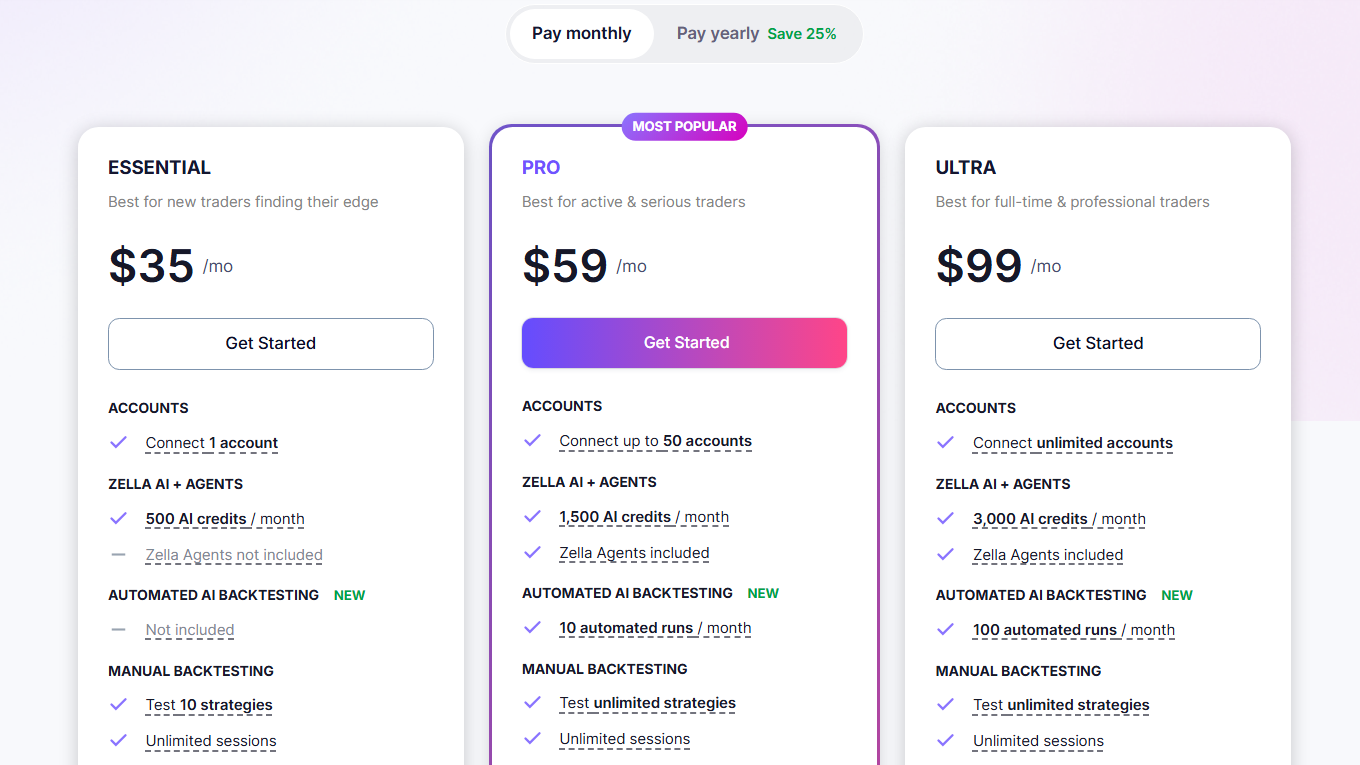
TradeZella keeps its pricing structure simple. Instead of offering a long list of plans with small feature differences, it focuses on two main tiers that cover the needs of most traders. - Source: https://www.tradezella.com/pricing
The decision comes down to whether you need a single trading account with essential journaling tools or unlimited accounts and advanced features.
Available plans
Essential: This plan is designed for individual traders who want all the core journaling features without paying for capabilities they may never use. It includes 1 trading account, 3 Playbooks, 500 AI credits, Trade Replay, unlimited backtesting, automatic trade imports, advanced analytics, and 1 GB of cloud storage. I think it's more than enough for most retail traders who manage a single account.
Pro: If you trade multiple accounts or want fewer limitations, Pro is the logical upgrade. It supports unlimited trading accounts, unlimited Playbooks, 1,000 AI credits, Sessions Trade Replay, 5 GB of storage, and unlimited mentor invitations while keeping all of the analytics and journaling features from Essential. This is the plan I'd recommend for active traders or anyone managing several funded accounts.
Free trial
TradeZella does not currently offer a traditional free trial. Instead, you choose a subscription plan when signing up. While I would have liked to see a dedicated trial period, the platform provides enough product demonstrations, documentation, and onboarding resources to help you understand how it works before committing.
Monthly vs annual pricing
Essential: $29/month or $24/month when billed annually ($288/year).
Pro: $49/month or $33.25/month when billed annually ($399/year).
If you're confident you'll use the platform throughout the year, annual billing offers meaningful savings. Even after comparing it with several competing trading journals, I think the annual plans are priced competitively for the features included.
Which plan offers the best value?
For most traders, Essential offers the strongest value. It includes nearly everything needed to build a disciplined review routine, including Playbooks, analytics, Trade Replay, and automatic imports, at a reasonable monthly cost.
Unless you're managing multiple accounts or regularly mentoring other traders, I don't think you'll outgrow it quickly.
I'd move to Pro only if you genuinely need unlimited accounts, unlimited Playbooks, or the higher AI limits. Those additions are valuable, but they're most beneficial for active traders, prop firm traders, or professionals who review large volumes of trades every week.
For everyone else, Essential strikes the best balance between cost and functionality.
User reviews
TradeZella has built a strong reputation among retail traders, reflected in its 4.8/5 TrustScore based on 970+ reviews on Trustpilot. Around 91% of reviewers have given the platform 5 stars, which is unusually high for a subscription-based trading tool.
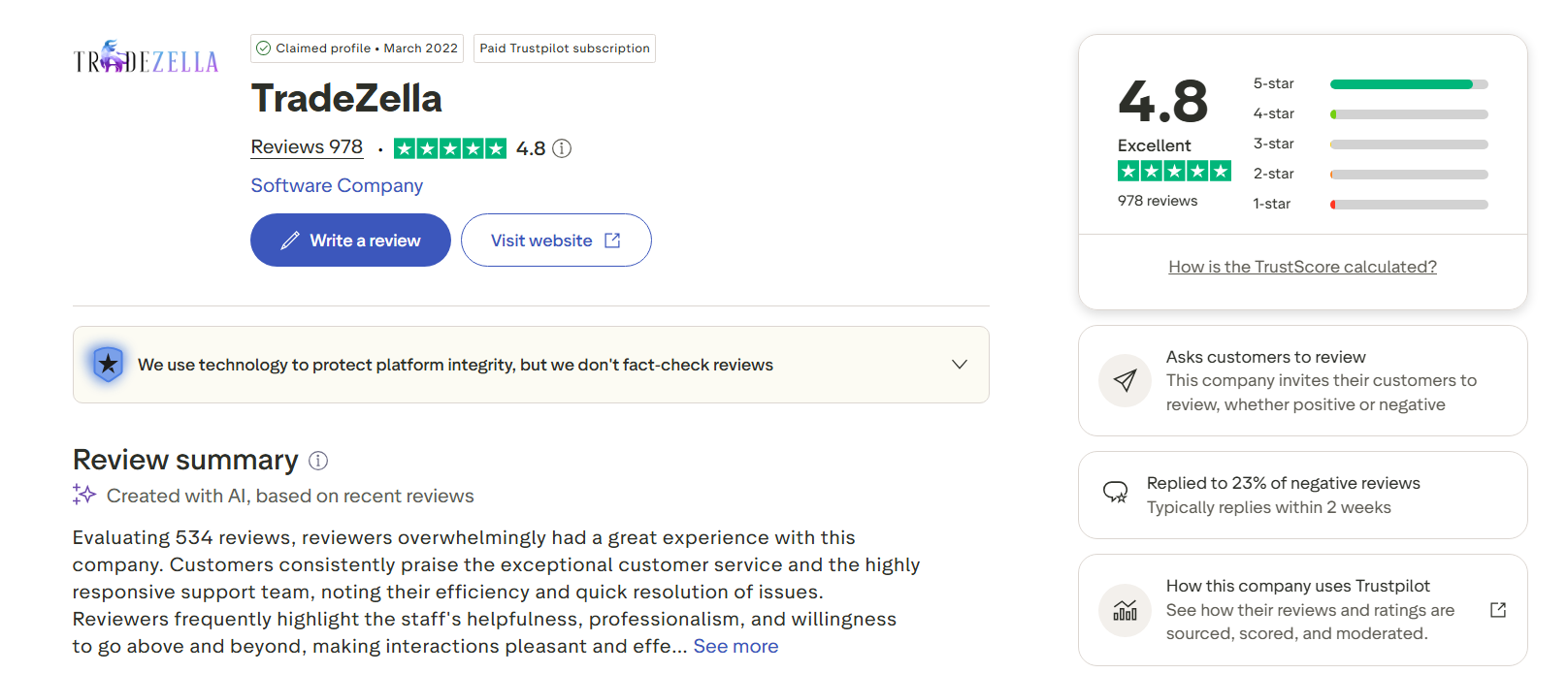
While online reviews should never be the only factor in your decision, they do provide a useful snapshot of how real users feel after using the platform.
Looking through both the review summary and individual customer feedback, a few themes appear repeatedly:
Customer support receives the most praise. Many users mention fast response times, knowledgeable staff, and support agents who stay involved until problems are resolved. Several recent reviews specifically describe billing issues, broker import problems, or technical questions being handled within minutes or hours rather than days.
The journaling workflow is consistently described as intuitive. New users often mention that TradeZella is easier to learn than expected, especially compared with spreadsheet-based journals. Automatic trade imports, dashboards, and Playbooks are frequently highlighted as features that make reviewing trades less time-consuming.
Backtesting and trade replay stand out as favorite features. Traders who actively review their strategies often say these tools help them identify patterns, refine setups, and gain confidence before risking real capital.
Constructive criticism does exist. A handful of reviewers mention a learning curve when first exploring the platform's more advanced features. Others would like broader broker compatibility or additional customization options. Even so, these comments are usually accompanied by positive feedback about the support team's willingness to help.
Overall, the public feedback aligns closely with my own experience. The strongest compliments aren't directed at a single feature, they're about the complete workflow. Users repeatedly mention that TradeZella makes it easier to build a consistent review routine rather than simply keeping a record of trades.
That said, I wouldn't rely on Trustpilot scores alone. I always recommend combining user reviews with your own evaluation of the platform's features, pricing, broker support, and whether its workflow matches your trading style.
TradeZella pros and cons
No trading journal is perfect, and TradeZella is no exception. After spending time with the platform, there were several things I genuinely enjoyed using, along with a few areas where I think it could still improve.
Pros
Clean, modern interface that's easy to navigate from the first login.
Playbooks are one of the best strategy documentation tools I've seen in a trading journal.
Automatic trade imports eliminate most manual data entry.
Performance dashboards present complex trading metrics in a simple, visual format.
Strong strategy tracking makes it easy to compare setups over weeks or months.
Supports multiple markets, including stocks, options, futures, forex, and crypto.
Flexible trade tagging helps organize large trading histories efficiently.
Screenshot support makes post-trade reviews much more informative.
Cloud-based platform lets you access your journal from virtually any device.
Regular feature updates show that the platform is actively being improved.
Cons
No native desktop application for traders who prefer offline software.
Some broker integrations are still unavailable, so certain traders must rely on CSV imports.
The number of AI credits depends on your subscription plan, which may feel restrictive for heavy users.
Advanced analytics take time to appreciate if you're completely new to performance metrics.
The monthly subscription may be difficult to justify for traders with only a handful of trades each month.
Some advanced features, such as unlimited Playbooks and multiple accounts, require upgrading to the Pro plan.
Because the platform offers many tools, it can be tempting to spend too much time analyzing statistics instead of focusing on improving execution.
Overall, I came away with a positive impression. Most of the drawbacks are relatively minor and won't affect every trader. For me, the biggest strengths, Playbooks, intuitive analytics, and an enjoyable review workflow, outweigh the limitations, especially if you're committed to reviewing your trades consistently rather than keeping a journal only occasionally.
For a trader managing 1 account, the Essential plan provides enough functionality to build a complete journaling workflow without immediately paying for the Pro tier. The upgrade becomes more relevant for traders managing 2 or more accounts, especially those running multiple prop firm accounts.
TradeZella for different types of traders
Not every trader uses a journal in the same way. Some focus on reviewing dozens of trades each day, while others care more about documenting a handful of high-conviction setups.
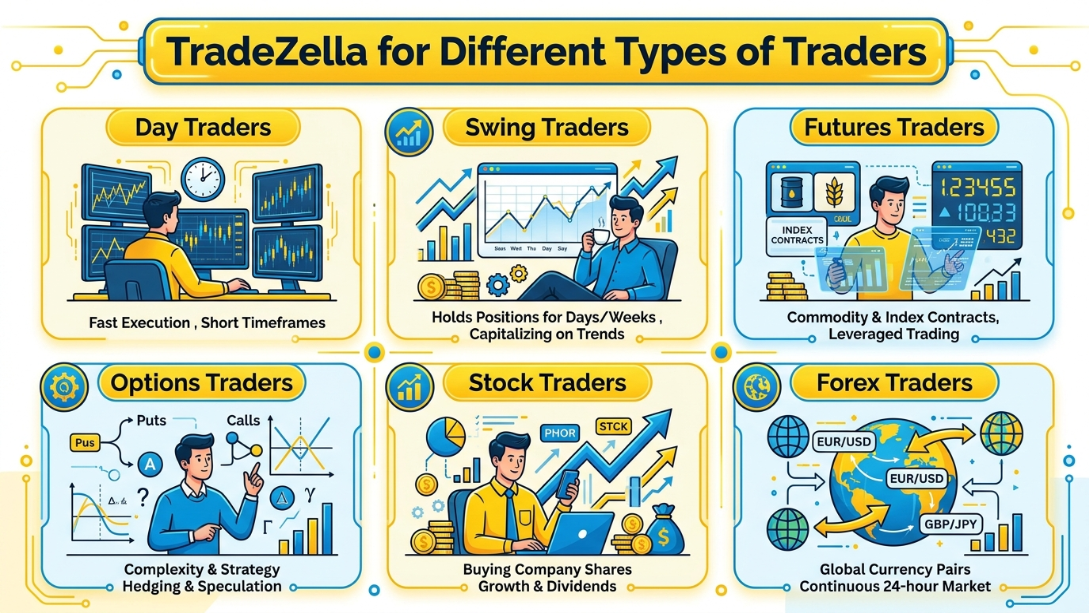
After testing TradeZella, here's where I think it fits best:
Day traders: TradeZella is an excellent fit for day traders who generate a high volume of trades. Automatic imports, trade tagging, and fast filtering make daily reviews much less time-consuming. I also found the combination of screenshots and Playbooks particularly useful for identifying recurring execution mistakes.
Swing traders: Swing traders don't usually need to review hundreds of trades each month, but they often spend more time analyzing the quality of individual setups. TradeZella's note-taking, chart attachments, and strategy tracking make it easy to document why a position was opened and whether the original trading thesis played out as expected.
Futures traders: Futures traders can benefit from the platform's detailed performance analytics, especially when comparing different contracts or setups. Metrics such as expectancy, drawdown, R-Multiple, and profit factor provide a much clearer picture than simply tracking account growth.
Options traders: I think options traders will appreciate TradeZella more than most. Playbooks make it easy to document different options strategies, while performance reports help compare how each setup performs over time. If you regularly trade spreads or multiple strategies, this becomes especially valuable.
Stock traders: For active stock traders, TradeZella offers everything needed to replace a spreadsheet. You can organize trades by ticker, sector, strategy, or market condition, making it much easier to spot strengths and weaknesses across your portfolio.
Forex traders: Forex traders are well supported through broker integrations and CSV imports. Once trades are imported, it's easy to review performance by currency pair, trading session, or strategy. If your goal is to improve consistency rather than simply record trades, TradeZella provides a structured workflow that's easy to maintain over the long term.
TradeZella vs competitors
Choosing a trading journal isn't just about finding the platform with the longest feature list. After comparing these four tools, I found that each has a clear strength.
TradeZella focuses on usability and structured reviews, TraderSync emphasizes automation, TradesViz offers exceptional reporting depth, and Edgewonk stands out for trading psychology and process improvement.
Feature | TradeZella | TraderSync | TradesViz | Edgewonk |
Supported markets | Stocks, options, futures, forex, crypto | Stocks, options, futures, forex | Stocks, options, futures, forex, crypto | Multi-asset support |
Automatic trade import | ✔ Yes | ✔ Yes | ✔ Yes | Limited (primarily via file imports) |
Broker integrations | Extensive and growing | Extensive | Extensive | Limited |
Performance dashboard | Modern, visual, and easy to navigate | Detailed and data-rich | Extremely customizable | Good performance reports |
Strategy tracking | ✔ Excellent with Playbooks | ✔ Advanced | ✔ Advanced | ✔ Strong |
Trade tagging | ✔ Yes | ✔ Yes | ✔ Yes | ✔ Yes |
Screenshot management | ✔ Yes | ✔ Yes | ✔ Yes | ✔ Yes |
Trading psychology tools | Good journaling workflow | AI-assisted feedback | Basic | Excellent |
AI features | AI insights and review assistance | AI insights and pattern detection | Limited | No |
Best for | Traders who want a clean workflow and structured reviews | Active traders who prioritize automation | Data-driven traders who love advanced analytics | Traders focused on discipline and psychology |
Learning curve | Easy | Moderate | Moderate to high | Moderate |
Starting price | From $29/month | From $29.95/month | Lower-cost plans available | One-time license purchase |
No single platform wins every category. If I wanted the cleanest user experience and the best strategy documentation, I'd choose TradeZella. For deeper automation and mature broker integrations, TraderSync remains a strong option.
TradesViz is ideal for traders who enjoy exploring detailed statistics, while Edgewonk continues to be one of the best choices for improving trading discipline and decision-making. The right platform ultimately depends on which part of your trading process you want to improve the most.
Best TradeZella alternatives
TradeZella is one of my favorite trading journals, but it isn't the right choice for everyone. Depending on your trading style, budget, or preferred workflow, one of these alternatives may be a better fit.
TraderZully: I needed a solid place to keep all my chaotic session notes and chart screenshots together in one unified notebook. Whenever I review my losing trades from last week, I use the filtering tools to see which specific market hours ruin my win rate. It feels way more intuitive than wrestling with endless folders on my desktop. I finally feel like I have a structured routine to fix my bad habits.
TraderSync: If automation is your top priority, TraderSync is the first platform I'd consider. It offers mature broker integrations, reliable automatic trade imports, detailed reporting, and AI-assisted trade reviews. I generally recommend it to active traders who want to spend more time analyzing performance and less time managing data.
TradesViz: TradesViz is built for traders who enjoy digging into statistics. Its reporting engine is one of the most customizable I've used, allowing you to analyze performance from almost every angle imaginable. The interface isn't quite as polished as TradeZella's, but the analytical depth is outstanding.
Edgewonk: Rather than focusing on dashboards alone, Edgewonk places much more emphasis on trading psychology and decision-making. If your biggest challenge is maintaining discipline or following your trading plan consistently, I think Edgewonk deserves serious consideration.
Tradervue: Tradervue has earned a strong reputation among active stock and day traders. It combines reliable trade imports, straightforward reporting, and an easy-to-follow review process. While it doesn't include features like Playbooks, it's still a dependable choice for traders who want a clean and uncomplicated journal.
Trademetria: If you're looking for a balance between simplicity and analytical depth, Trademetria is worth a look. It supports multiple asset classes, includes portfolio tracking alongside trade journaling, and provides useful performance reports without feeling overly complex. I think it's a solid option for traders who have outgrown spreadsheets but don't need every advanced feature offered by TradeZella or TraderSync.
» Read more: Best Trading Journal Apps & Software for Forex, Stock, Futures, Crypto (Free & Paid)
What I like most about TradeZella and where TradeZella could improve
After spending time with TradeZella, I came away with a very positive impression. It isn't perfect, but most of its shortcomings are relatively minor compared with what it gets right. These are the areas that stood out to me the most:
UI: This is probably my favorite aspect of the platform. The interface feels modern without trying to be flashy, and I rarely had to search for features. Everything is organized logically, which makes daily journaling feel effortless.
Dashboard: The dashboard strikes a nice balance between simplicity and detail. I can quickly check key metrics after a trading session, then drill deeper if I want more context. It never feels overwhelming, even after importing a large number of trades.
Reports: The reporting tools are comprehensive enough for most traders. I especially like how easy it is to compare strategies, trading periods, and tagged trades. I didn't find myself exporting data very often because the built-in reports answered most of my questions.
Broker sync: Automatic imports work well when your broker is supported. The setup process is straightforward, and once everything is connected, journaling becomes almost automatic. I still recommend checking compatibility before subscribing because not every broker has direct integration.
Pricing: TradeZella isn't inexpensive, but I think the pricing is reasonable for traders who review their performance consistently. If you only place a few trades each month, a spreadsheet may still be enough. For active traders, I believe the time savings justify the subscription.
Mobile features: The mobile experience is useful for checking recent trades or adding notes while away from your desk. That said, I still prefer doing detailed reviews on a larger screen where charts, reports, and dashboards are easier to navigate.
Market support: I like that I can journal stocks, options, futures, forex, and crypto within the same platform. That flexibility makes it a good choice for traders who participate in more than one market.
Limited customization: While the default dashboards are well designed, I occasionally wished I had more freedom to customize layouts or create entirely custom reports. Most traders probably won't notice this, but data-focused users might.
Learning curve: TradeZella is easier to learn than many competing platforms, but getting the most from features like Playbooks, advanced analytics, and strategy tracking still takes time. I found that the value increased significantly after a few weeks of consistent use rather than during the first day.
Overall, what impressed me most is that TradeZella encourages good trading habits without making the journaling process feel like extra work.
Instead of adding complexity, it removes much of the friction that often causes traders to abandon their journals after a few weeks. That, more than any individual feature, is why I think the platform stands out.
Is TradeZella worth it?
Whether TradeZella is worth paying for depends less on your experience level and more on how seriously you take trade reviews. If you consistently analyze your performance, the platform can save a significant amount of time while making those reviews more structured and actionable.
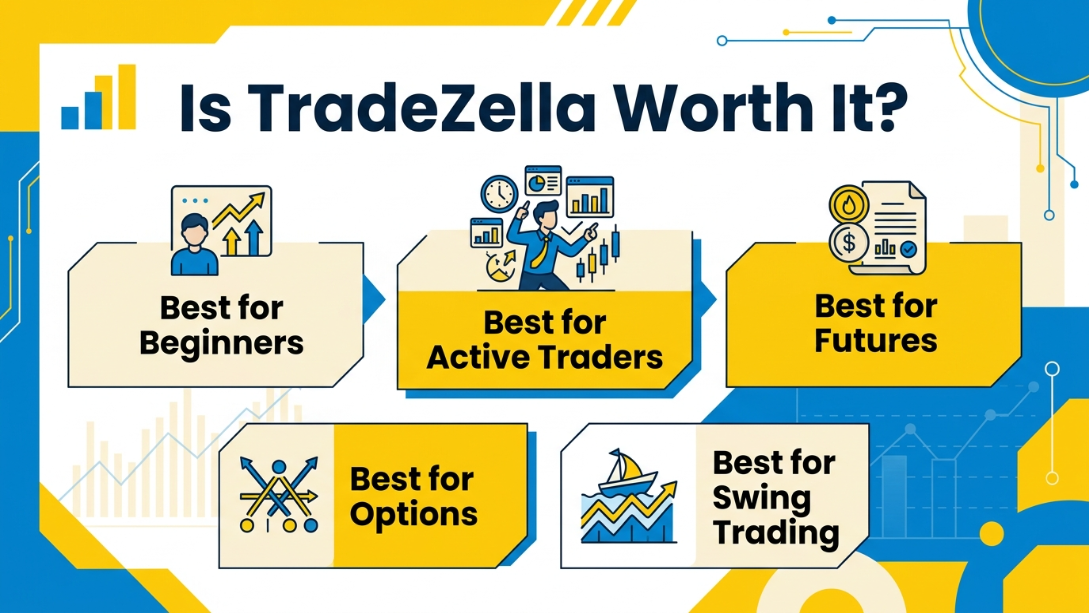
Best for beginners
If you're new to trading journals, I think TradeZella is one of the easiest premium platforms to start with. The interface is intuitive, the dashboards are easy to understand, and Playbooks help you develop good habits from the beginning.
Rather than simply recording trades, you'll learn to review your execution against a defined trading plan.
Best for active traders
This is where TradeZella delivers the most value. Active traders who generate 20, 50, or even 100+ trades per month are likely to benefit more from TradeZella than someone who places only a few trades. At that volume, manually entering trades, attaching screenshots, tagging setups, and calculating performance metrics can quickly become a repetitive task.
Automatic trade imports, performance dashboards, strategy tracking, and detailed reports make reviewing dozens of trades each week much more efficient. If you trade regularly, I believe the subscription can pay for itself through the time it saves.
Best for futures
TradeZella is a strong option for futures traders who want to evaluate more than just profit and loss. The platform makes it easy to compare contracts, monitor risk metrics, and review performance across different setups. As long as your broker is supported or you're comfortable importing trades via CSV, it fits naturally into a futures trading workflow.
For futures traders, I'd recommend testing at least 30–50 recent trades before deciding whether the analytics fit your workflow. That gives you enough data to compare expectancy, drawdown, profit factor, and performance across different contracts or setups instead of making a decision based on only a handful of trades.
Best for options
Options traders are likely to get even more value from TradeZella because of its Playbooks and strategy tracking. Documenting spreads, income strategies, or volatility-based setups becomes much more organized, and comparing long-term performance across different strategies is far easier than doing it in a spreadsheet.
Options traders should pay particular attention to how their broker imports multi-leg positions during the initial setup. Before committing to an annual subscription, I would import at least 20–30 recent options trades and verify that entries, exits, legs, and P&L are recorded correctly.
Best for swing trading
Swing traders may not generate hundreds of trades every month, but they often spend more time planning each position. That's why I think TradeZella works well for this style. The ability to attach charts, write detailed notes, and review trades days or weeks later helps you evaluate the quality of your decision-making rather than focusing only on the final result.
If you're taking only 2–5 swing trades per month, a spreadsheet may still be enough. However, if you're consistently managing 10–20 positions per month and want to compare setups across several months, TradeZella's automated organization and Playbooks become considerably more useful.
Overall, I'd recommend TradeZella to traders who view journaling as an essential part of improving their performance instead of an occasional task. If you're committed to reviewing your trades consistently, it's one of the strongest trading journal platforms currently available.
Final verdict
After spending time exploring TradeZella's features, I think it's one of the strongest trading journals for traders who want more than a simple trade log. The analytics are detailed, Playbooks help create consistent routines, and the overall experience feels well organized. If your priority is reviewing trades, finding recurring mistakes, and improving your decision-making over time, TradeZella is an easy recommendation. Just make sure its pricing and broker support match your trading setup before subscribing.
Trader Type | Recommendation |
Beginner | ⭐⭐⭐⭐☆ |
Day Trader | ⭐⭐⭐⭐⭐ |
Swing Trader | ⭐⭐⭐⭐☆ |
Futures Trader | ⭐⭐⭐⭐⭐ |
Options Trader | ⭐⭐⭐⭐⭐ |
Strategy-Focused Trader | ⭐⭐⭐⭐⭐ |