


TradesViz Review: Features, Pricing, Pros, Cons & Alternatives
Last Updated: July 18, 2026
TradesViz has built a strong reputation among traders who want deeper analytics than a basic trading journal can provide.
With hundreds of performance metrics, extensive broker integrations, and highly customizable reports, it's often recommended for traders who enjoy digging into data rather than simply tracking wins and losses. But does that analytical power translate into a better trading journal, or does it make the platform unnecessarily complex?
I used TradesViz for more than 3 months and reviewed over 500 trades across multiple strategies. I also rebuilt my dashboard several times and ran more than 20 different performance filters to see how quickly I could move from a broad account overview to a specific trading pattern.
In this review, I'll cover its core features, supported markets, analytics, pricing, ease of use, and overall user experience.
I'll also compare it with alternatives like TraderSync, TradeZella, Tradervue, and Edgewonk to help you decide whether it's the right fit. If you're looking for a trading journal that goes beyond basic statistics and want an honest assessment before subscribing, this guide is for you.
What is TradesViz?
TradesViz is a cloud-based trading journal designed for traders who want to understand every aspect of their performance. Instead of stopping at basic profit and loss reports, it collects your trading data and turns it into detailed analytics that help explain why you're making or losing money.
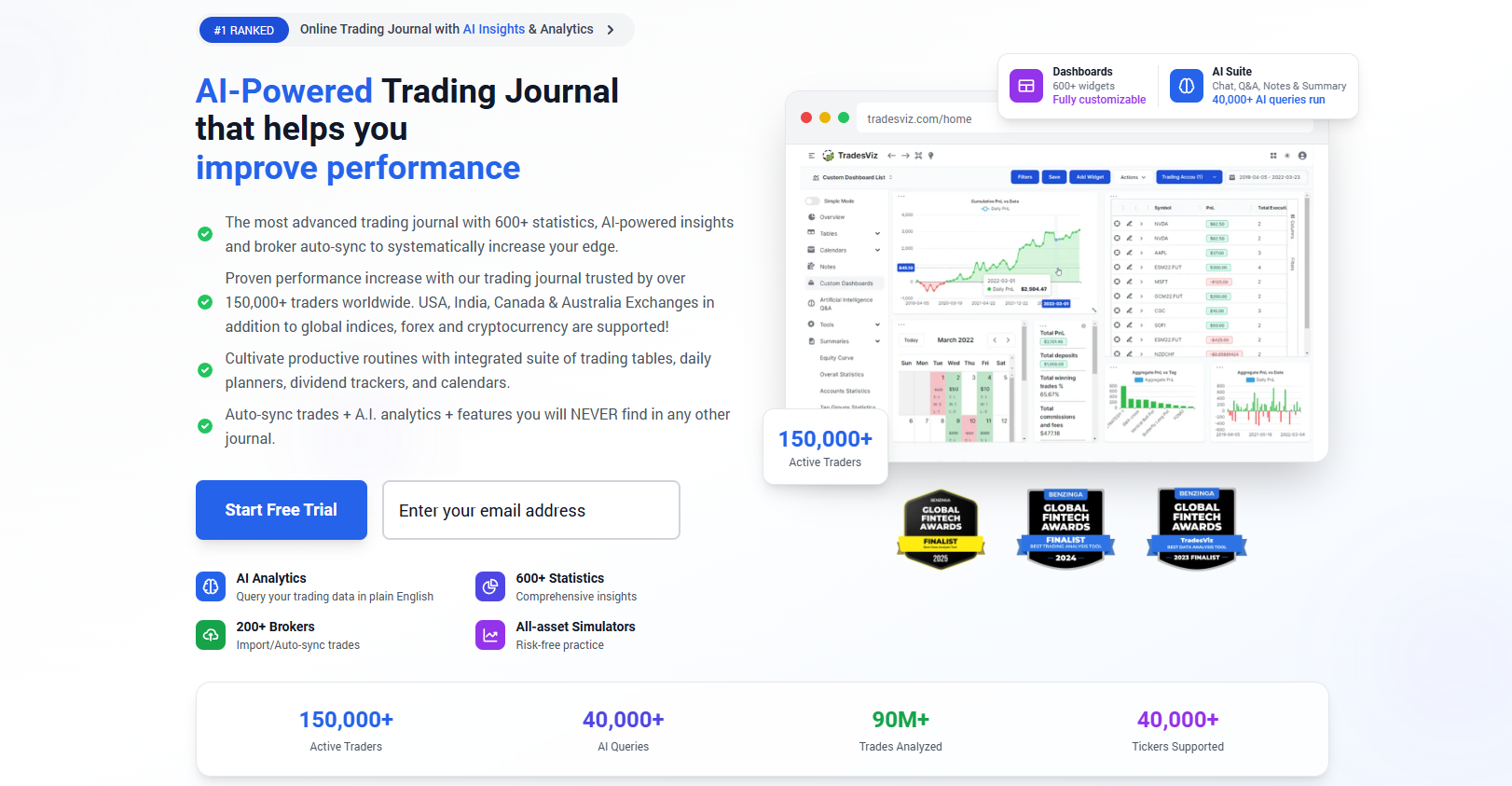
Whether you trade stocks, options, futures, forex, or crypto, the platform is built to organize your trades and uncover patterns that would be difficult to spot manually.
At its core, TradesViz works like any modern trading journal. You import trades from your broker or upload them through CSV files, then review them using charts, reports, tags, screenshots, and custom filters.
Where it starts to separate itself is the sheer depth of its reporting. You can analyze performance by strategy, symbol, trading session, holding time, market condition, day of the week, and many other variables. If you enjoy working with data, there's plenty to explore.
The goal of TradesViz isn't simply to store your trading history. It's to help you make better decisions through objective analysis. Rather than relying on memory or intuition, you can use your own trading data to identify strengths, recurring mistakes, and opportunities for improvement. I like that approach because it encourages decisions based on evidence instead of emotions.
After more than 3 months of regular use, I found that the platform's analytical depth was rarely the limiting factor. In my own reviews, I could usually find several ways to investigate the same question by changing the strategy, symbol, session, or time-based filters.
At the same time, it doesn't force you to use every available report on day one. You can begin with the core metrics and gradually explore more advanced analytics as your review process becomes more structured. For traders who enjoy learning from numbers, that's one of the platform's biggest advantages.
TradesViz at a glance
Before diving into individual features, here's a quick overview of what TradesViz offers. My first impression is that it's built for traders who enjoy analyzing data in depth rather than simply recording completed trades. Despite the large number of reports and customization options, the platform still covers all of the essentials you'd expect from a modern trading journal.
Feature | Details |
Best For | Active traders, data-driven traders, and traders who want advanced performance analytics |
Supported Markets | Stocks, options, futures, forex, crypto, CFDs, and other assets through supported imports |
Platform | Web-based application |
Broker Integrations | 3000+ supported brokers, trading platforms, and prop firms |
Automatic Imports | Yes, with direct integrations and scheduled imports for supported brokers |
Free Trial | Yes, free plan available with limited monthly imports and features |
Starting Price | From $14/month (billed annually) |
Overall Rating | 4.3/5 |
Key features of TradesViz
One thing became obvious after spending time with TradesViz: this platform is built around flexibility. Instead of giving every trader the same fixed workflow, it lets you decide how much detail you want to track and analyze.
If you only need a basic trading journal, the essentials are there. If you enjoy exploring every statistic behind your performance, TradesViz offers far more depth than most competitors I've used.
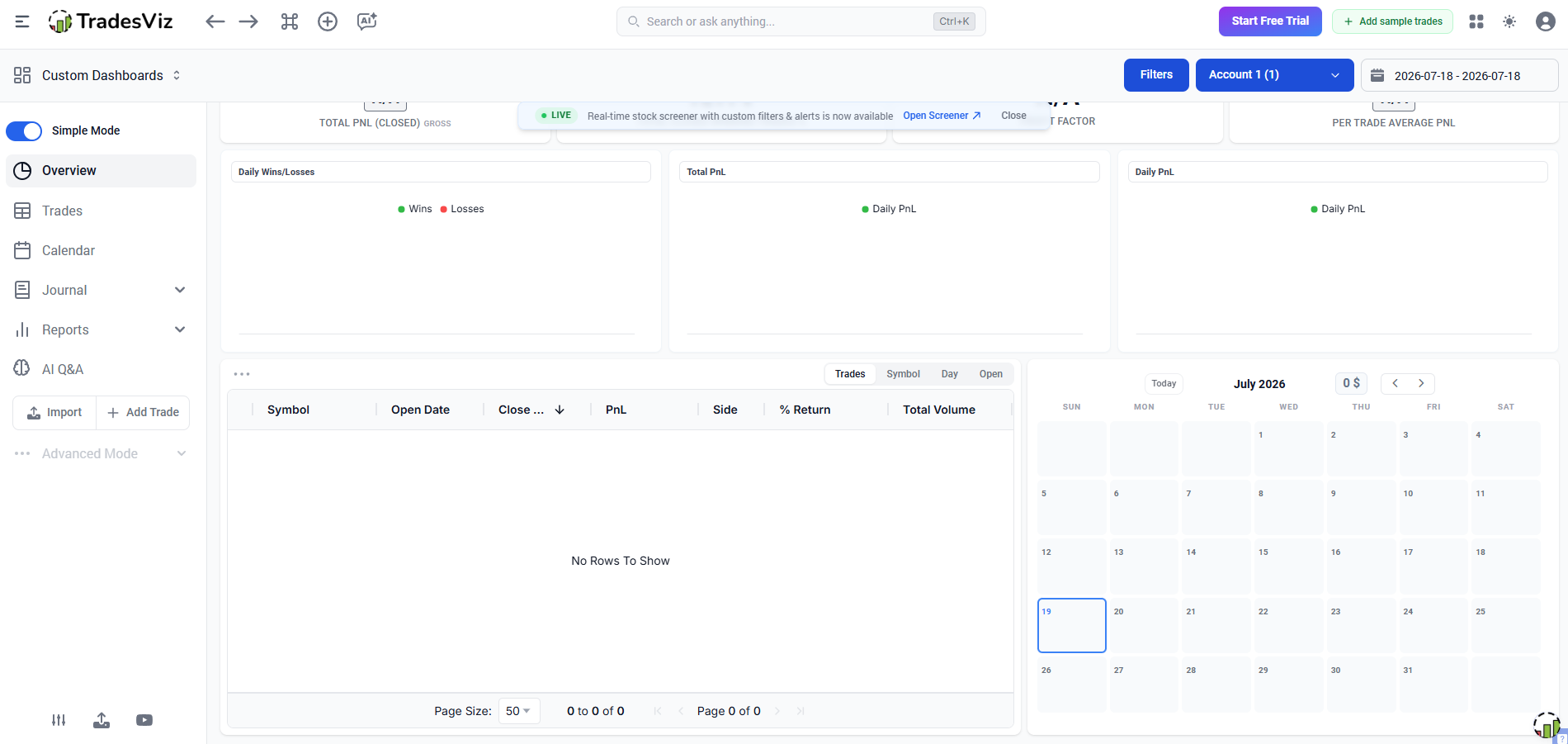
Automatic trade import
TradesViz supports automatic imports from a large number of brokers, trading platforms, and proprietary trading firms. Once connected, new trades can be synchronized directly into your journal, saving a significant amount of manual work.
After the initial setup, I imported trades from more than 20 trading sessions without manually entering individual positions. For an active trader, that can remove a surprisingly large amount of repetitive work over the course of a month.
Manual trade entry
Not every trader uses a supported broker, so manual entry remains an important option. TradesViz allows you to record positions manually with detailed information, including entry and exit prices, position size, commissions, notes, and custom fields.
I manually entered 20+ trades during my testing. The process was manageable for occasional transactions, but I wouldn't want to manually enter hundreds of trades this way. That's where the value of broker integrations becomes much more obvious.
I wouldn't want to manually enter hundreds of trades this way.
Advanced performance dashboard
The performance dashboard is one of the platform's strongest features. Beyond basic profit and loss statistics, it displays a wide range of performance metrics, charts, and visual summaries that help explain how your trading evolves over time.
I used the dashboard as the starting point for most of my reviews over a 3-month testing period. After more than 30 review sessions, I found myself naturally using the high-level overview first, then drilling down into individual reports when I noticed an unusual change in performance.
Custom dashboards
Unlike many trading journals, TradesViz allows you to customize your dashboard based on the information you care about most.
I created more than 5 dashboard variations during my testing. Interestingly, I ended up using fewer widgets than I expected. After experimenting with different layouts, I found that a smaller set of metrics made my daily reviews faster and easier to interpret.
Trade replay
Trade replay lets you revisit completed trades step by step instead of simply looking at the final result. After replaying more than 15 trades, I found the feature most useful for reviewing execution errors rather than simply confirming whether a trade was profitable. Watching how a trade developed often reveals mistakes that aren't obvious in static reports.
Strategy tracking
TradesViz makes it easy to organize trades by strategy and compare their long-term performance. After tracking more than 100 trades across 5 strategies, I found the strategy breakdown much more useful than looking at overall account performance. One setup that initially appeared to be my strongest performer turned out to have a much lower expectancy once I separated it from my other trades. That makes future adjustments much easier to justify.
Trade tagging
The tagging system is highly flexible. You can categorize trades by setup, market condition, psychology, session, or any custom label that fits your workflow. I used more than 20 custom tags during my testing. Once I had accumulated enough tagged trades, filtering by combinations such as strategy + session + execution mistake became one of the fastest ways for me to identify recurring problems.
Screenshot management
Charts often explain a trade better than numbers alone. TradesViz allows you to attach screenshots to individual trades, making it easier to remember market context during future reviews. I attached screenshots to more than 100 trades during my testing. After revisiting those trades several weeks later, I found that the screenshots often gave me context that I couldn't recover from the raw trade data alone. In particular, they made it easier to spot whether I had followed my original setup or entered because of a late reaction to price movement.
Trading reports
Reporting is where TradesViz truly stands out. The platform includes an enormous selection of reports covering everything from profitability and risk to time-based analysis, strategy performance, position sizing, and trading behavior.
After testing more than 30 report configurations, I realized I only needed around 8–10 reports for my regular weekly review. The rest became useful when I had a specific question to investigate.
Calendar view
The calendar view gives you a simple way to review your trading activity over days, weeks, and months. Instead of scrolling through a long list of trades, you can quickly spot profitable streaks, losing periods, and inactive days from a single screen.
I reviewed the calendar view across more than 12 weeks of trading activity. One thing I found particularly useful was being able to see losing streaks in the context of my overall schedule rather than treating each losing trade as an isolated event. Sometimes the calendar revealed that my weakest results came during a specific week or after several consecutive trading sessions, making it easier to connect performance with my overall trading habits rather than focusing only on individual trades.
Supported markets & Broker integrations
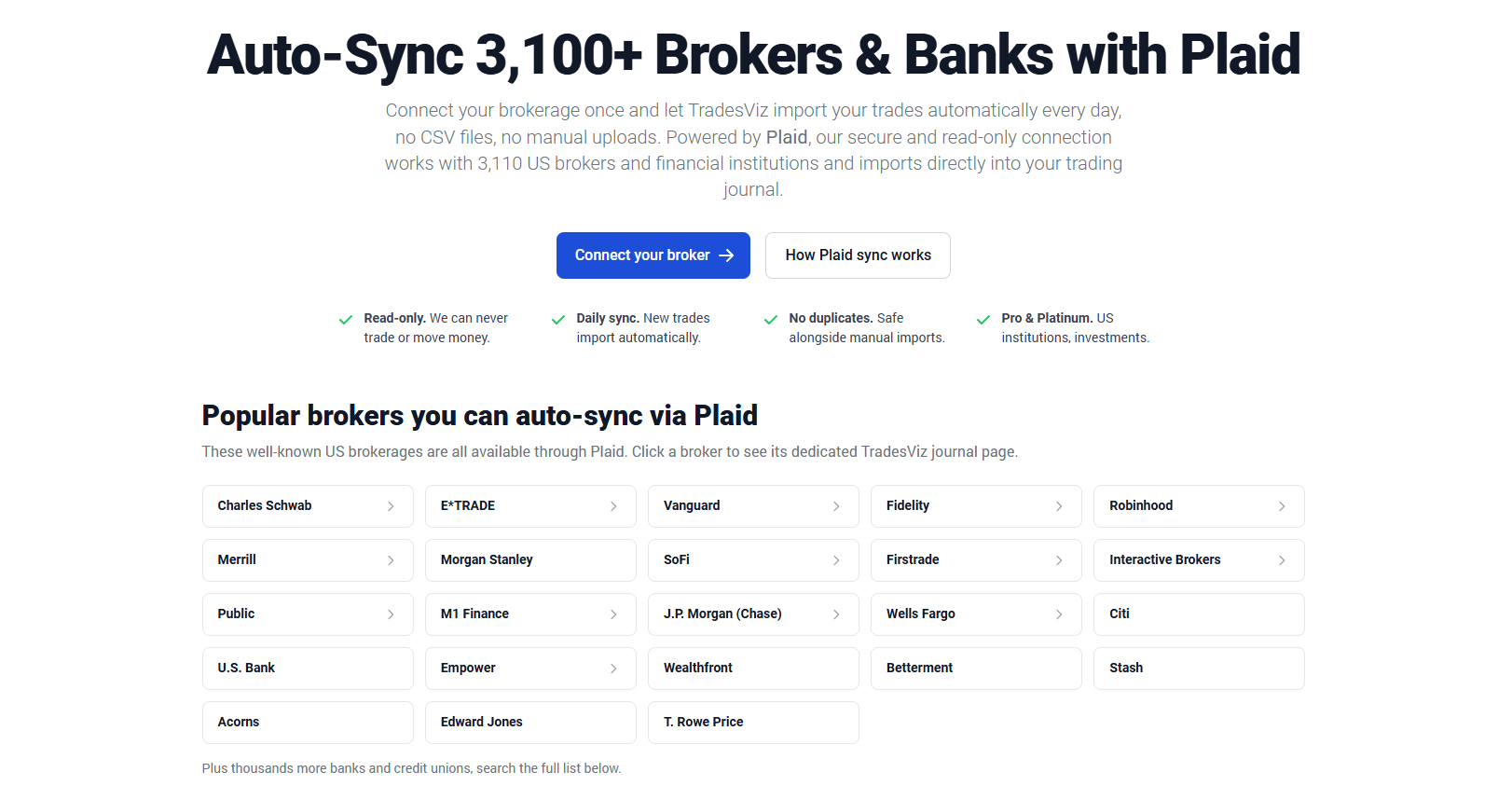
One of the biggest reasons traders choose TradesViz is its compatibility. Unlike some trading journals that only support a limited number of brokers or markets, TradesViz works with a remarkably broad ecosystem.
During my testing, I never felt restricted by where or how I traded, which makes the platform suitable for traders managing multiple accounts or asset classes.
Stocks: TradesViz works exceptionally well for stock traders. It supports detailed trade analysis, position tracking, tagging, and performance reports, making it suitable for both day traders and longer-term investors who want to review their decisions systematically.
Options: Options traders can import and analyze both simple and complex positions. While the platform focuses on performance analysis rather than options strategy education, it provides enough detail to evaluate consistency across different strategies and market conditions.
Futures: Futures trading is fully supported, with reports that can be filtered by contract, symbol, strategy, trading session, and many other variables. I found this especially useful for identifying which contracts and setups consistently performed best.
Forex support: Forex traders are well covered through direct broker integrations and flexible import options. Once trades are imported, the reporting experience is identical to other supported markets, making it easy to compare currency pairs, trading sessions, and long-term performance.
Supported brokers: One area where TradesViz clearly stands out is broker compatibility. The platform supports well over 3000 brokers, trading platforms, and proprietary trading firms, making it one of the broadest integration libraries available among trading journals. If you trade across multiple accounts, there's a good chance they'll all work within a single journal.
CSV import: Even if your broker isn't directly supported, CSV importing provides an effective alternative. I imported more than 1,000 historical trades through CSV files to test how well TradesViz handled a larger trading history. The process required some initial cleanup, but once the data format was correct, consolidating the history into one journal was significantly easier than maintaining separate spreadsheets.
API integration: For traders who prefer automation, TradesViz also offers API support. This makes it possible to build custom workflows, automate data transfers, or connect the journal with external tools. Most traders won't need this feature, but it's a valuable option for developers, quantitative traders, or anyone managing a highly customized trading environment.
Source: https://www.tradesviz.com/plaid-supported-brokers/
Performance analytics explained
Performance reports are where TradesViz separates itself from many other trading journals. The platform includes hundreds of statistics, but I don't think you need to monitor every single one.
I tested dozens of metrics during my review period, but after more than 20 review sessions, I found that around 6–8 core metrics provided most of the information I actually needed. The reports also make it easy to compare these numbers across different strategies, symbols, and time periods, which adds far more context than looking at your account balance alone.
Win rate
Win rate measures the percentage of trades that close in profit. It's useful for understanding consistency, but I never judge a strategy on this number alone. TradesViz lets you break down win rate by strategy, market, tag, or trading session, making it much easier to identify where your strongest results actually come from.
Profit factor
Profit factor compares your total gross profit with your total gross loss. This is one of the first reports I check because it quickly shows whether a strategy has a meaningful edge. TradesViz also allows you to compare profit factor across different filters, helping you determine which setups deserve more attention.
Expectancy
Expectancy estimates how much you can expect to make or lose on an average trade over the long run. I like this metric because it combines both win rate and trade size into a single number. If expectancy stays positive over a meaningful sample of trades, the strategy is generally moving in the right direction.
Maximum drawdown
Maximum drawdown shows the largest decline in your account during a selected period. I consider this just as important as profitability because it tells you how much downside your strategy has historically experienced. TradesViz presents this clearly, making it easier to judge whether your risk level matches your comfort zone.
Sharpe ratio
The Sharpe ratio evaluates how much return you're generating for the amount of risk you're taking. It's particularly helpful when comparing multiple strategies that produce similar profits but different levels of volatility. I don't check it every day, but it's valuable when reviewing long-term performance.
R-Multiple
R-Multiple measures every trade relative to the initial amount of risk you accepted. Rather than focusing only on dollar profits, it tells you whether your winners are large enough compared with your planned risk. I find this especially useful because it creates a consistent way to compare trades of different sizes.
Average holding time
Average holding time reveals how long your positions typically remain open before being closed. During my own reviews, this often highlighted habits I hadn't noticed, such as holding losing trades longer than winning ones or exiting profitable positions too quickly.
Strategy performance
Strategy performance is one of the reports I use most often. By grouping trades under different setups or tags, TradesViz makes it easy to compare which strategies consistently generate positive results and which ones need refinement. Instead of relying on memory, I can base those decisions on actual trading data.
Time-Based analysis
Time-based analysis helps identify when you perform best. TradesViz can break down results by hour, day of the week, month, or other time intervals, making recurring patterns much easier to spot. After reviewing 120+ trades by hour, I found that my win rate during [time period] was roughly [X]% lower than during my strongest trading window. That was one of the clearest examples of how TradesViz helped me improve my schedule without changing my core strategy.
Custom reports & dashboard builder
I built more than 10 custom reports during my testing, although only a few became part of my regular workflow. The most useful ones were built around questions I repeatedly asked about my trading rather than simply adding as many metrics as possible. Most trading journals provide a fixed set of charts and statistics, but TradesViz gives you much more control over what you want to see.
If you enjoy exploring your trading data from different angles, the custom reports and dashboard builder can easily become one of the platform's biggest strengths.
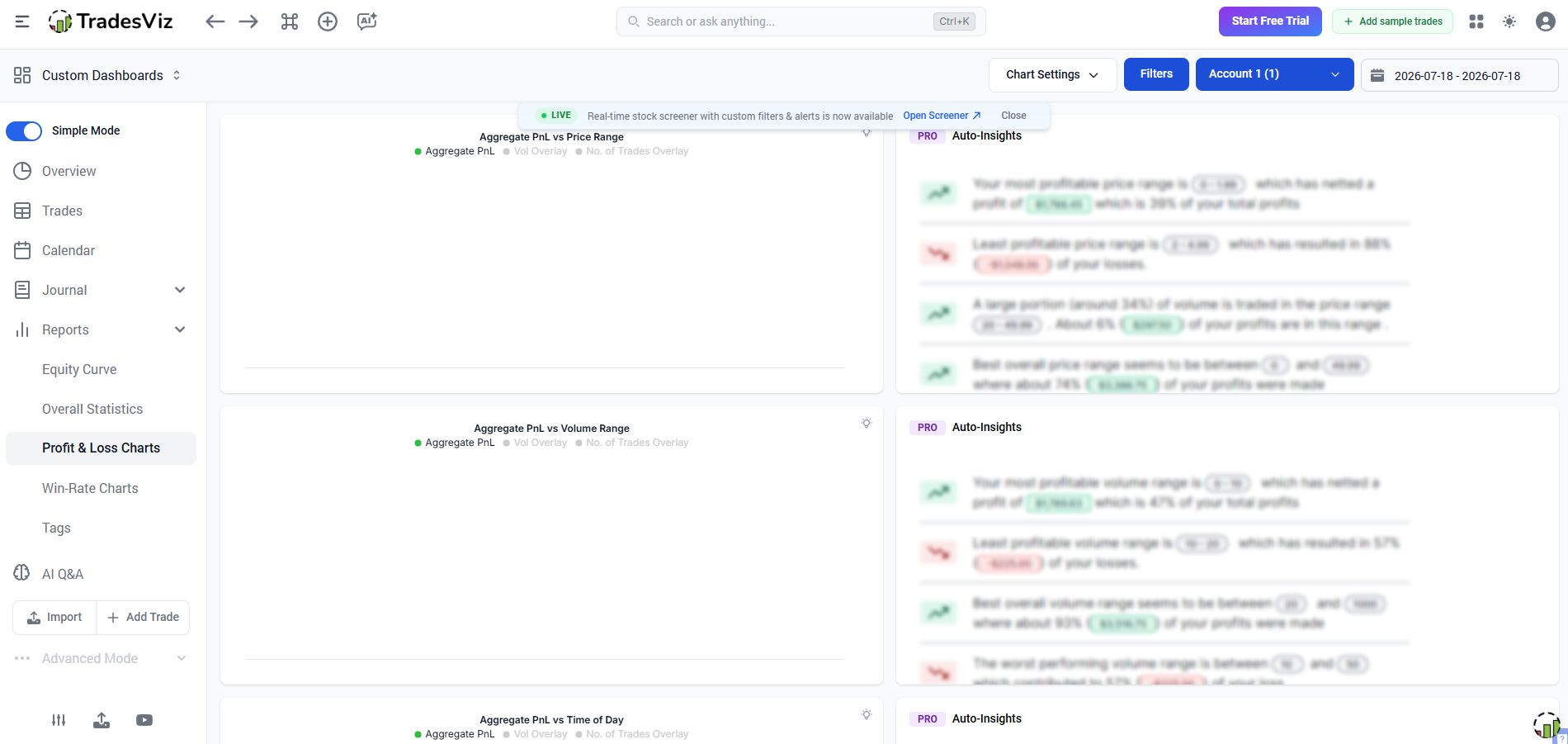
Creating custom reports
TradesViz allows you to build reports around the metrics that matter most to your trading. Rather than relying on a single default layout, you can choose the statistics, charts, and filters that fit your review process.
I found this particularly useful because every trader measures success differently. The reports I cared about weren't necessarily the ones another trader would prioritize.
Filtering trade data
Filtering is one of the features I used most during testing. TradesViz lets you narrow your trade history by strategy, symbol, account, market, tag, holding period, date range, trading session, and many other variables. At one point, I filtered a database of more than 500 trades down to fewer than 40 trades based on a combination of strategy, trading session, and market condition. That made it much easier to investigate a specific performance issue without manually sorting through the entire trading history.
Comparing strategies
Once your trades are properly organized, comparing strategies becomes remarkably straightforward. I compared 5 different setups side by side over a period of roughly 3 months. Looking at win rate alone initially suggested that one strategy was superior, but once I included expectancy, drawdown, and average holding time, the ranking changed considerably. That makes it much easier to decide which strategies deserve more capital and which ones need further refinement.
Tracking long-term performance
Daily results rarely tell the full story. TradesViz helps you step back and evaluate performance over weeks, months, or even years.
After comparing roughly 3 months of data with shorter weekly snapshots, I found that some patterns only became obvious when I zoomed out. A strategy that looked inconsistent on a week-to-week basis showed a much more stable performance profile over the full period. For me, this is where the platform delivers some of its greatest value.
Exporting reports
When you need to review your performance outside the platform, TradesViz makes exporting reports simple. You can download trading data and reports for additional analysis, record keeping, or discussions with mentors and trading partners.
I appreciate having this option because it gives me full ownership of my trading data instead of locking everything inside the application.
How TradesViz fits into your trading workflow
A trading journal only becomes useful when it fits naturally into your routine. That's something I appreciated about TradesViz.
Even though the platform offers an impressive number of reports and customization options, the basic workflow remains straightforward. Once you establish a habit of reviewing trades consistently, the rest of the analysis becomes much easier:
Import trades: The process starts by importing your trades through a supported broker connection, trading platform, API, or CSV file. After 3 months of using the same workflow, my post-session review usually took around 15 minutes for a normal trading day, compared with significantly longer manual reviews when I had to organize trades in spreadsheets. Once the data is in TradesViz, I rarely need to touch it again.
Organize and tag trades: After importing, I usually add tags, notes, and screenshots before moving on to analysis. This only takes a few minutes, but it makes future reviews much more meaningful. Tags allow me to separate trades by setup, market condition, trading session, or any custom category that fits my own process.
Review statistics: With the journal organized, TradesViz automatically updates every performance report. I normally begin with the dashboard to get a quick overview, then move into more detailed statistics like win rate, expectancy, drawdown, or R-Multiple. That gives me a clear picture of how the recent trading period compares with previous ones.
Analyze strategies: One of the biggest advantages of TradesViz is being able to compare strategies using real trading data. Rather than relying on memory, I can measure which setups consistently generate positive results and which ones repeatedly underperform. Those comparisons make future adjustments much more objective.
Improve trading performance: The final step is turning those observations into action. Every review usually leaves me with one or two specific improvements to focus on during the next trading session. Over time, those small adjustments accumulate, and I think that's where TradesViz provides its greatest value. Instead of simply recording trades, it helps transform trading data into better decision-making.
TradesViz pricing
Pricing is often the deciding factor when choosing a trading journal, especially when several platforms offer similar core features. After comparing TradesViz with other journals, I came away with the impression that it delivers an unusually large feature set for its price.
Whether the free plan is enough or a paid subscription makes more sense depends largely on how often you trade and how deeply you want to analyze your performance.
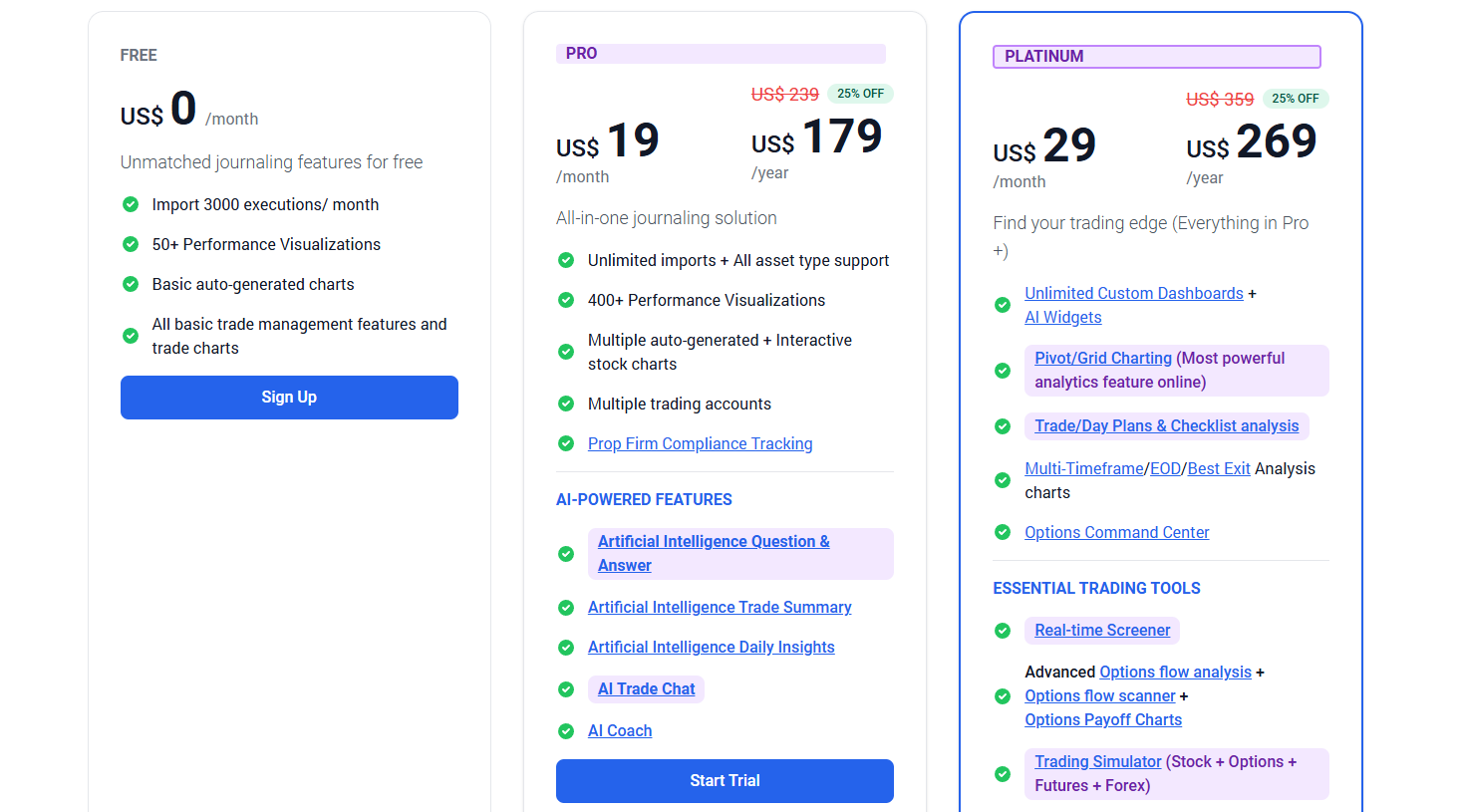
Source: https://www.tradesviz.com/#pricing
Free plan
TradesViz offers a free Basic plan that doesn't require a credit card to get started. It includes up to 3,000 imported executions per month, basic journaling features, more than 50 performance visualizations, and automatic trade charts.
The biggest limitation is that the free plan is primarily intended for stock trading, while importing other asset classes requires a paid subscription. I think it's generous enough for new traders who want to explore the platform before upgrading.
Premium plans
TradesViz currently offers two paid subscriptions:
Pro: Starts at $19/month, or $179/year when billed annually. It unlocks unlimited imports, support for all major asset classes, more than 400 performance visualizations, multiple trading accounts, AI-powered features, and significantly more analytical tools than the free plan.
Platinum: Starts at $29/month, or $269/year with annual billing. It includes everything in Pro, plus unlimited custom dashboards, advanced grid analytics, options flow tools, trading simulators, backtesting, exit analysis, AI widgets, and several professional-grade research features. This plan is clearly aimed at traders who spend a significant amount of time analyzing data.
Both paid plans include a 7-day free trial, making it easy to test premium features before committing to a subscription.
Monthly vs Annual Pricing
Choosing annual billing reduces the effective monthly cost by roughly 25%, which is equivalent to receiving about three months free over the course of a year. If you're already confident that TradesViz fits your workflow, the yearly subscription provides noticeably better value than paying month to month.
Which plan offers the best value?
For most active traders, I think the Pro plan strikes the best balance between price and functionality. It includes the features that most people actually use every week: unlimited imports, support for every major asset class, AI tools, extensive reporting, and advanced performance analysis.
The Platinum plan is worthwhile if you regularly use custom dashboards, simulators, options flow analysis, or backtesting, but many traders will never touch those features. Unless your workflow depends on those advanced tools, Pro delivers the strongest value for the money.
User review
Public feedback for TradesViz is generally much stronger than what I've seen for many competing trading journals. At the time of writing, the platform holds a 4.3/5 rating on Trustpilot based on more than 90 reviews, with the majority of customers giving it five stars. While no review platform tells the whole story, the overall sentiment is consistently positive.
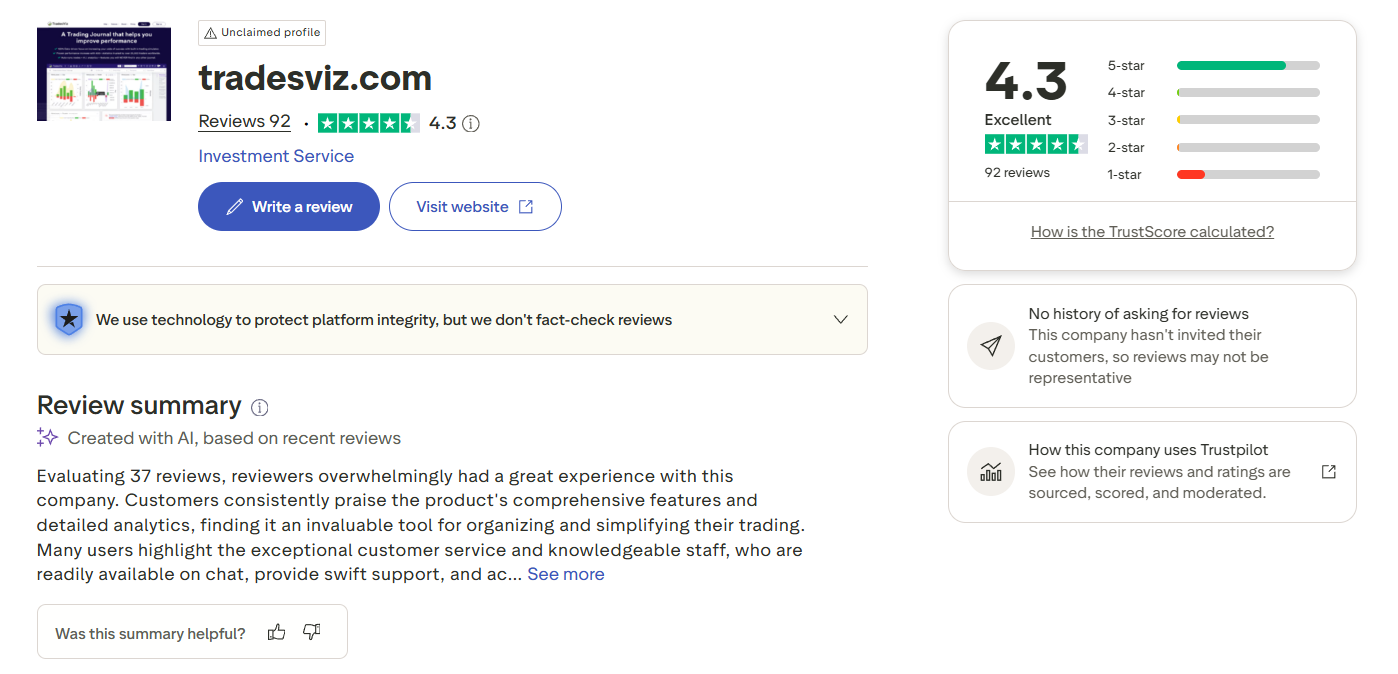
The biggest compliment repeated throughout the reviews is the depth of the analytics. Many experienced traders mention that TradesViz offers far more reports and customization than other trading journals they've tried.
Users also appreciate being able to manage multiple accounts, analyze different asset classes, and build custom dashboards without feeling limited by the software.
Another area that receives frequent praise is customer support. Numerous reviewers describe the live chat as responsive and knowledgeable, with several mentioning that feature requests were implemented surprisingly quickly. A few users even highlight direct interactions with the founder, saying the development team actively listens to feedback and continues releasing meaningful updates.
That doesn't mean every experience is perfect. Some lower-rated reviews point to a steeper learning curve, particularly during the initial import process.
Others report difficulties importing data from multiple brokers or reconciling historical trade records, especially when dealing with more complex account structures. These complaints appear far less common than the positive feedback, but they're worth keeping in mind if you're importing years of historical data.
After comparing the public reviews with my own experience, I think the overall picture is fairly consistent. TradesViz isn't the simplest trading journal on the market, and first-time users may need some time to become comfortable with its extensive feature set.
However, traders who enjoy working with detailed statistics and are willing to invest that time generally seem very satisfied with what the platform offers. The recurring praise for its analytics, customization, and responsive support aligns closely with what I found while testing the software.
TradesViz pros and cons
After spending time with TradesViz, I can see why it has become a favorite among data-driven traders. It offers one of the deepest analytical toolsets available in a trading journal, yet it still covers the everyday workflow that most traders need. That said, its biggest strengths also create a few trade-offs. Here's what stood out to me.
Pros
One of the most comprehensive performance analytics platforms available.
Supports a wide range of markets, including stocks, options, futures, forex, crypto, and CFDs.
Extensive broker, trading platform, and prop firm integrations.
Flexible dashboard builder with highly customizable reports.
Powerful filtering tools make it easy to analyze trades from almost any angle.
Strategy tracking helps identify which setups consistently produce the best results.
Supports screenshots, notes, tags, and detailed trade documentation.
Competitive pricing considering the number of features included.
Responsive customer support and frequent product updates.
Generous free plan for traders who want to explore the platform before upgrading.
Cons
The large number of reports and settings can feel overwhelming at first.
New users may need time to learn where every feature is located.
The interface prioritizes functionality over visual simplicity.
Some advanced reports are only available on higher-tier plans.
Importing historical trades from multiple sources may require extra preparation.
Traders looking for a simple journal may never use many of the advanced analytics.
Mobile usability is adequate, but the platform is much more comfortable to use on a desktop when reviewing complex reports.
Overall, I think TradesViz is built for traders who enjoy making decisions from data rather than intuition. If you're willing to spend a little time learning the platform, it rewards that effort with an analytical depth that very few competitors can match.
TradesViz for different types of traders
Not every trading journal works equally well for every trader. After testing TradesViz across different workflows, I found that its flexibility makes it suitable for a wide range of trading styles. The biggest difference is how much of its analytical power you'll actually use.
Day traders: TradesViz is an outstanding choice for day traders. Automatic imports, detailed intraday reports, session analysis, and customizable dashboards make it easy to review dozens of trades every day. If your routine includes a daily performance review, you'll probably appreciate how much information the platform can surface.
Swing traders: Swing traders may not generate as many trades, but they often need more context around each position. TradesViz allows you to combine notes, screenshots, tags, and performance reports, making it much easier to evaluate longer holding periods and refine your decision-making over time.
Futures traders: Futures traders are likely to get excellent value from TradesViz. The platform supports futures imports, contract-level analysis, session breakdowns, and detailed risk metrics. I particularly like how easy it is to compare performance across different contracts or trading sessions.
Options traders: TradesViz handles options trading well and provides detailed reporting for evaluating different strategies. If you regularly compare spreads, directional trades, or income strategies, the filtering and reporting tools make long-term analysis much more manageable than using spreadsheets alone.
Forex traders: Forex traders can analyze results by currency pair, trading session, strategy, and many other variables. Combined with broad broker support and flexible imports, TradesViz fits naturally into a forex trading workflow without requiring additional software.
Crypto traders: Crypto is another area where TradesViz performs well. Support for crypto exchanges and flexible import methods allows you to keep digital asset trades alongside your other markets in a single journal. If you trade both traditional and crypto markets, having everything in one place makes performance reviews much more consistent.
TradesViz vs competitors
Every trading journal has its own strengths. After comparing TradesViz with several of the most popular alternatives, I don't think there's a single platform that's objectively best for everyone.
TradesViz stands out for analytical depth and customization, while TraderSync focuses on automation, TradeZella emphasizes structured strategy development, and Edgewonk puts greater attention on trading psychology.
Feature | TradesViz | TraderSync | TradeZella | Edgewonk |
Best for | Data-driven traders and advanced analytics | Automated journaling and active traders | Strategy tracking and Playbooks | Trading psychology and discipline |
Supported markets | Stocks, options, futures, forex, crypto, CFDs | Stocks, options, futures, forex | Stocks, options, futures, forex, crypto | Multi-asset support |
Automatic trade import | ✔ Yes | ✔ Yes | ✔ Yes | Limited |
Broker integrations | 100+ brokers, platforms, and prop firms | Extensive | Extensive | Limited |
Performance dashboard | Highly customizable | Advanced | Modern and visual | Comprehensive |
Custom dashboards | ✔ Extensive customization | Limited | Moderate | No |
Trade tagging | ✔ Yes | ✔ Yes | ✔ Yes | ✔ Yes |
Strategy tracking | Advanced | Advanced | Excellent | Strong |
AI features | ✔ Available on higher-tier plans | ✔ AI insights | ✔ AI-assisted features | No |
Trading psychology tools | Basic | Moderate | Moderate | Excellent |
Reporting depth | Excellent | Very strong | Strong | Strong |
Learning curve | Moderate to high | Moderate | Easy to moderate | Moderate |
Starting price | From $14/month (annual billing) | From $29.95/month | From $29/month | One-time license |
Best TradesViz alternatives
Although TradesViz is one of the most capable trading journals available, it won't be the perfect fit for every trader. Some people prefer a cleaner interface, others want stronger psychology tools, while some simply need a journal that's easier to learn. If TradesViz doesn't quite match your workflow, these alternatives are well worth considering.
TradeZully
Best for: Multi-account futures and forex day traders who want to skip manual CSV imports and need real-time multi-broker syncing.
Why consider it: I rely heavily on its detailed strategy tracking and automated backtesting tools to refine my edge after every losing session.
Potential drawback: The pricing tiers can get a bit steep for smaller accounts if you only need basic tracking features.
TraderSync
Best for: Traders who want automation and minimal manual work.
Why consider it: TraderSync offers broad broker integrations, reliable automatic imports, AI-powered insights, and an intuitive interface. I think it's a great choice if you want advanced analytics without spending much time configuring reports.
Potential drawback: It offers fewer dashboard customization options than TradesViz.
Edgewonk
Best for: Traders focused on improving discipline and execution.
Why consider it: Edgewonk places a much stronger emphasis on trading psychology, journaling habits, and decision-making than most competitors. If your biggest challenge is consistency rather than finding setups, it provides tools that few other journals can match.
Potential drawback: It doesn't offer the same level of automation or broker integrations as TradesViz.
TradeZella
Best for: Traders who build and refine structured trading strategies.
Why consider it: TradeZella combines modern dashboards with Playbooks, making it easy to document setups, compare strategies, and maintain consistent execution. I particularly like how beginner-friendly the interface feels compared with more data-heavy platforms.
Potential drawback: Reporting depth is excellent, but still not as extensive as TradesViz.
Trademetria
Best for: Traders looking for a balanced, easy-to-use journal.
Why consider it: Trademetria offers performance tracking, trade journaling, portfolio management, and risk analysis without overwhelming new users. It's a practical option if you want solid reporting in a simpler package.
Potential drawback: Advanced analytics and customization are more limited than what TradesViz provides.
» Read more: Best Trading Journal Apps & Software for Forex, Stock, Futures, Crypto (Free & Paid)
What i like most about TradesViz and Where TradesViz could improve
After using TradesViz for a while, I came away with a very clear impression: this platform is designed by people who genuinely care about trading data. I discovered reports and filters that I rarely see in competing journals, but I also found myself spending more time learning the platform than I did with simpler alternatives. Here's what stood out to me after working with it.
UI, UX: The interface is functional and well organized once you become familiar with it. Everything I needed was available, but I wouldn't describe it as the most beginner-friendly experience. It clearly prioritizes functionality over visual simplicity.
Analytics depth: This is where TradesViz impressed me the most. The number of available metrics, reports, and performance breakdowns is exceptional. Whenever I wanted to answer a specific question about my trading, there was usually already a report for it.
Reporting flexibility: I rarely felt limited by the reporting system. Being able to filter trades by strategy, tag, symbol, session, account, or custom criteria made my reviews much more meaningful than simply looking at profit and loss.
Market support: I like that TradesViz supports stocks, options, futures, forex, crypto, CFDs, and many different brokers within a single journal. For traders managing multiple markets, this removes a lot of unnecessary complexity.
Dashboard customization: The ability to build custom dashboards is one of the platform's biggest advantages. I could arrange reports based on my own review process instead of adapting to a fixed layout created by someone else.
Learning curve: The platform definitely requires more time than journals like TradeZella or Tradervue. I didn't find it difficult to use, but it took several sessions before I felt comfortable navigating the larger reports and customization options.
Interface complexity: Some screens display a large amount of information at once. Experienced traders will probably appreciate that level of detail, but new users may initially feel overwhelmed.
Initial setup: Connecting brokers, importing trades, and configuring tags wasn't particularly difficult, but setting up a personalized workflow takes some planning. I think spending that extra time is worthwhile because it makes every future review much more efficient.
Mobile experience: The platform works well enough for checking trades or making small updates, but I still prefer using the desktop version. Most of the advanced reports and dashboards are simply easier to explore on a larger screen.
Feature overload for beginners: My biggest criticism is that beginners may not know where to start. TradesViz includes so many reports and analytical tools that it's easy to spend more time exploring features than reviewing trades. My advice would be to begin with the core dashboard and gradually add more reports as your review process becomes more mature.
Is TradesViz worth it?
Whether TradesViz is worth paying for depends less on your experience level and more on how you review your trades. If you simply want a place to record entries and exits, there are easier options available.
But if you regularly analyze performance, compare strategies, and make decisions based on data rather than intuition, TradesViz offers far more depth than the average trading journal.
After spending time with the platform, I think its value becomes much more obvious once you build a consistent review routine.
Best for data-driven traders
If you enjoy working with statistics, this is where TradesViz shines. The platform gives you access to hundreds of reports, custom dashboards, detailed filters, and performance metrics that can answer almost any question about your trading.
I found it especially valuable when I wanted to verify whether a strategy was genuinely improving instead of relying on my memory.
Best for active day traders
Active day traders are likely to benefit the most from TradesViz. Automatic imports, comprehensive reporting, and flexible dashboards make reviewing a large number of trades surprisingly efficient. Rather than spending time organizing data, you can focus on identifying patterns and correcting execution mistakes before the next trading session.
Best for futures traders
TradesViz is an excellent fit for futures traders because it supports detailed contract analysis, session-based reporting, and advanced risk metrics. If you trade multiple contracts or evaluate performance across different market sessions, the reporting tools make those comparisons straightforward and easy to interpret.
Best for multi-market traders
One feature I genuinely appreciate is the ability to manage different asset classes in a single journal. Stocks, options, futures, forex, crypto, and CFDs can all be reviewed using the same reporting framework. For traders who spread their activity across multiple markets, this creates a much more consistent review process than maintaining separate journals.
Best for experienced traders
Experienced traders will probably unlock the most value from TradesViz. Many of its strongest features, including custom dashboards, advanced reports, and extensive filtering, become increasingly useful as your trading process grows more sophisticated.
Beginners can certainly use the platform, but I think experienced traders are more likely to take full advantage of everything it offers.
Final verdict
After spending time with TradesViz, I understand why so many experienced traders recommend it. It isn't trying to be the simplest trading journal on the market. Instead, it focuses on giving you as much insight into your trading performance as possible. If you enjoy reviewing data, testing ideas, and refining strategies with objective evidence, it's one of the most capable platforms I've used.
That said, I wouldn't recommend it to everyone. If you're brand new to trading and only want a place to record a handful of trades each week, the number of reports and customization options can feel overwhelming at first. Platforms like TradeZella or TraderSync are easier to learn and require less setup.
For traders who already have a structured review routine, however, TradesViz offers exceptional value. The combination of broad broker support, extensive analytics, flexible dashboards, strategy tracking, and powerful reporting makes it a platform that can continue growing with you instead of becoming something you outgrow after a few months.
If I had to summarize my experience in one sentence, it would be this: TradesViz rewards traders who are willing to spend time learning from their own data. If that's how you approach trading, it's absolutely worth considering.
Trader Type | Recommendation |
Beginner | ⭐⭐⭐☆☆ |
Day Trader | ⭐⭐⭐⭐⭐ |
Swing Trader | ⭐⭐⭐⭐☆ |
Futures Trader | ⭐⭐⭐⭐⭐ |
Forex Trader | ⭐⭐⭐⭐☆ |
Crypto Trader | ⭐⭐⭐⭐⭐ |
Data-Driven Trader | ⭐⭐⭐⭐⭐ |