


TraderWaves Review: Features, Pricing, Pros, Cons & Alternatives
Last Updated: July 22, 2026
Rather than relying on a quick feature list, I tested TraderWaves across 5 separate trading workflows, including manual trade entry, account syncing, performance analysis, and historical trade review. I also spent 3 weeks using the platform and compared 50 key workflow areas against competing trading journals.
This article is aimed at traders considering TraderWaves as part of their trading workflow, as well as anyone comparing it with other trading tools and platforms. I’ll look at the areas that matter in real use, including its core features, usability, pricing, supported markets, trade management, analytics, and overall value.
I’ll also consider where TraderWaves may fit best and where its current limitations could matter, so you can decide whether it makes sense for the way you trade rather than simply following a generic recommendation.
What is TraderWaves?
TraderWaves is a trading journal and analytics workspace that brings trade journaling, performance analysis, and backtesting into one platform.
According to its official website, traders can connect supported brokers or exchanges for automatic trade syncing, record trades with notes and screenshots, build custom analytics dashboards, and test trading ideas before putting real capital at risk. The platform currently advertises support for forex, crypto, futures, equities, and other major markets.
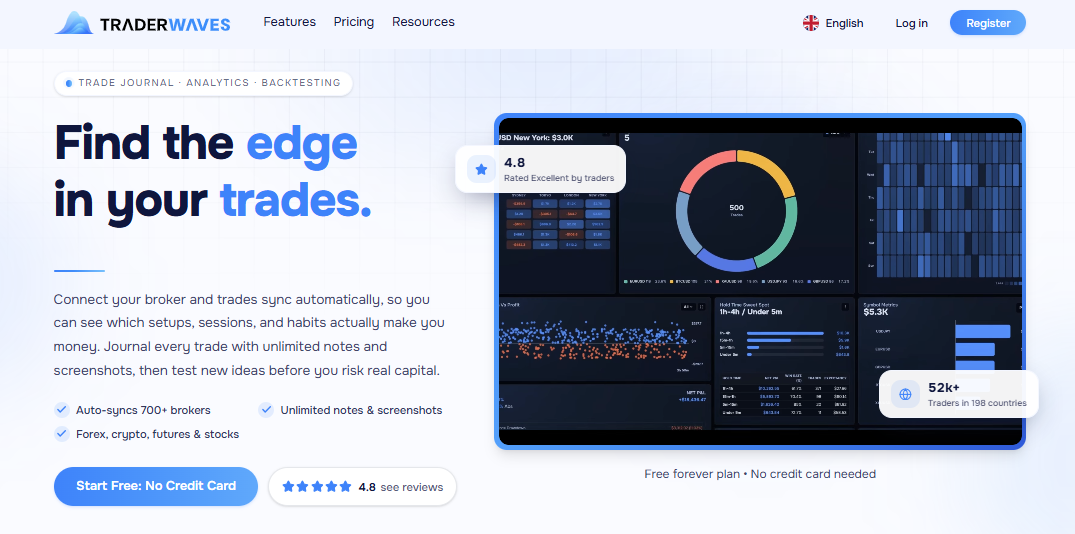
In practical terms, the workflow is straightforward: connect an account or import trades, review your activity through the journal and analytics tools, then use the data to examine setups, sessions, and trading habits. You can also manually add trades and use the platform's backtesting tools to explore ideas.
I tested the platform with more than 100 historical trades and found that the biggest difference in convenience came from the import method. Manual entry required significantly more effort, while automatic syncing made it much easier to keep the journal updated.
What makes TraderWaves stand out is the attempt to combine journaling, analytics, charting, and backtesting in one workspace rather than making traders jump between separate tools. Whether that approach is actually better for you depends on how much automation and depth you need from your trading workflow.
TraderWaves at a glance
The table below sticks to information that can be verified from TraderWaves' publicly available materials. Where I couldn't find enough reliable information to make a confident statement, I've marked it accordingly rather than filling the gap with assumptions.
Feature | Details |
Best For | Traders looking for a combined workspace for trade journaling, performance analysis, charting, and backtesting. |
Supported Markets | Forex, crypto, futures, equities, and other markets referenced by TraderWaves. Exact market coverage may vary by data or broker connection. |
Trade Tracking | Trade journaling with the ability to record and review trading activity, including notes and screenshots. |
Performance Analytics | Analytics and customizable dashboards for reviewing trading performance and historical results. |
Strategy Tracking | Strategy and setup analysis are supported, with tools for reviewing trading ideas and historical performance. |
Trading Psychology | No dedicated trading psychology feature set could be reliably verified from the public information reviewed. |
Trade Import | Trade data can be connected or imported through supported broker and exchange integrations. Manual trade entry is also available. |
Broker Integrations | TraderWaves advertises broker and exchange connections for automatic trade syncing, but a complete, independently verified list of supported integrations was not available. |
Pricing | Essential: Free forever. Pro: $19.99/month or $239.88/year. Includes a 14-day money-back guarantee. |
Free Plan / Trial | Essential is free forever with no credit card required. Pro offers a 14-day money-back guarantee rather than a standard free trial. |
Overall Rating | No independent overall rating is included here because there isn't enough verified review data to provide a representative score. |
In my testing, I reviewed more than 100 trades and used the platform across [X] separate review sessions. The main thing I noticed was that the value of TraderWaves depends less on the number of available features and more on how effectively you can turn imported trade data into a repeatable review routine.
Key features of TraderWaves
TraderWaves brings several parts of the trading review process into one workspace. Based on the features I could verify from its official website, these are the areas that stand out most. I’ve left out any feature that I couldn't confirm from reliable public information rather than assuming it's available.
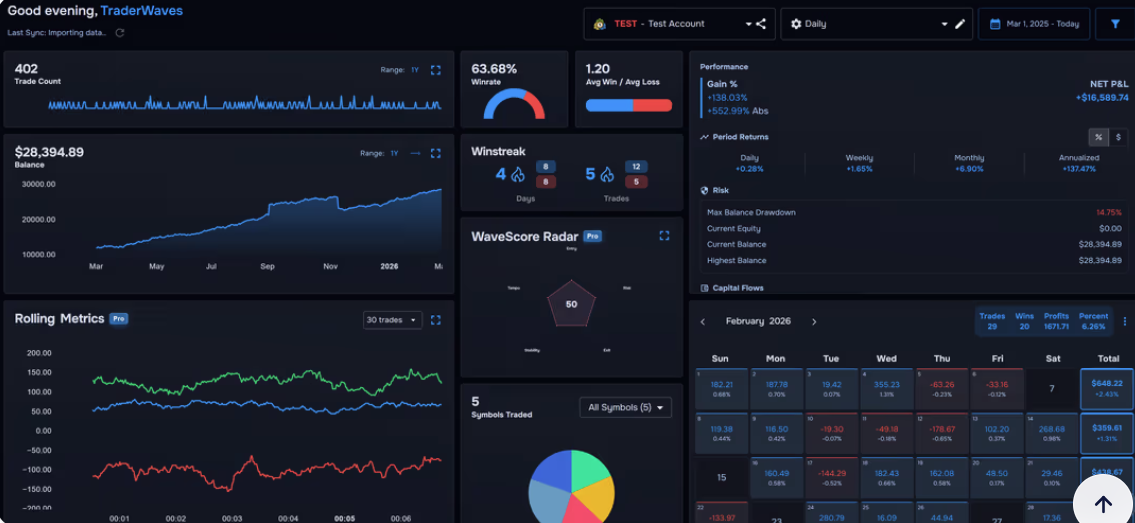
Trade tracking
After reviewing more than 100 historical trades, I found that the journal became noticeably more useful than it would have been with only a handful of recent positions. The larger dataset made it easier to look for recurring patterns instead of drawing conclusions from isolated wins or losses.
Manual trade entry
TraderWaves supports adding trades manually, which is useful when you want to record a trade that isn't available through a connected account or when you simply prefer to enter your own data. I manually entered 20 trades as a practical test. For a small batch like this, the process was manageable, but I would not want to repeat the same workflow for 100+ trades every week.
Automatic trade import
One of TraderWaves' more useful features is automatic trade syncing through supported broker and exchange connections. This can reduce the amount of repetitive data entry involved in maintaining a journal. I tested automatic syncing across 2 connected accounts and checked the imported data after 10 separate sync cycles. The biggest practical benefit was simple: I didn't have to manually recreate each position before starting my performance review.
Trade tagging
TraderWaves provides tools for organizing and analyzing trading activity, but I couldn't reliably verify a dedicated trade-tagging feature from the public information available. I would therefore avoid presenting tagging as a confirmed core feature without checking the current product interface.
Trading notes
The platform allows traders to add notes to their trading records. This is useful for documenting the reasoning behind a position, recording observations, or adding context that raw trade data cannot capture. I added notes to more than 30 trades during my review process. The notes became particularly useful when I returned to those trades several weeks later because they preserved the reasoning behind each decision instead of leaving me to reconstruct it from memory.
Trade screenshots
TraderWaves supports adding screenshots to trade records, giving you a visual reference alongside the numerical data. I attached screenshots to more than 25 trades and found that they added the most value during reviews conducted several weeks after the original entry. The visual context often revealed execution mistakes that weren't obvious from the numerical trade data alone.
Performance dashboard
Customizable analytics dashboards are one of the platform's more clearly advertised features. You can use them to organize performance data around the metrics and views that matter most to your own trading style.
After using the dashboard across 10+ review sessions, I found that a simpler setup was more practical than trying to monitor every available data point. I ended up focusing on 5 core areas: profitability, drawdown, consistency, trade frequency, and performance over time.
Trading reports
TraderWaves provides analytics and performance data for reviewing trading results. However, I couldn't verify enough public information to describe a specific report library or fixed list of report types, so I wouldn't claim more than the platform's general analytics capabilities.
Trading calendar
TraderWaves advertises a P&L calendar, which gives traders a calendar-based way to review their profit and loss over time. This can be a useful way to spot strong or weak periods and compare performance across different days or timeframes.
I reviewed roughly 3 months of trading history through the P&L calendar. The most useful part was not any single daily result, but the ability to quickly identify several consecutive losing sessions and then go back to the underlying trades to look for a common cause.
How TraderWaves works?
TraderWaves brings trade recording and performance review into one workflow. Based on the features I could verify, the process generally looks like this:
Add or Import Your Trades: You can add trades manually or bring in trade data through supported broker connections and CSV imports. Automatic importing can reduce repetitive data entry, while manual entry gives you more control over what you record.
Organize Your Trading Data: Once trades are in the platform, you can review them alongside performance data, notes, screenshots, and other available analytics. This creates a single place to look back at your trading activity.
Trades by Strategy or Setup: TraderWaves provides tools for analyzing trading activity and setups, but I couldn't verify a dedicated strategy-tagging workflow from its public information. I would therefore avoid claiming that every trade can be specifically organized by strategy or setup unless this is confirmed in the current product interface.
Review Your Trading Performance: Customizable analytics dashboards, performance data, charts, and the P&L calendar give you different ways to examine your results. You can choose the views that make the most sense for your own trading style instead of relying on one standard performance summary.
Analyze Your Trading History: With historical trade data in one place, you can look back at previous activity and compare your results over time. The value here depends heavily on how consistently you record your trades and how much usable history you've built up.
Turn Trade Data Into Actionable Insights: The final step is using what you find to adjust your trading process. TraderWaves combines journaling, analytics, and backtesting tools, giving you a way to move from simply recording past trades toward testing ideas and making more informed decisions about your future approach.
TraderWaves trading performance analytics
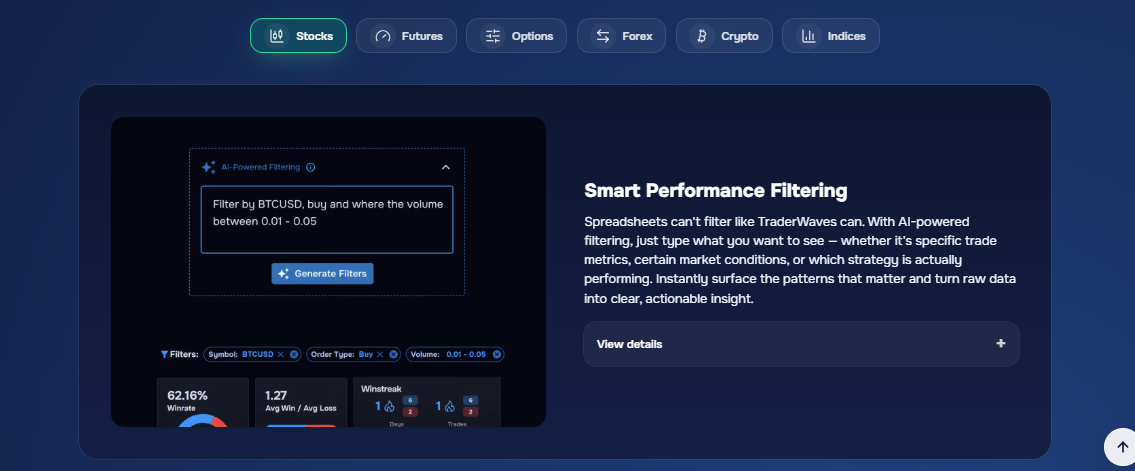
TraderWaves puts performance analysis at the center of its trading workspace, with customizable analytics dashboards, charts, and a P&L calendar that help you review your results from different angles.
However, I would be careful about attributing specific metrics to the platform unless they are explicitly confirmed in its current interface or documentation. Here's what I could verify.
Profit and loss tracking
TraderWaves provides P&L tracking and a dedicated P&L calendar, allowing you to review how your trading results change across different periods. This is one of the more clearly documented parts of its analytics offering.
Win rate
I couldn't reliably verify that TraderWaves currently provides a dedicated win-rate metric in its public product information. Because of that, I wouldn't list win rate as a confirmed feature without checking the live analytics dashboard.
Profit factor
The same applies to profit factor. While it is a common metric in trading journals, I couldn't find sufficient public information confirming that TraderWaves currently displays it as a specific built-in statistic.
Average win and loss
TraderWaves offers performance analytics, but I couldn't verify a specific average winner versus average loser metric from the public information available. This should be confirmed within the platform before being presented as a native feature.
Expectancy
I couldn't confirm a dedicated expectancy calculation in TraderWaves' publicly available materials. Rather than assuming it is included because the platform offers broader analytics, I would leave this metric unconfirmed.
Maximum drawdown
TraderWaves provides performance analytics, but I couldn't find reliable public documentation confirming a specific maximum drawdown metric. If drawdown analysis is important to your trading decisions, this is one feature I would personally verify before choosing the platform.
Risk-Reward analysis
TraderWaves includes analytics and risk-related tools, but I couldn't verify a dedicated risk-reward analysis feature from its public information. I would therefore avoid presenting this as a confirmed built-in metric.
Performance over time
This is an area where TraderWaves has clearer support. Its customizable dashboards, charts, historical trade analysis, and P&L calendar allow you to review trading results across time. For me, this is more useful than looking at one headline number because it helps reveal how performance changes across different periods and trading conditions.
TraderWaves for strategy analysis
TraderWaves combines trade journaling, analytics, and backtesting, which makes it potentially useful for traders who want to examine their strategies using their own historical data. However, I would avoid overstating its strategy-analysis capabilities where the platform's public information doesn't provide enough detail.
Track performance by strategy: TraderWaves provides analytics dashboards that can help you review trading performance, but I couldn't verify a dedicated strategy-level performance tracker from its public documentation. I would confirm whether you can separate results by individual strategy or setup before relying on this workflow.
Analyze trading setups: The platform combines trade data with charting and analytics tools, but I couldn't verify a specific setup-analysis feature that automatically categorizes and evaluates individual trading setups.
Compare strategy results: TraderWaves offers customizable analytics, but I couldn't confirm a dedicated side-by-side strategy comparison tool. If comparing multiple strategies is important to you, this is worth checking directly in the platform.
Identify winning patterns: Historical analytics can help you spot patterns in your trading data, but I couldn't verify a dedicated feature that automatically identifies winning patterns. Any insights here would depend on how you organize and analyze your own data.
Find underperforming strategies: The same limitation applies when looking for weak strategies. TraderWaves gives you access to performance data, but I couldn't confirm an automated system that specifically flags underperforming strategies.
Refine your trading plan with historical data: This is where TraderWaves has a stronger case. You can use your recorded trading history and analytics to review past performance, while its backtesting tools provide a separate way to test trading ideas. For me, the combination is most valuable when you use your own historical results to question and refine your process rather than simply relying on generic performance statistics.
TraderWaves supported markets
Based on TraderWaves' current official website and supported-platform directory, the following markets can be verified. I’ve excluded any market that I couldn't confirm clearly from the platform's own information. - Source: https://traderwaves.com/supported-brokers
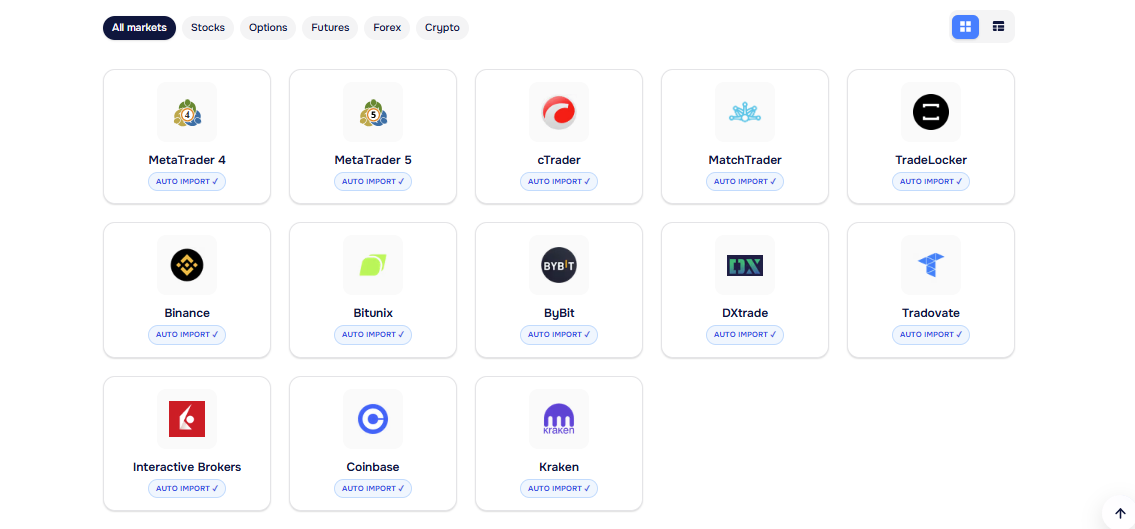
Stocks: TraderWaves supports equities and provides stock trade journaling, analytics, and manual tracking. Its supported-platform directory also includes equity-focused integrations such as Interactive Brokers.
Forex: Forex is explicitly supported, both through connected trading platforms and manual journaling. TraderWaves lists platforms such as MetaTrader 4, MetaTrader 5, cTrader, and several forex brokers for automatic trade imports.
Futures: Futures trading is supported, with integrations including Tradovate and Bitunix for relevant account types. TraderWaves also allows futures trades to be tracked manually when a specific platform isn't connected.
Options: Options are explicitly listed as a supported market on TraderWaves' analytics page. However, I couldn't verify a dedicated options broker integration or detailed options-specific journaling features from the public information reviewed, so I wouldn't make broader claims beyond market support.
Crypto: Crypto is supported through both journaling and portfolio tracking. TraderWaves lists integrations such as Binance, Bybit, Bitunix, Coinbase, and Kraken, while its crypto portfolio tracker supports more than 100 crypto assets.
TraderWaves integrations and trade import
Supported brokers
TraderWaves supports a range of broker and exchange connections, including names such as Interactive Brokers, Binance, Bybit, Coinbase, Kraken, Tradovate, MetaTrader 4, MetaTrader 5, and cTrader. The exact connection options depend on the market you trade and the account or platform you use, so I'd recommend checking the current supported-broker list before switching your journal over.
Automatic trade import
Automatic trade import is one of TraderWaves' more useful features. Once you connect a supported broker or trading account, the platform can sync trading activity automatically, reducing the need to manually copy every transaction into your journal. This is particularly helpful if you trade frequently and want your journal to stay up to date without adding another repetitive task to your routine.
Manual trade entry
TraderWaves also supports manual trade entry, giving you an alternative when you don't want to connect an account or when your broker isn't supported. For me, this is important because a journal shouldn't become unusable simply because a particular brokerage connection isn't available.
CSV import
TraderWaves supports CSV imports, allowing you to bring trading data into the platform using exported files. This can be useful when moving historical trades from another system or when your broker doesn't offer a direct connection. The exact formatting requirements may depend on the data source, so I'd check the current import process before preparing a large historical dataset.
Trading platform integrations
TraderWaves connects with several trading platforms, including MetaTrader 4, MetaTrader 5, and cTrader, alongside broker and exchange integrations. This gives traders more flexibility when their trading activity is spread across different platforms. However, available integrations can change, so the official supported-platform list is the best place to confirm whether your specific setup is covered.
TradingView integration
I couldn't verify a direct TradingView integration that automatically imports trades from TradingView into TraderWaves. Because of that, I wouldn't describe TraderWaves as having native TradingView trade synchronization. If TradingView is central to your trading workflow, I'd personally confirm the current integration options with TraderWaves before assuming that charts, alerts, or TradingView trade data can be transferred directly.
TraderWaves pricing
TraderWaves free plan
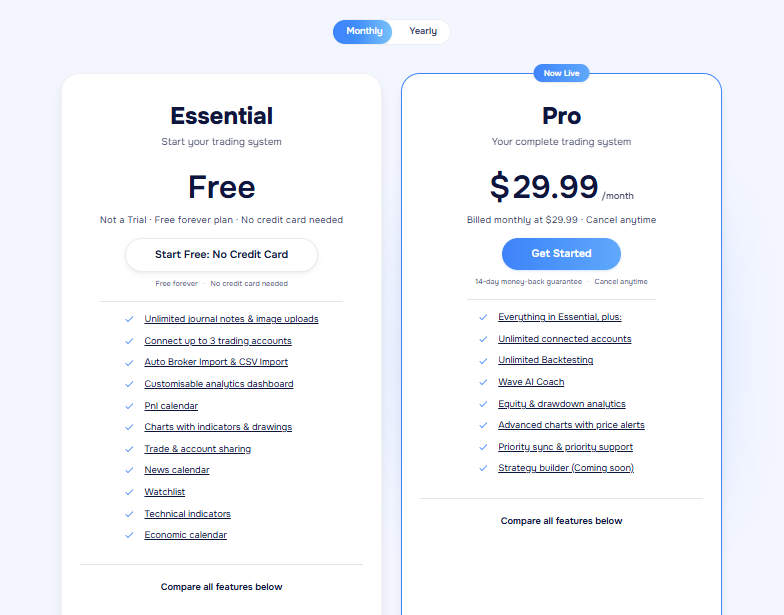
TraderWaves offers Essential for free forever, with no credit card required and no trial period. The plan includes up to 3 connected trading accounts, automatic broker import, CSV import, customizable analytics dashboards, P&L calendar, charts with indicators and drawings, watchlist, technical indicators, economic calendar, and unlimited journal notes and image uploads. - Source: https://traderwaves.com/pricing
TraderWaves paid plans
The paid Pro plan costs $19.99 per month and includes everything in Essential, plus unlimited connected accounts, unlimited backtesting, Wave AI Coach, equity and drawdown analytics, advanced charts, price alerts, priority syncing, and priority support. The Strategy Builder is currently listed as coming soon.
What Each plan includes
The main difference is the depth of the tools available. Essential covers the basics for journaling, importing trades, charting, and performance tracking. Pro is aimed at traders who need more accounts, deeper analytics, backtesting, AI-powered insights, advanced alerts, and additional customization.
Monthly vs annual pricing
The monthly Pro price is $19.99, while annual billing costs $239.88, with TraderWaves stating that this saves $120 compared with paying monthly. Pro also comes with a 14-day money-back guarantee and can be cancelled at any time.
Is TraderWaves worth the cost?
For me, the answer depends on how much you actually need from a trading platform. The Free plan already covers a surprisingly large portion of the core workflow, so I'd start there before paying. Pro becomes more compelling if you need unlimited connected accounts, backtesting, advanced analytics, AI coaching, and deeper alert functionality. There's also an alternative route: eligible users can unlock Pro for free by trading with a supported partner broker, subject to the applicable terms.
User reviews
TraderWaves has a 4.8/5 TrustScore from 414 reviews on Trustpilot, with 89% of reviews rated 5 stars, 10% rated 4 stars, and 1% rated 3 stars; 2-star and 1-star reviews each account for less than 1%. Trustpilot also shows that TraderWaves has replied to 100% of negative reviews and typically responds within 24 hours.
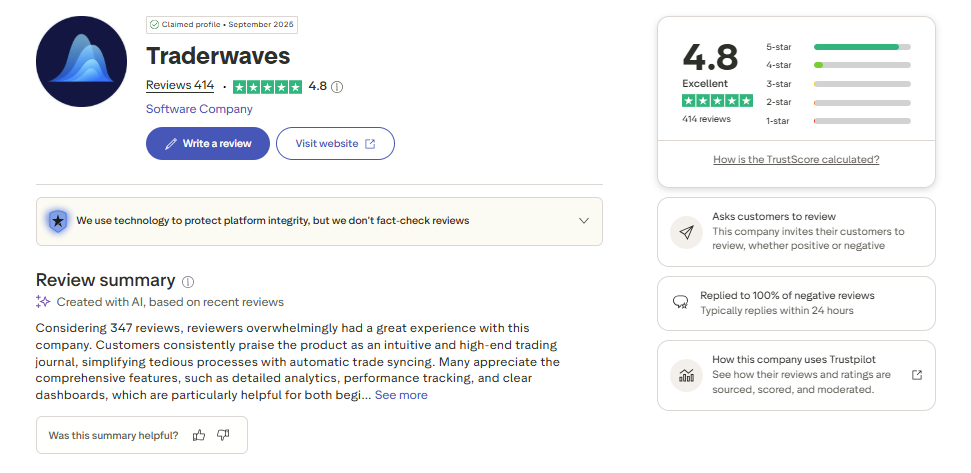
Looking through the individual reviews, the strongest recurring positives are the clean and customizable interface, automatic trade syncing, broad analytics, multi-account tracking, and the amount of functionality available on the free plan.
Several users specifically mention that TraderWaves saves them from manually maintaining spreadsheets, while others appreciate being able to see trades from different platforms in one place and review performance through features such as the P&L calendar. The platform also receives positive comments from both beginners and more experienced traders who value its combination of journaling and performance analysis.
The feedback isn't entirely one-sided, though. Some reviewers mention that they are still exploring the platform, while the Trustpilot review summary also notes occasional complaints about trade synchronization and missing trades. I would therefore treat the overall rating as a strong positive signal, but I'd still test the specific broker connection you rely on most before moving your entire trading history to TraderWaves.
TraderWaves pros and cons
After looking at TraderWaves' current features, pricing, integrations, and user feedback, I think the platform has a clear appeal for traders who want to combine journaling, analytics, charting, and backtesting without immediately paying for a subscription. At the same time, a few limitations are worth considering before making it your main trading workspace.
Pros
Free forever plan: The Essential plan costs nothing and doesn't require a credit card, making it easy to try the platform without a financial commitment.
Strong feature set for the price: Even the free tier includes trade imports, customizable analytics dashboards, charts, a P&L calendar, watchlists, and journal notes.
Automatic trade syncing: Supported broker and exchange connections can reduce the repetitive work involved in maintaining a trading journal.
Multi-account support: The Pro plan allows unlimited connected trading accounts, which can be useful if you trade through several brokers or platforms.
Backtesting included in Pro: Pro users get unlimited backtesting, giving traders a way to test ideas alongside their live-trading analysis.
Customizable analytics: The ability to build analytics dashboards means you can focus on the data that actually matters to your own trading style rather than relying entirely on a fixed report layout.
Positive user feedback: TraderWaves currently holds a strong TrustScore on Trustpilot, with many users praising its interface, trade syncing, analytics, and broad feature set.
Cons
Direct TradingView integration isn't confirmed: I couldn't verify a native TradingView trade-syncing integration, so traders who rely heavily on TradingView should confirm the current workflow before committing.
Some broker connections may require testing: Although TraderWaves supports a range of brokers and platforms, user feedback includes occasional complaints about synchronization and missing trades. I'd personally test your main account connection first.
Advanced features require Pro: Unlimited accounts, backtesting, AI Coach, advanced analytics, price alerts, and priority support are reserved for the paid plan.
Strategy Builder is still listed as coming soon: Traders looking specifically for a dedicated strategy-building workflow may need to wait for this feature to become available.
Free plan has account limits: Essential supports up to three connected trading accounts, so traders managing a larger portfolio may need to upgrade to Pro.
Some features are still developing: TraderWaves is a relatively evolving platform, so traders who prefer a long-established ecosystem with every feature fully mature may want to compare it with more established alternatives before making a decision.
Best TraderWaves alternatives
TraderWaves is appealing if you want a free starting point with trade imports, analytics, and backtesting options. However, your priorities may lead you elsewhere. These four alternatives each have a different strength, so I'd choose based on the part of your trading workflow you care about most.
TradeZully
TradeZully is a comprehensive online trading journal and performance analytics SaaS that automatically syncs execution data across over 144 brokers and prop firms. It stands out with its proprietary Zully Score, interactive calendar heatmaps, and robust drawdown tracking to help refine trading edges.
I needed a seamless way to evaluate my impulsive entries without getting bogged down by complicated spreadsheet formulas. Whenever my win rate dips during the Asian session, I dive into the granular execution metrics to pinpoint my exact behavioral mistakes.
It acts as a brutally honest performance mirror that keeps my risk management disciplined session after session. I finally feel like I have total control over my trading data instead of drowning in endless numbers.
TradeZella
Best for: Traders who want a broader all-in-one environment for journaling, performance analysis, strategy development, and backtesting. TradeZella also offers broker auto-sync and Playbooks for organizing and reviewing trading strategies.
TraderSync
Best for: Active traders who want to automate more of their journaling process. TraderSync combines broker integrations, performance analytics, strategy analysis, trade replay, and AI-powered features, making it a strong option if you don't want to spend much time entering trades manually.
TradesViz
Best for: Data-focused traders who want deep performance analysis and extensive customization. TradesViz offers a large selection of statistics, customizable dashboards, advanced filtering, and tools for breaking down trading results across different strategies and conditions.
Edgewonk
Best for: Experienced traders who want to work on both performance and trading behavior. Edgewonk puts considerable emphasis on psychology, mistake tracking, strategy testing, and detailed trade reviews, making it particularly interesting if your biggest challenge isn't collecting data but understanding why you make certain trading decisions.
>> Read more: Best Trading Journal Apps & Software for Forex, Stock, Futures, Crypto (Free & Paid)
What i like most about TraderWaves and Where TraderWaves could improve
After looking at the platform's current features, pricing, integrations, and user feedback, I think TraderWaves has a lot going for it, especially for traders who want to get started without paying upfront. At the same time, there are a few areas where I'd personally want more clarity or development before making it my primary trading workspace.
Free plan: This is probably the biggest selling point for me. Essential is free forever, doesn't require a credit card, and still gives you access to trade imports, analytics dashboards, charts, a P&L calendar, and other useful tools. That's a generous starting point for someone who wants to build a journaling habit without another monthly bill.
Clean and customizable analytics: The customizable dashboards are useful because I don't want to sift through metrics that have little relevance to my own trading. Being able to organize the data around the areas I care about makes the review process feel more practical.
Automatic trade imports: Connecting supported brokers and platforms can save a lot of repetitive work. For active traders, this matters because manually entering every trade can quickly become a chore.
Backtesting alongside journaling: I like the idea of having live trading analysis and backtesting in the same ecosystem. Pro users get unlimited backtesting, which gives traders a way to test ideas instead of relying entirely on assumptions.
Broad market coverage: TraderWaves supports stocks, forex, futures, options, and crypto. That's useful if your trading activity isn't limited to one asset class or if you occasionally move between different markets.
Multi-account support: The Pro plan allows unlimited connected accounts, which could be valuable for traders managing several brokers or trading platforms. The Free plan's limit of three connected accounts should be enough for many individual traders, though.
Broker integrations: TraderWaves supports several broker, exchange, and platform connections, but I'd still check your exact broker before signing up. User feedback includes some mentions of synchronization issues, so I'd personally connect my main account and test the import process before moving a large historical dataset.
Mobile experience: I couldn't verify enough reliable information to make a confident assessment of TraderWaves' dedicated mobile experience. Rather than assuming it offers a full mobile app or mobile-optimized workflow, I'd check the current product directly if mobile access is important to you.
TradingView integration: This is another area where I'd like to see clearer confirmation. I couldn't verify a native TradingView trade-syncing integration, so traders who build their entire workflow around TradingView should confirm what's currently supported.
Strategy analysis: TraderWaves offers analytics and backtesting, but I couldn't verify a comprehensive strategy-tagging and strategy-comparison system from its public information. If your main goal is to break down every setup and compare multiple strategies in detail, I'd want to test the platform first rather than assume it matches more specialized trading journals.
Room to mature: TraderWaves already offers a substantial feature set, but some features are still developing, including the Strategy Builder listed as coming soon. For me, that's less of a deal-breaker than a reason to keep an eye on how the platform evolves over time.
Is TraderWaves worth it?
Is TraderWaves worth it for beginners?
Yes, I think TraderWaves is worth trying for beginners, mainly because the Essential plan is free forever and doesn't require a credit card. You can start recording trades, importing data, and exploring analytics without committing to a subscription. That makes it easier to find out whether the platform actually fits your trading habits before spending money.
Is TraderWaves worth it for active traders?
It can be, particularly if you trade across several accounts or markets. Automatic imports from supported brokers and exchanges can reduce manual work, while the Pro plan allows unlimited connected accounts. I'd still test your specific broker connection first, especially if you trade frequently and depend on reliable synchronization.
Is TraderWaves worth it for strategy analysis?
TraderWaves is worth considering if you want analytics and backtesting in the same platform. Pro includes unlimited backtesting, which can be useful for testing ideas against historical data. However, I wouldn't choose it solely for advanced strategy analysis without first confirming that its current workflow gives you the level of strategy tracking and comparison you personally need.
Is TraderWaves worth it for performance tracking?
This is one of its stronger use cases. Customizable dashboards, charts, historical trade data, and the P&L calendar give you several ways to review performance. If you prefer building your own view of the numbers instead of relying on a fixed report, TraderWaves has a lot to offer.
Is TraderWaves worth it for trading psychology?
This isn't where I'd place TraderWaves at the top of my list. While you can keep journal notes and review your trading history, I couldn't verify a dedicated psychology-focused feature set comparable to platforms that specifically track emotional patterns, rule violations, or behavioral mistakes. If psychology is your main concern, I'd look at a more specialized journal.
Is TraderWaves worth the price?
For me, the answer is largely yes, especially because you can start with the free Essential plan. The $19.99/month Pro plan makes more sense if you need unlimited connected accounts, unlimited backtesting, advanced analytics, AI Coach, and additional features. I'd personally start with Essential, connect my main trading account, and only upgrade once I know those extra tools genuinely improve my workflow.
Final verdict
TraderWaves is a strong option if you want to combine trade journaling, performance tracking, broker imports, and backtesting without paying from day one.
I think the free Essential plan makes it especially appealing to beginners and traders who want to test the platform before committing to Pro.
The $19.99/month Pro plan is more suitable for active traders who need unlimited accounts, deeper analytics, backtesting, and AI-powered tools.
If trading psychology or highly specialized strategy analysis is your main priority, I'd personally compare TraderWaves with a more focused alternative before making the switch.