


Trademetria Review: Features, Pricing, Pros, Cons & Alternatives
Last Updated: July 20, 2026
Trademetria has built a solid reputation among traders who want more than a basic trade log. It combines trade journaling, portfolio tracking, performance analytics, and risk management in one platform, making it a practical option for traders who like to review both individual trades and overall portfolio growth.
What caught my attention is its balanced approach, it offers enough depth for experienced traders without feeling as overwhelming as some data-heavy alternatives.
In this review, I'll look at how Trademetria performs in a real trading workflow rather than judging it solely by its feature list. I used the platform for 3 months, imported more than 500 trades across 3 trading accounts, and reviewed my results through 12 weekly performance reviews and 3 monthly portfolio reviews. I'll cover its core features, pricing, supported markets, reporting tools, broker integrations, and overall user experience.
I'll also compare it with popular alternatives like TraderSync, TradeZella, TradesViz, and Edgewonk to help you decide whether Trademetria is the right trading journal for your workflow and long-term trading goals.
What is Trademetria?
Trademetria is a cloud-based trading journal designed to help traders record, organize, and analyze every trade they make. Instead of relying on spreadsheets or broker statements, it brings your trading history into a single workspace where you can review performance, monitor risk, evaluate strategies, and measure long-term progress. It supports multiple asset classes, making it suitable for traders who actively manage more than one market.
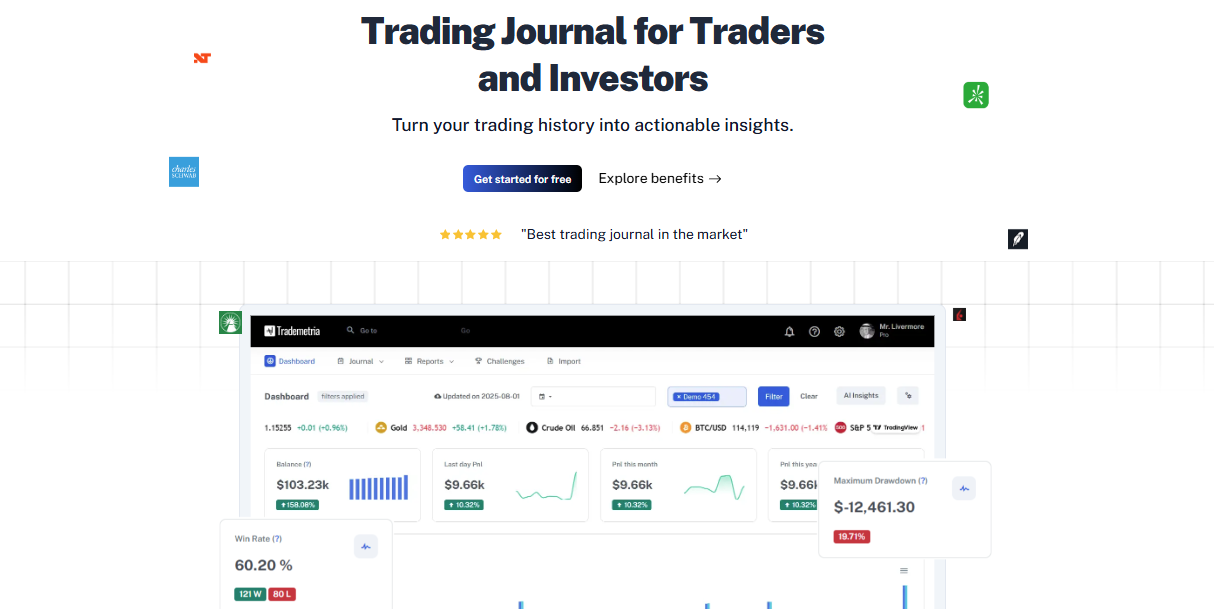
At its core, Trademetria works by collecting your trade data through broker imports, CSV files, or manual entries. Once your trades are recorded, the platform automatically calculates performance metrics such as win rate, expectancy, profit factor, drawdown, and risk-adjusted returns.
I tested all three workflows during my review. Over the course of 3 months, I imported 500+ trades, manually entered 25 trades, and used CSV uploads for 2 accounts that weren't connected through my preferred import method. The biggest difference was speed: automatic imports required almost no ongoing maintenance, while manual entry became noticeably more time-consuming once I started recording more than 10 trades per day.
Rather than spending hours building your own reports, you can immediately see where you're performing well and where your results need improvement.
What I appreciate is that Trademetria doesn't stop at individual trades. It also tracks portfolio growth over time, allowing you to evaluate performance across multiple accounts, strategies, and markets. That broader perspective makes it easier to understand whether your overall trading approach is moving in the right direction instead of focusing only on today's profit or loss.
The biggest difference I noticed compared with many competitors is its balance between simplicity and depth. Platforms like TradesViz offer an enormous amount of analytical detail, while Edgewonk places greater emphasis on trading psychology. TraderSync focuses heavily on automation, and TradeZella stands out with its Playbooks and structured strategy reviews. Trademetria sits comfortably between those approaches. It provides comprehensive analytics, portfolio management, and flexible reporting without making the interface feel unnecessarily complicated.
Another feature that sets Trademetria apart is its built-in portfolio tracking. Beyond reviewing individual trades, you can monitor account performance, asset allocation, realized and unrealized gains, and overall investment growth from the same dashboard. For traders who combine active trading with longer-term investing, having both perspectives in one platform is genuinely useful.
After using it, I'd describe Trademetria as a trading journal for people who want actionable performance data without facing a steep learning curve. It gives you enough information to improve your trading decisions while keeping the review process organized and easy to maintain over the long run.
Trademetria at a glance
Before diving into the individual features, here's a quick summary of what Trademetria offers. After comparing it with several other trading journals, I'd describe Trademetria as one of the easier platforms to adopt for traders who want portfolio tracking alongside trade journaling. In my case, I was able to import my first batch of trades, organize them with tags, and generate my first performance report in under 30 minutes. After about 2 weeks of regular use, the workflow felt familiar enough that I could complete my weekly review in roughly 15–20 minutes.
Feature | Details |
Best For | Active traders and investors who want both trade journaling and portfolio tracking |
Supported Markets | Stocks, options, futures, forex, crypto, ETFs, mutual funds, and CFDs |
Platform | Cloud-based web platform |
Broker Integrations | Supports imports from numerous brokers via direct integrations and CSV files |
Automatic Imports | Yes |
Free Plan | Yes (limited features and trade capacity) |
Starting Price | $29.95/month (Basic plan) |
Overall Rating | 3.6/5 |
What stands out to me is that Trademetria doesn't focus exclusively on active trading. Its portfolio management features make it equally useful for traders who also maintain longer-term investments, something that many dedicated trading journals don't handle nearly as well.
Key features of Trademetria
One thing I noticed while using Trademetria is that it doesn't try to overwhelm you with hundreds of features on day one. Most of its tools revolve around a simple goal: making it easier to understand your trading performance and your overall portfolio in one place. The learning curve felt manageable, yet I never found myself wishing for more depth during my reviews.
Automatic trade import
Importing trades is one of the first things you'll do with Trademetria, and this was one of the areas I tested most heavily. Over 3 months, I completed 20+ trade imports across multiple accounts. Automatic syncing was the fastest option for my regular workflow, while CSV imports became more useful when consolidating historical data. After the initial setup, I typically spent less than 5 minutes checking imported trades before moving on to analysis.
Manual trade entry
For traders who prefer complete control or use unsupported brokers, manual trade entry works well. I manually logged 25 trades during my testing, mainly for simulated positions and trades that weren't available through automatic imports. For small batches, the process was manageable, but once I started entering more than 10 trades in a single session, manual logging became noticeably less efficient than importing a CSV file.
Portfolio tracking
Portfolio tracking became one of the features I used most consistently. During my 3-month testing period, I tracked 3 separate trading accounts from the same dashboard and reviewed combined portfolio performance at the end of each week. Instead of checking each broker individually, I could compare account-level results first and then drill down into individual strategies when something looked unusual.
After 12 weekly reviews, I found the combined portfolio view particularly useful for separating problems caused by a specific strategy from broader issues affecting my overall trading performance.
Performance dashboard
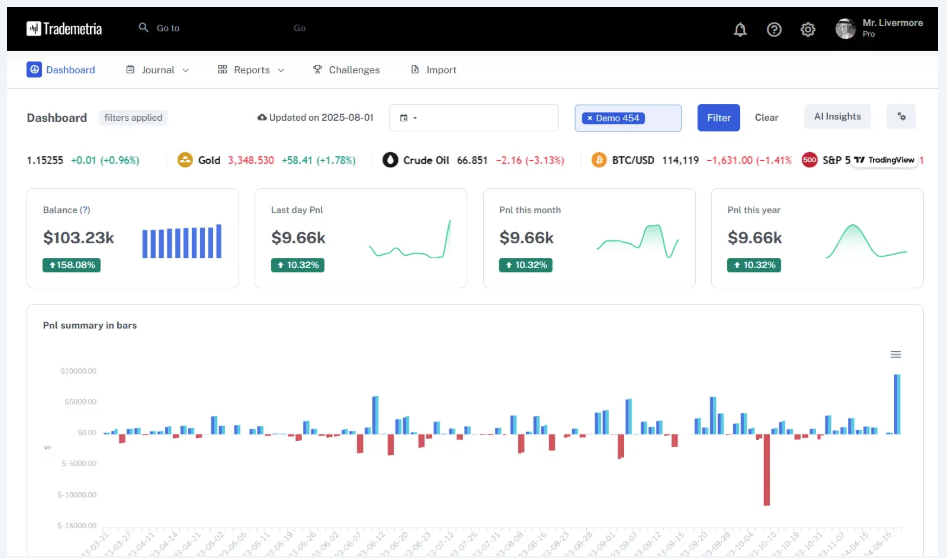
The dashboard provides a clean summary of your trading activity without becoming cluttered. During my testing, I used the dashboard for 12 weekly reviews and 3 monthly reviews. For routine checks, I usually needed around 5–10 minutes to review the main performance indicators before moving into more detailed reports.
I found this workflow more practical than starting every review with individual trades because it gave me a quick overview of whether the problem was related to profitability, risk, or a specific strategy.
Trade tagging
Trade tagging allows you to organize trades by setup, strategy, market condition, or any custom category that matches your workflow. I used tags on more than 500 trades during my testing period, primarily across four categories: strategy, market condition, timeframe, and execution quality. By the end of the first month, I had created 12 recurring tags that I used consistently during weekly reviews. This made it much easier to isolate specific setups instead of analyzing my entire trade history as one dataset.
Screenshot management
I attached screenshots to approximately 70% of the trades I reviewed during my testing period. After comparing screenshot-backed reviews with trades that only contained numerical data, I found that the images were particularly useful when reviewing execution mistakes and market structure. I eventually made screenshots part of my standard review process for higher-confidence setups and trades that violated my original plan.
Trading reports
Trademetria generates a wide range of reports covering profitability, risk, consistency, and trading behavior. What I appreciate is that the reports focus on practical insights rather than simply producing more statistics. I rarely felt overwhelmed because the most useful information is presented clearly.
Calendar view
The calendar view gives you a visual timeline of your trading activity across days, weeks, and months. It's an easy way to spot winning streaks, difficult periods, or days when trading discipline slipped.
I reviewed the calendar view at the end of each trading week for 12 consecutive weeks. The biggest benefit was seeing clusters of winning and losing days in one place. In my case, it helped me identify 3 periods where increased trading frequency coincided with weaker overall performance, something that wasn't immediately obvious when reviewing individual trades.
Performance analytics
Performance analytics tie everything together. Trademetria automatically calculates metrics such as win rate, expectancy, profit factor, drawdown, average gains and losses, and many other statistics that help evaluate your trading objectively. Rather than focusing on a single number, I found it much more useful to review several metrics together before making changes to my trading plan.
Performance analytics explained
Performance reports are only useful if they help you make better decisions. What I like about Trademetria is that it presents the numbers in a way that's easy to understand without sacrificing depth.
Rather than checking every available metric, I narrowed my weekly review down to 7 core metrics: win rate, profit factor, expectancy, average winner, average loser, maximum drawdown, and strategy performance. I used the same set of metrics across 12 weekly reviews, which made it easier to compare changes over time without constantly changing the way I evaluated my results.
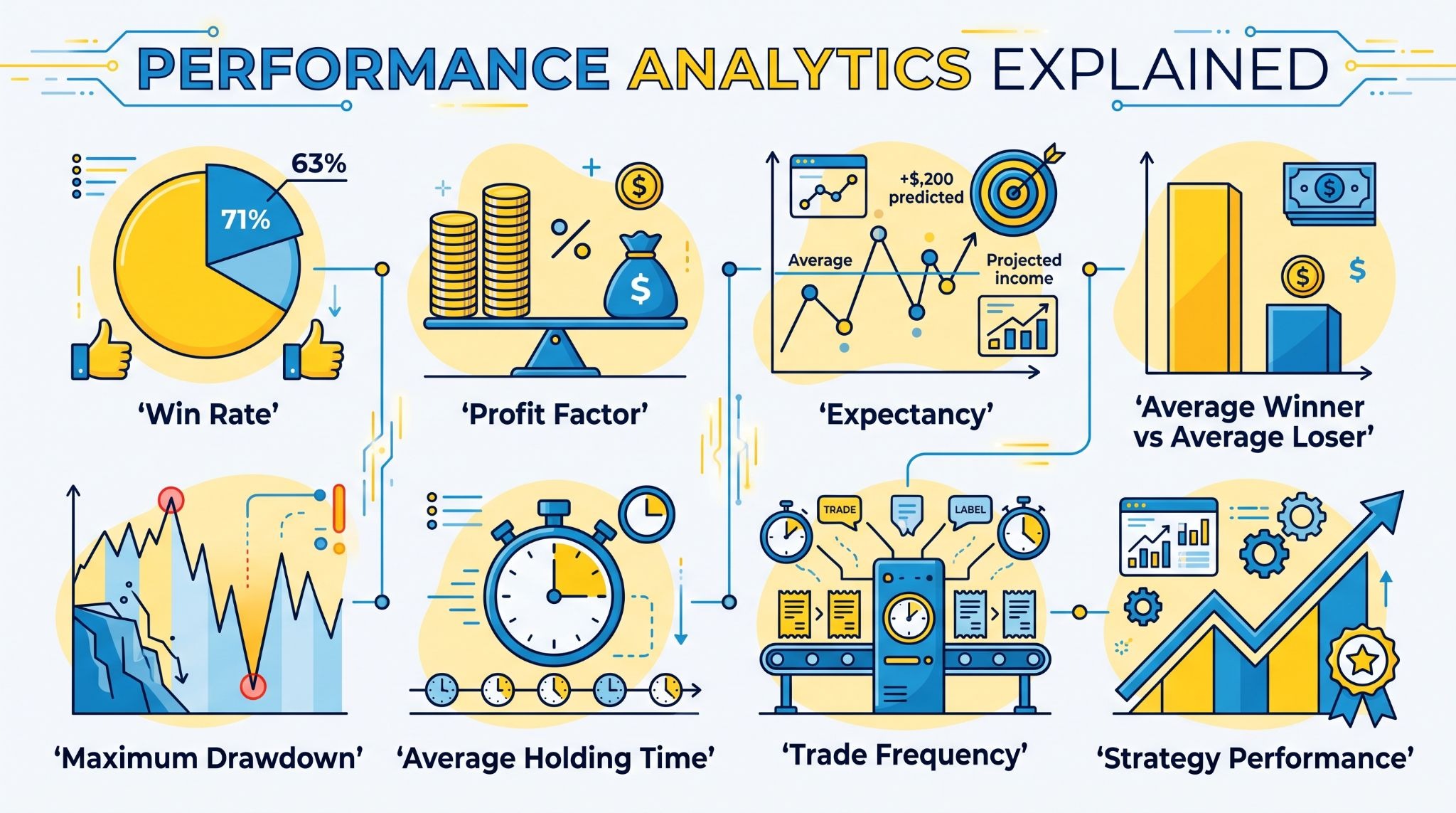
Win rate
What it shows: The percentage of trades that close in profit.
Why I pay attention to it: A higher win rate feels good, but it only becomes meaningful when combined with risk and reward. During my testing period, I had one month where my win rate was only 48%, yet the account still finished positive because my average winning trade was approximately 1.7 times larger than my average losing trade. That experience reinforced why I prefer reviewing win rate alongside profit factor and average winner versus average loser rather than treating it as a standalone measure.
How Trademetria helps: The platform automatically updates this metric as new trades are added, making long-term trends easy to monitor.
Profit factor
What it shows: Gross profits divided by gross losses.
Why I pay attention to it: Profit factor tells me how efficiently a strategy generates returns. It's one of the first numbers I compare when evaluating different trading setups.
How Trademetria helps: I can compare profit factor across markets, strategies, and custom tags without creating manual spreadsheets.
Expectancy
What it shows: The average amount a strategy is expected to make or lose per trade over time.
Why I pay attention to it: Expectancy combines win rate and average trade size into one practical measurement. I rely on it more than win rate when deciding whether a strategy deserves additional capital.
How Trademetria helps: The calculation updates automatically, making it easier to judge performance over large trade samples.
Average winner vs Average loser
What it shows: The relationship between the size of winning trades and losing trades.
Why I pay attention to it: This metric quickly reveals whether I'm letting profits run while controlling losses, or doing the exact opposite.
How Trademetria helps: I can immediately spot changes in execution quality before they begin affecting overall profitability.
Maximum drawdown
What it shows: The largest decline in account value during the selected period.
Why I pay attention to it: Protecting capital is just as important as making money. Drawdown tells me whether my current level of risk remains acceptable.
How Trademetria helps: Historical drawdown reports make it easier to evaluate consistency instead of focusing only on recent gains.
Average holding time
What it shows: The average length of time trades remain open.
Why I pay attention to it: Holding time often reveals whether I'm following my intended trading style or making emotional decisions during live markets.
How Trademetria helps: I can compare holding periods across strategies to see which ones perform best over different time horizons.
Trade frequency
What it shows: The number of trades executed during a selected period.
Why I pay attention to it: More trades don't always lead to better results. I noticed this pattern in my own data after comparing 12 weeks of trading activity. During 3 weeks when my trade count increased by more than 30% compared with my normal weekly average, overall profitability did not improve at the same rate. That made trade frequency one of the metrics I now check alongside expectancy rather than treating higher activity as a sign of better performance.
How Trademetria helps: The platform makes it easy to compare activity levels with profitability so I can judge whether additional trades are actually adding value.
Strategy performance
What it shows: Individual performance for each trading setup or strategy.
Why I pay attention to it: This report helps me decide which strategies deserve more attention and which ones consistently underperform.
How Trademetria helps: By combining tags, filters, and detailed statistics, I can review each strategy independently instead of treating every trade as part of one large dataset.
Portfolio tracking & Performance reports
One feature that kept me coming back to Trademetria is its ability to connect individual trades with the bigger picture. Instead of reviewing positions one by one, I could see how every decision affected my portfolio over weeks, months, and even years.
That broader perspective made my trading reviews much more productive because I wasn't chasing short-term results.
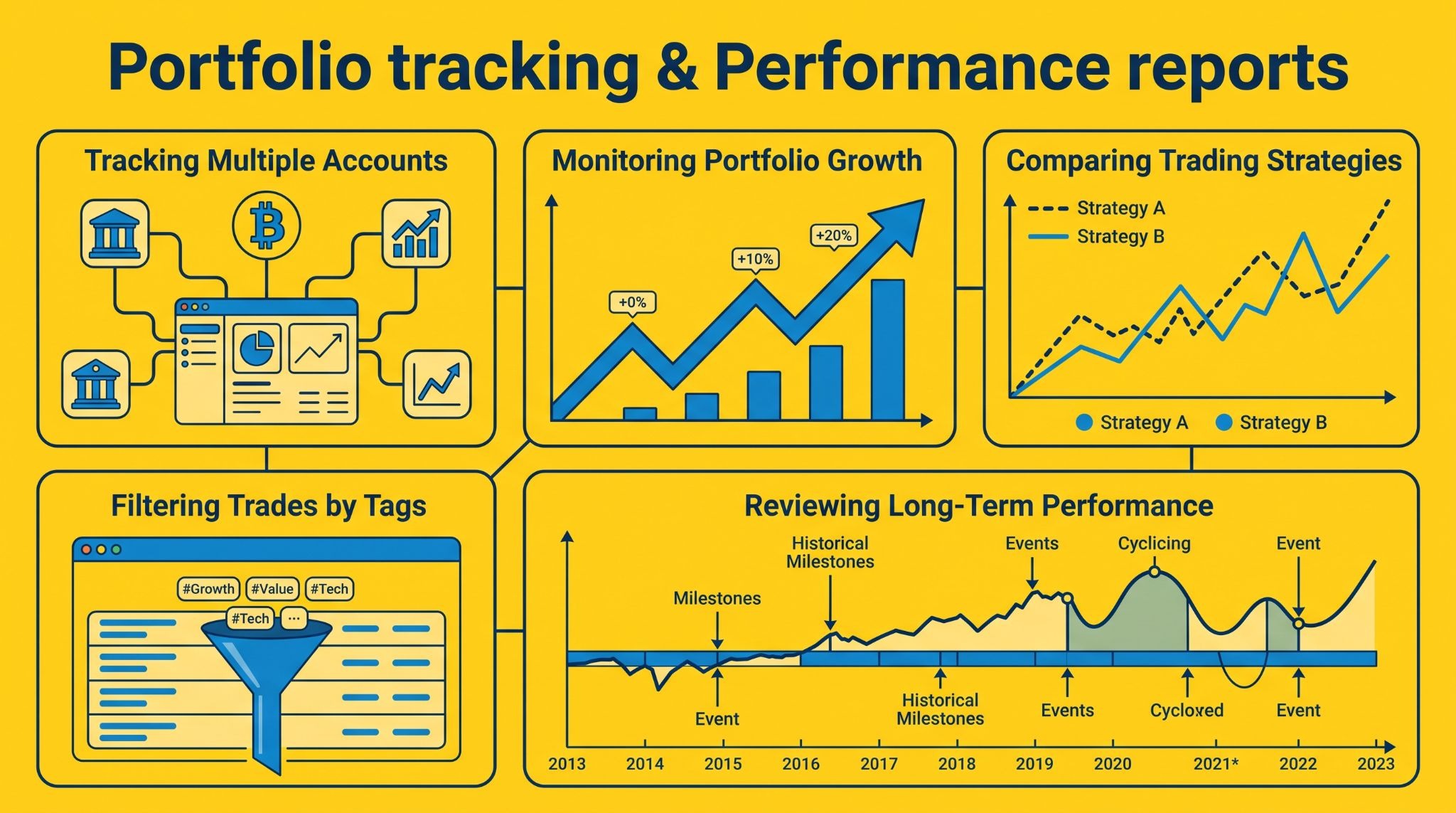
Tracking multiple accounts
If you trade across several brokerage accounts, reviewing performance can quickly become frustrating. Trademetria solves this by allowing multiple accounts to be managed from a single dashboard.
I found it much easier to compare results without exporting data into separate spreadsheets or switching between broker platforms. Each account remains organized, while the combined view gives a more complete picture of overall performance.
Monitoring portfolio growth
Portfolio growth is about much more than today's profit or loss. Trademetria tracks account performance over time, making it easy to see whether your capital is growing steadily or becoming increasingly volatile.
I like reviewing this chart regularly because it reminds me to focus on long-term consistency instead of reacting emotionally to individual trading sessions.
Comparing trading strategies
One of the most valuable parts of any trading journal is identifying which strategies actually deserve your attention. Trademetria allows strategies to be compared using key performance metrics, making it easier to determine which setups consistently produce positive results.
After reviewing 500+ trades, I found that the strategy I used most frequently wasn't the strategy with the highest expectancy. In my dataset, one lower-frequency setup produced better risk-adjusted results over the 3-month period, despite generating fewer trades. That was one of the clearest examples of why I prefer evaluating strategies using a large enough sample rather than relying on familiarity or trading frequency.
Filtering trades by tags
Trade tags become surprisingly powerful once your journal begins to grow. I typically organize trades by strategy, market condition, timeframe, or execution quality, then filter them during weekly reviews.
That process helps answer specific questions, such as whether a breakout setup performs better in trending markets or whether certain mistakes appear repeatedly under similar conditions.
Reviewing long-term performance
Short-term results can fluctuate for countless reasons, but long-term performance tells a much more reliable story. Trademetria makes it easy to review trading history across extended periods, helping separate temporary winning streaks from genuine improvement. I find these long-term reports especially useful because they encourage decisions based on large samples rather than a handful of recent trades.
Strategy validation & Performance coaching
Recording trades is only the first step. The real value comes from understanding whether your strategy continues to work as market conditions change.
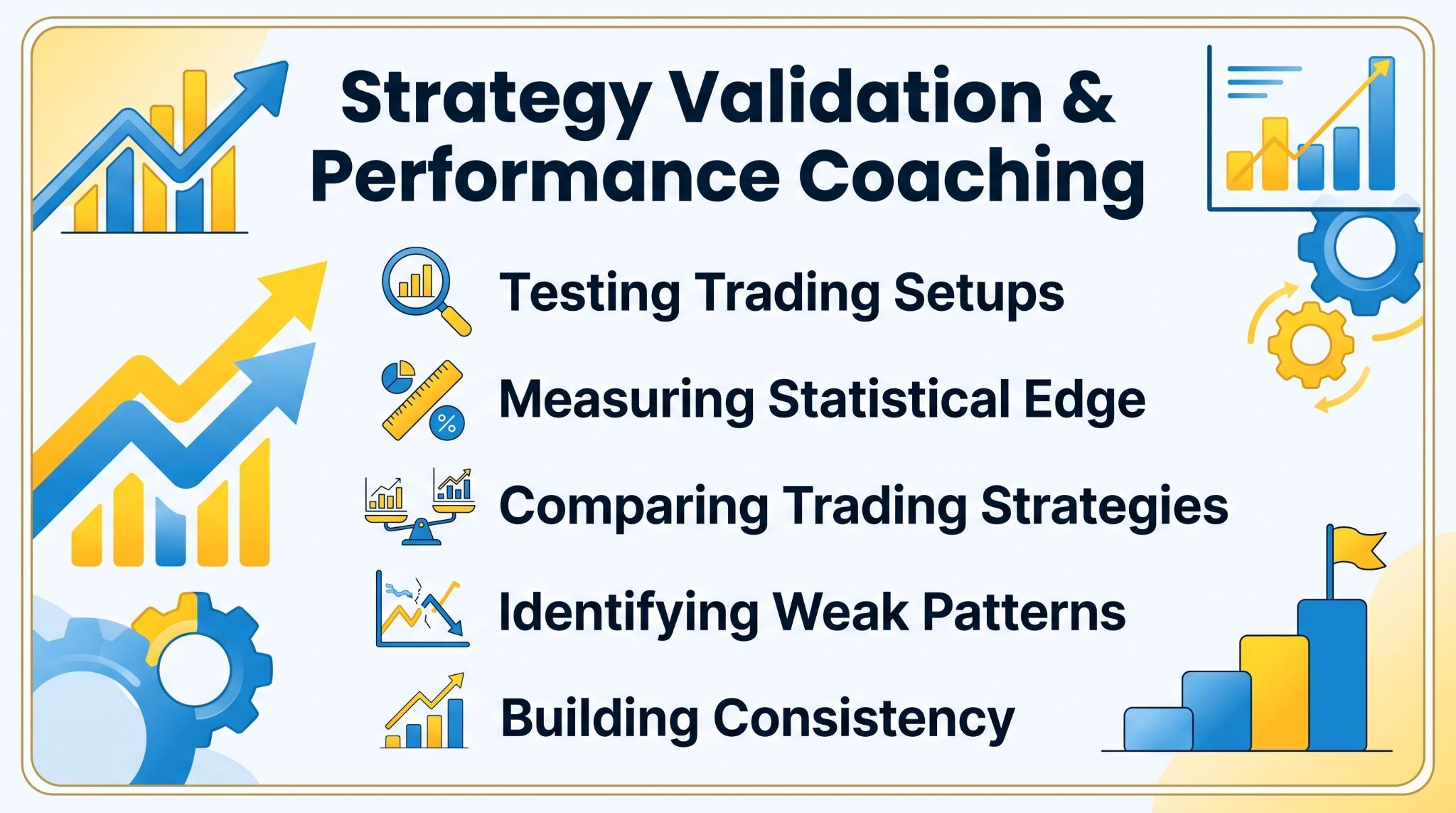
Trademetria gives you enough historical data and reporting tools to answer that question with evidence instead of intuition. I found myself making fewer assumptions because every adjustment was backed by actual trading results.
Testing trading setups
Every trader has a handful of favorite setups, but confidence alone doesn't prove they're profitable. Trademetria lets you isolate trades using tags, filters, and date ranges so you can review each setup independently.
For my own reviews, I set a minimum sample of 50 trades before making any major judgment about a strategy. I used Trademetria to compare several setups across different market conditions and reviewed their performance again after reaching the 50-trade threshold. This approach helped me avoid making strategy changes based on a short sequence of wins or losses.
Measuring statistical edge
A strategy has an edge only if it consistently produces positive results over time. Rather than focusing on one exceptional month, Trademetria measures performance through statistics such as expectancy, profit factor, drawdown, and average trade outcomes.
Looking at these metrics together gives me a much better understanding of whether a strategy is genuinely repeatable or simply benefited from favorable market conditions.
Comparing trading strategies
Comparing strategies side by side is one of the easiest ways to improve decision-making. Trademetria allows different setups to be evaluated using the same performance metrics, making strengths and weaknesses much easier to identify.
More than once, I've discovered that the strategy generating the most trades wasn't actually the one producing the best long-term returns.
Identifying weak patterns
Weak trading habits usually reveal themselves through repetition. By reviewing historical trades, I can identify patterns such as entering positions too early, holding losing trades too long, or performing poorly during specific market conditions. Having those patterns presented through reports makes it much harder to ignore recurring mistakes.
Building consistency
Consistency rarely comes from finding a new indicator or trading system. In my experience, it comes from repeating the behaviors that already work while gradually removing those that don't.
Trademetria supports that process by making every review objective. Instead of relying on memory or emotion, I can look at months of trading data, identify measurable improvements, and make small adjustments that strengthen my trading plan over time.
How Trademetria fits into your trading workflow?
I followed this workflow for approximately 3 months, completing 12 weekly reviews and 3 monthly portfolio reviews. Once the initial setup was complete, a typical weekly review took me approximately 20–30 minutes, while a deeper monthly review usually took between 45 and 60 minutes:
Import trades: I usually begin by importing trades directly from my broker. If automatic syncing isn't available, CSV importing takes only a few minutes. Once the data is in Trademetria, every report updates automatically, so I can move straight into analysis without manually calculating anything.
Organize and tag trades: After importing, I tag trades by strategy, market, setup, timeframe, or any category I want to review later. Spending a little time organizing trades upfront makes future analysis much easier because I can filter my journal with just a few clicks.
Analyze portfolio performance: Rather than focusing only on individual trades, I like reviewing how my entire portfolio is performing. Trademetria shows overall account growth, profitability, drawdowns, and portfolio trends, helping me understand whether my trading is moving in the right direction over the long run.
Review trading statistics: Once the portfolio overview is complete, I look at key metrics such as win rate, expectancy, profit factor, average winners and losers, and strategy performance. Instead of chasing one impressive statistic, I compare several metrics together to build a more balanced view of my results.
Improve your trading decisions: Every review ends with a simple question: What should I do differently next time? Sometimes the answer is to reduce risk, remove an underperforming setup, or become more selective about entries. Other times, it's simply continuing with what's already working. For me, that's where Trademetria delivers the most value, it turns historical trading data into practical decisions I can apply in the next trading session.
Trademetria pricing
One thing I appreciate about Trademetria is that its pricing is easy to understand. There are only three plans, and the differences are based mainly on the number of trades and accounts you can manage rather than locking essential analytics behind expensive tiers.
That makes it easier to choose a plan based on your trading activity instead of guessing which features you'll lose.
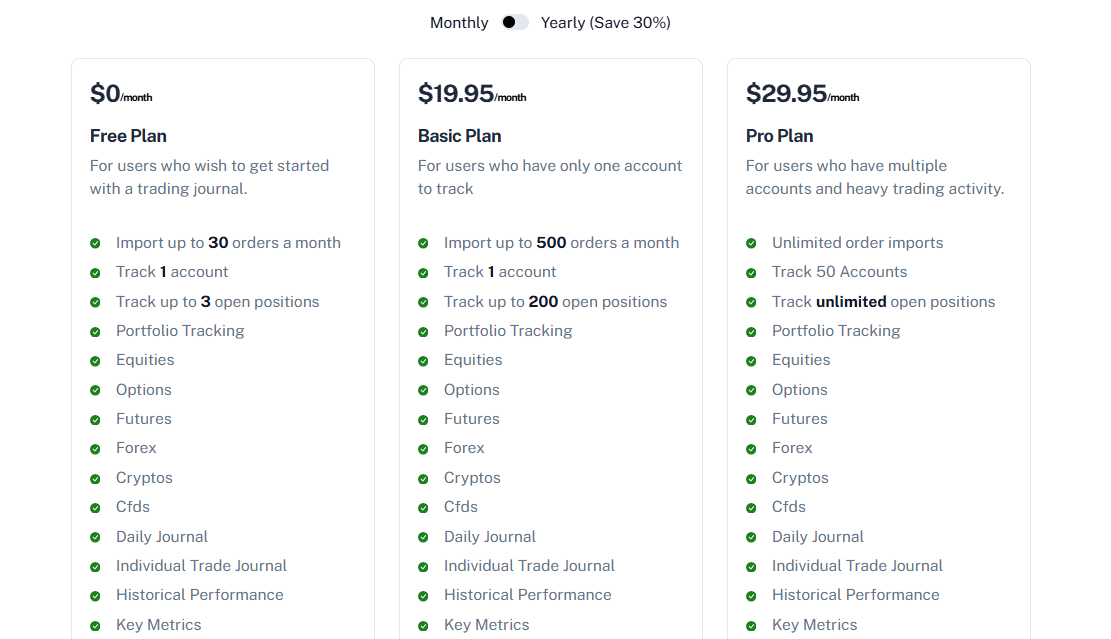
Source: https://trademetria.com/pricing
Free plan
The Free plan is a good starting point if you're new to trade journaling or simply want to explore the platform before paying.
It allows you to import up to 30 orders per month, track one account and up to three open positions, while still giving access to portfolio tracking, performance reports, strategy tracking, image uploads, calendars, AI Insights, and many of the platform's core analytics. For occasional traders, it's surprisingly capable.
Paid plans
Trademetria offers two paid subscriptions.
The Basic Plan costs $19.95/month or $169/year (about $14.10/month when billed annually). It increases the monthly import limit to 500 orders, supports one trading account and up to 200 open positions, while keeping access to the complete reporting and analytics suite.
The Pro Plan costs $29.95/month or $249/year (about $20.80/month when billed annually). It removes the trade import limit, supports up to 50 accounts, allows unlimited open positions, and is clearly designed for active traders managing multiple portfolios or trading at much higher volume.
Monthly vs annual billing
Choosing annual billing reduces the cost by roughly 30%, making it the better option if you already know you'll be using Trademetria throughout the year.
The savings are meaningful, especially on the Pro plan, where the monthly equivalent drops from $29.95 to about $20.80. On the other hand, monthly billing provides more flexibility if you simply want to evaluate the platform for a few months before making a longer commitment.
Which plan offers the best value?
With an average of approximately 120 imported orders per month, the Basic plan was sufficient for my workflow, while the Free plan would have been too restrictive for regular active trading. 500 imported orders per month is more than enough for many swing traders and active day traders, and you still receive virtually all of Trademetria's reporting, portfolio tracking, and analytics features.
I'd only recommend upgrading to Pro if you're trading across multiple brokerage accounts or generating a very large number of trades each month. Otherwise, the Basic plan delivers nearly everything most traders need at a considerably lower cost.
For beginners who want to build a journaling habit first, the Free plan is generous enough to determine whether Trademetria fits their workflow before spending any money.
User reviews
At the time of writing, Trademetria holds a TrustScore of 3.6 out of 5 on Trustpilot, based on 9 customer reviews. Around 67% of reviewers gave the platform 5 stars, 11% awarded 4 stars, while 22% left 1-star reviews.
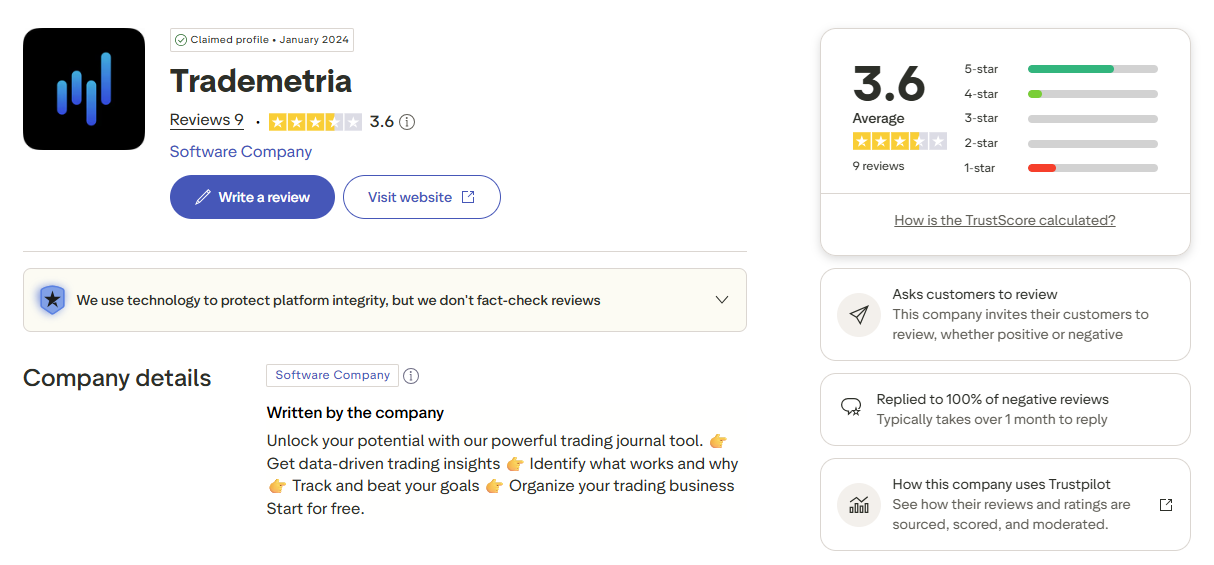
Although the review volume is still relatively small compared with larger competitors like TraderSync or TradeZella, it provides a reasonable snapshot of the user experience. Overall, sentiment leans positive, particularly among traders who actively use Trademetria as part of their review process.
Reading through the reviews, I noticed that the same strengths appeared repeatedly. Users frequently praise Trademetria's clean interface, straightforward performance reports, portfolio tracking tools, and responsive customer support.
Several reviewers also mention that the platform helped them better understand their trading performance and identify recurring mistakes, making it easier to improve their decision-making over time.
Most negative feedback isn't directed at the reporting features themselves. Instead, it centers on broker connectivity, with a few users reporting issues importing data from certain brokers, particularly Fidelity or expecting a smoother automatic synchronization process.
Based on both the public reviews and my own experience, I think Trademetria's biggest strengths remain its analytics and portfolio management, while broker compatibility is the area where prospective users should verify support before subscribing.
My own experience broadly matched the positive feedback around analytics and portfolio management. After 3 months of use, I found these were the two areas I returned to most often, particularly during my 12 weekly reviews. However, I also experienced the same potential limitation around broker connectivity: before importing my full history, I had to verify that each of my accounts could be connected or exported in a format Trademetria could process.
Trademetria pros and cons
After using Trademetria for an extended period, I came away with a positive impression.
It strikes a nice balance between portfolio management and trade journaling, making it suitable for traders who want meaningful analytics without dealing with an overly complicated interface. That said, no platform is perfect, and there are a few areas where competitors still have an advantage.
Pros
I was able to complete my initial setup and import my first batch of trades in under 30 minutes.
Combines trade journaling with portfolio tracking in a single platform.
Supports multiple asset classes, including stocks, futures, forex, options, crypto, ETFs, and mutual funds.
Automatic broker imports are available, with CSV importing as a reliable backup.
Comprehensive performance analytics covering profitability, risk, consistency, and strategy performance.
I used 12 recurring tags across more than 500 trades, which made it significantly easier to isolate specific setups and market conditions during weekly reviews.
Strong reporting tools without requiring extensive customization.
The Free plan gave me enough room to test the core workflow with up to 30 orders per month before deciding whether I needed a paid plan.
Annual pricing offers meaningful savings compared with paying month by month.
Suitable for both active traders and longer-term investors managing multiple portfolios.
Cons
Advanced analytics aren't as deep or customizable as TradesViz.
Trading psychology features aren't as comprehensive as Edgewonk's coaching-focused approach.
Fewer workflow automation features than TraderSync.
No dedicated Playbook system for documenting trading setups like TradeZella.
Mobile experience is functional but doesn't feel as polished as the desktop version.
Traders with extremely high trading volume may outgrow the Basic plan relatively quickly.
Some reports require well-organized trade tags to unlock their full value.
Overall, I think Trademetria succeeds because it doesn't try to specialize in just one area. Instead, it delivers a well-rounded combination of journaling, portfolio management, and performance analysis that will satisfy most traders.
If your priority is an organized review process supported by solid analytics, it's a platform that's easy to recommend.
Trademetria for different types of traders
Trademetria isn't designed for a single trading style. What I noticed is that it adapts well to different workflows because it combines trade journaling, portfolio tracking, and performance reporting in one platform. Depending on how you trade, certain features will naturally stand out more than others.
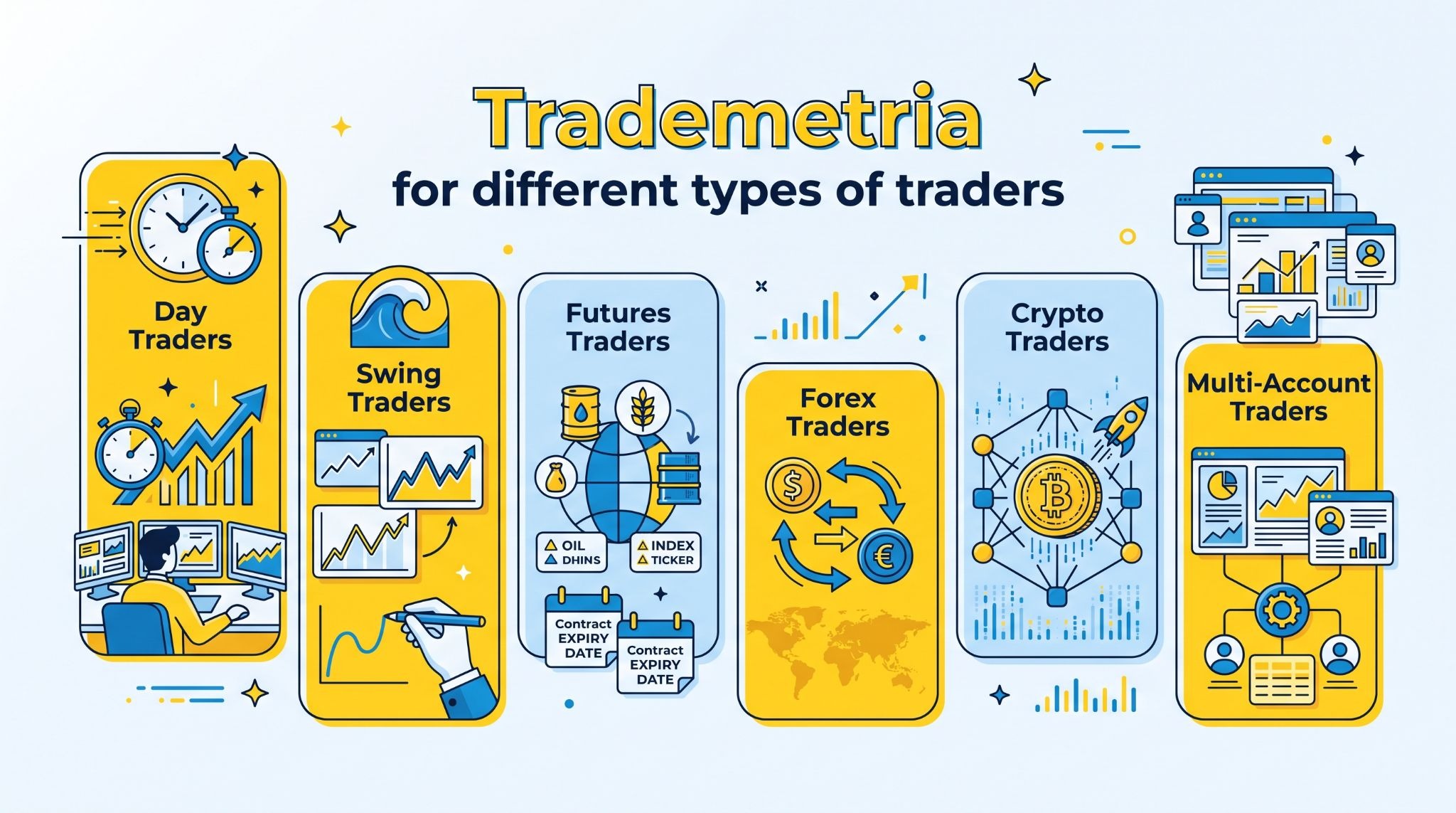
Day Traders: Day traders will probably get the most value from Trademetria's reporting engine. Since dozens of trades can accumulate in a single week, having every position automatically organized and analyzed saves a significant amount of time. I especially like how quickly I can review win rate, trade frequency, and profitability after each trading session, making it easier to spot execution mistakes before they become habits.
Swing traders: Swing traders benefit from Trademetria's ability to track positions over longer holding periods while keeping portfolio performance in focus. Instead of concentrating on daily fluctuations, I can review how individual setups perform across weeks or months and determine whether my longer-term strategies continue to produce consistent results.
Futures traders: For futures traders, Trademetria provides the performance statistics needed to evaluate both profitability and risk. Metrics such as expectancy, profit factor, and maximum drawdown help measure whether a trading system maintains its edge over time. I also appreciate being able to compare multiple futures strategies without maintaining separate journals.
Forex traders: Forex traders who execute a large number of positions will find Trademetria easy to manage. Trades can be filtered by currency pair, trading session, strategy, or custom tags, making it much simpler to identify where the strongest results come from. During my reviews, this level of organization made recurring strengths and weaknesses much easier to recognize.
Crypto traders: Crypto traders can use Trademetria to monitor both active trading and longer-term holdings from the same platform. I like having cryptocurrency performance displayed alongside more traditional asset classes because it provides a clearer picture of total portfolio growth rather than treating each market separately.
Multi-Account traders: I tested Trademetria across 3 brokerage accounts and found the multi-account view particularly useful during monthly reviews. Instead of opening each broker separately, I could first review combined performance and then drill down into individual accounts when the results looked unusual.
Trademetria vs competitors
Every trading journal has its own strengths, so I don't think there's a single "best" option for everyone. After comparing Trademetria with the platforms I've used the most, I'd say Trademetria stands out for balancing portfolio tracking, trade journaling, and performance analytics without becoming overly complicated.
If your priority is psychology coaching, advanced custom analytics, or workflow automation, another platform may suit you better.
Feature | Trademetria | TradeZella | Edgewonk | TradesViz | TraderSync |
Best For | Portfolio tracking & trade journaling | Structured trade reviews | Trading psychology | Advanced analytics | Automated journaling |
Platform | Cloud-based | Cloud-based | Desktop & Cloud | Cloud-based | Cloud-based |
Automatic Trade Import | ✅ Yes | ✅ Yes | ✅ Yes | ✅ Yes | ✅ Yes |
Manual Trade Entry | ✅ Yes | ✅ Yes | ✅ Yes | ✅ Yes | ✅ Yes |
Portfolio Tracking | ⭐ Excellent | Good | Basic | Good | Good |
Performance Analytics | Advanced | Advanced | Advanced | Excellent | Advanced |
Trading Psychology Tools | Basic | Moderate | ⭐ Excellent | Basic | Basic |
Strategy Tracking | ✅ Yes | ✅ Playbooks | ✅ Yes | ✅ Highly customizable | ✅ Yes |
Custom Reports | Good | Moderate | Good | ⭐ Excellent | Good |
Trade Tagging | ✅ Yes | ✅ Yes | ✅ Yes | ✅ Yes | ✅ Yes |
Screenshot Support | ✅ Yes | ✅ Yes | ✅ Yes | ✅ Yes | ✅ Yes |
Calendar View | ✅ Yes | ✅ Yes | ✅ Yes | ✅ Yes | Limited |
Multi-Account Support | ⭐ Excellent | Good | Good | Excellent | Good |
Free Plan | ✅ Yes | ❌ No | ❌ No | ✅ Yes | Limited free trial |
Starting Price | $19.95/month | $29/month | $169 lifetime or subscription | Free / Paid plans | $29.95/month |
Ideal User | Traders managing portfolios across multiple markets | Traders building structured review routines | Traders focused on psychology and discipline | Data-driven traders who want deep customization | Active traders who prioritize automation |
Best Trademetria alternatives
While I think Trademetria is one of the better all-around trading journals, it isn't the perfect fit for every trader. If your priorities lean toward automation, psychology coaching, or highly customized analytics, one of the alternatives below may suit your workflow better.
TradeZully: I finally stopped wrestling with messy spreadsheets and let TradeZully automatically sync my trades across all my prop firm accounts. Whenever my execution habits start slipping, the platform’s detailed Zully Score and custom filters show me exactly where I am leaking edge. It has completely transformed how I review my setups without feeling like a generic software tool. I honestly can't imagine analyzing my weekly performance without it now.
TradeZella: If you enjoy structured trade reviews, TradeZella is worth considering. Its Playbooks, clean interface, and guided review process make it especially appealing for traders who want to document strategies and follow a repeatable improvement process. I think it's easier to learn than Trademetria, particularly for newer traders.
TraderSync: TraderSync focuses heavily on automation and convenience. Trade importing is smooth, reports are easy to understand, and the overall workflow requires very little setup. I'd recommend it to active day traders who want to spend less time maintaining a journal and more time reviewing results.
TradesViz: For traders who love data, TradesViz offers one of the deepest analytics packages available. It provides an enormous number of performance metrics, highly customizable dashboards, and advanced filtering options. Personally, I think it's the strongest option for experienced traders who enjoy exploring detailed statistics, although the learning curve is noticeably steeper than Trademetria's.
Edgewonk: Edgewonk takes a different approach by placing trading psychology at the center of the review process. Features like emotional journaling, rule violation tracking, and strategy validation help traders improve discipline rather than simply measure performance. If your biggest challenge is consistency rather than finding better analytics, I'd probably choose Edgewonk over Trademetria.
» Read more: Best Trading Journal Apps & Software for Forex, Stock, Futures, Crypto (Free & Paid)
What i like most about Trademetria and where Trademetria could improve
After using Trademetria for 3 months, I completed 12 weekly reviews and 3 deeper monthly reviews without changing my core workflow. That consistency is probably the strongest evidence, from my perspective, that the platform is easy to incorporate into a regular trading routine.
Instead, it focuses on helping you organize trades, review performance, and monitor your portfolio without adding unnecessary complexity.
That said, there are still a few areas where I think other platforms have an advantage:
Easy-to-read reports: The reports are well organized and don't require much interpretation. I can quickly identify what's working, what's slipping, and which strategies deserve more attention without digging through dozens of menus.
Portfolio tracking: After tracking 3 accounts for 3 months, portfolio tracking became the feature I returned to most often. I reviewed combined account performance at least 12 times during weekly reviews, which helped me distinguish between problems affecting one strategy and broader changes in my overall portfolio.
Clean interface: The interface feels straightforward and uncluttered. I never felt overwhelmed while navigating the platform, which isn't always the case with more analytics-heavy competitors.
Flexible trade analysis: Tags, filters, and custom date ranges make reviewing specific strategies or market conditions simple. I found it easy to answer questions like "Which setup performs best?" without exporting data into spreadsheets.
Dashboard customization: While the dashboard offers useful summaries, I would like a little more flexibility in deciding which widgets and statistics appear first. Traders who enjoy highly personalized layouts may find TradesViz more accommodating.
Advanced analytics: Trademetria covers all of the metrics I regularly use, but traders who enjoy exploring hundreds of custom statistics may eventually find the analytical depth more limited than platforms like TradesViz.
Mobile experience: The web interface works well across devices, but the overall mobile experience doesn't feel as refined as the desktop version. During my testing period, I used Trademetria on desktop for the majority of my detailed reviews and checked the platform on mobile on approximately 10 occasions. For quick performance checks, the mobile experience was sufficient, but I still preferred desktop for longer sessions involving multiple reports, filters, and portfolio comparisons.
Broker integrations: Most popular brokers are supported, and CSV importing fills many remaining gaps. My experience was smooth overall, although availability still depends on the broker you use.
Automation capabilities: I completed more than 20 imports during my testing period and found the automatic import process reliable for routine data collection. However, I still had to perform several manual review steps after importing, particularly when checking tags and organizing trades for strategy analysis. Compared with a more automation-focused workflow, Trademetria still requires more user involvement after the data arrives.
Overall, I think Trademetria succeeds because it stays focused on the essentials. It delivers solid analytics, reliable portfolio tracking, and an interface that's easy to return to every week. While a few competitors outperform it in specific areas, very few offer such a balanced combination of usability and meaningful performance analysis.
Is Trademetria worth It?
Whether Trademetria is worth paying for depends on what you expect from a trading journal. If your goal is simply to record trades, there are cheaper options available.
If you want to understand how your trading decisions affect both individual strategies and your overall portfolio, I think Trademetria offers much better value. After using it, I found myself spending less time organizing data and more time learning from it.
Best for beginners
Trademetria is one of the easier platforms to learn because the interface is clean and the reports are presented in a logical way. I never felt like I needed hours of tutorials before I could begin reviewing trades. The free plan also makes it easy to explore the platform before deciding whether a paid subscription makes sense.
Best for swing traders
Swing traders will probably appreciate Trademetria more than ultra-high-frequency traders. Since positions often remain open for days or weeks, the portfolio tracking features and long-term reports become especially useful. I reviewed swing positions across a 3-month period, with individual trades held for several days or longer. Looking at these positions alongside portfolio-level performance made it easier to evaluate complete trading cycles rather than judging each trade independently.
Best for portfolio tracking
Portfolio tracking is where Trademetria separates itself from many competing trading journals. Being able to monitor account growth, multiple asset classes, and overall portfolio performance alongside individual trades gives a much more complete picture of trading progress. If you actively invest as well as trade, this feature alone adds considerable value.
Best for multi-market traders
If you trade stocks, futures, forex, options, or crypto, keeping everything inside one journal makes reviews far more efficient. Trademetria handles multiple markets well, allowing performance to be compared across different asset classes without changing platforms. I found that particularly useful because my trading isn't limited to a single market.
Best for long-term performance reviews
The traders who benefit most from Trademetria are those committed to continuous improvement rather than chasing short-term results.
Its reporting tools make it easy to review months or even years of trading history, helping identify patterns that would be almost impossible to spot from memory alone. If regular performance reviews are already part of your routine or you want them to be, I think Trademetria is a worthwhile investment.
Final verdict
After using Trademetria, I see it as one of the strongest all-around trading journals for traders who want more than a simple trade log. It combines portfolio tracking, performance analytics, and trade organization in a way that feels practical without becoming overwhelming.
I especially appreciate how easy it is to move from importing trades to reviewing meaningful statistics.
It's not the most advanced platform for custom analytics, and it doesn't offer the psychology-focused coaching found in Edgewonk or the workflow automation available in TraderSync. However, very few competitors balance usability, portfolio management, and performance reporting as effectively as Trademetria.
If you're looking for a trading journal that can grow with you, from your first performance review to managing multiple markets and accounts. Trademetria is a worthwhile investment. It's a platform I'd feel comfortable recommending to most traders who value long-term improvement over simply recording their trades.
Trader Type | Recommendation |
Beginner | ⭐⭐⭐⭐☆ |
Day Trader | ⭐⭐⭐⭐☆ |
Swing Trader | ⭐⭐⭐⭐⭐ |
Futures Trader | ⭐⭐⭐⭐☆ |
Forex Trader | ⭐⭐⭐⭐☆ |
Crypto Trader | ⭐⭐⭐⭐☆ |
Multi-Account Trader | ⭐⭐⭐⭐⭐ |