


Tradervue Review: Features, Pricing, Pros, Cons & Alternatives
Last Updated: July 18, 2026
But with newer platforms offering AI features, Playbooks, and more advanced analytics, is Tradervue still worth paying for?
I spent more than 3 months testing Tradervue across different parts of the journaling workflow, from importing historical trades and organizing tags to reviewing performance reports and sharing trades. I also worked through more than 500 individual trade records and compared the platform side by side with TraderSync, TradeZella, TradesViz, and Edgewonk. That gave me a much clearer picture of where Tradervue saves time, where it feels dated, and where newer platforms have moved ahead.
If you're looking for a trading journal and want to know whether Tradervue fits your workflow before subscribing, this guide is for you.
What is Tradervue?
Tradervue is a cloud-based trading journal built to help traders record, review, and analyze their trading performance. Instead of relying on spreadsheets or handwritten notes, it brings your trades, charts, and statistics together in one place so you can understand not only how much you made or lost, but also why those results happened.
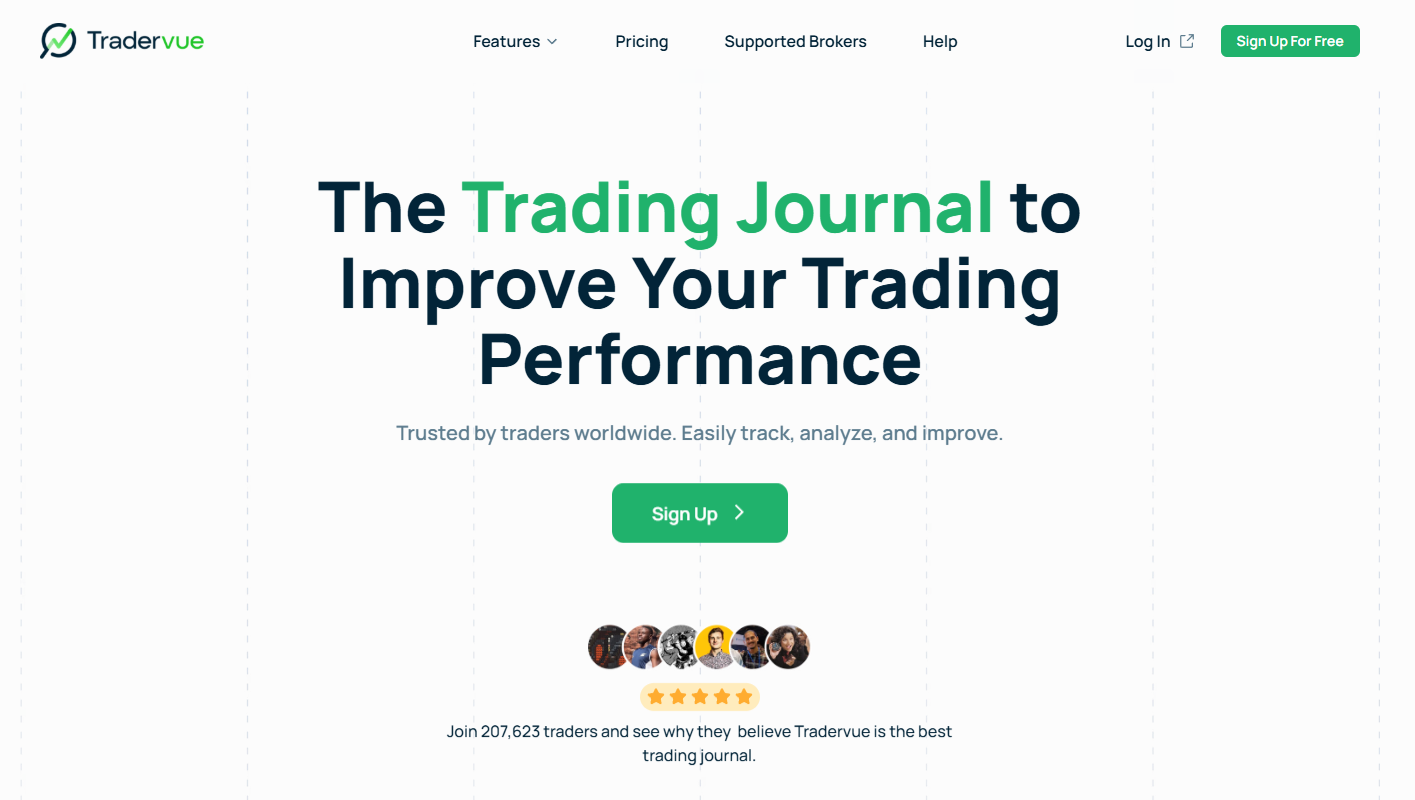
One of the reasons Tradervue has remained popular for so many years is its straightforward approach. It doesn't try to overwhelm you with dozens of advanced features. Instead, it focuses on the fundamentals of trade journaling: importing trades, reviewing executions, attaching charts, tracking performance, and identifying recurring strengths and weaknesses.
The platform is particularly well known among stock, options, and futures traders who want a reliable review process without a steep learning curve. Automatic broker imports, trade tagging, detailed reports, and screenshot management form the core of the experience. If you've never used a trading journal before, Tradervue is relatively easy to pick up compared with many modern competitors.
In my case, I was able to get the basic journaling workflow running in roughly 15–20 minutes. After importing my first batch of trades, I spent another 10 minutes adding tags and attaching screenshots. I didn't need to read extensive documentation before I could start reviewing trades, which is something I appreciate when testing new trading software.
The main goal of Tradervue is simple: help you become a more consistent trader through regular review. Every trade you import becomes another piece of data that can reveal patterns in your decision-making. Over time, those patterns can answer questions that aren't obvious from your account balance alone. Which setups produce your best results? Which mistakes keep repeating? Which market conditions suit your trading style?
What I like most is that Tradervue encourages a routine rather than chasing shortcuts. It doesn't promise to predict winning trades or replace your trading strategy. Instead, it gives you the tools to evaluate your own performance objectively. If you're willing to review your trades consistently, that process can be just as valuable as finding a new setup or indicator.
Tradervue at a glance
Before diving into the details, here's a quick summary of where Tradervue stands. It isn't the newest trading journal on the market, but it continues to be a dependable choice for traders who value simplicity, reliable reporting, and an established workflow over flashy features.
Feature | Details |
Best For | Active stock, options, and futures traders who want a straightforward trading journal |
Supported Markets | Stocks, options, futures, forex (via supported imports), and other assets through manual or CSV imports |
Platform | Web-based application accessible from any modern browser |
Broker Integrations | Supports automatic imports from many popular brokers, plus flexible CSV importing |
Automatic Imports | Yes, for supported brokers and trading platforms |
Free Trial | Yes, free plan available with limited monthly imports and journal features |
Starting Price | From $29/month (Pro plan) |
Overall Rating | 4/5 |
From my perspective, Tradervue's biggest strength is its balance. It doesn't try to compete by adding every possible feature or the latest AI tools. Instead, it focuses on making trade reviews fast, organized, and consistent. If your goal is to understand your trading habits rather than experiment with cutting-edge automation, Tradervue still deserves a place on your shortlist.
Key features of Tradervue
Tradervue doesn't try to be the most feature-packed trading journal available. Instead, it focuses on the tools traders actually use every day.
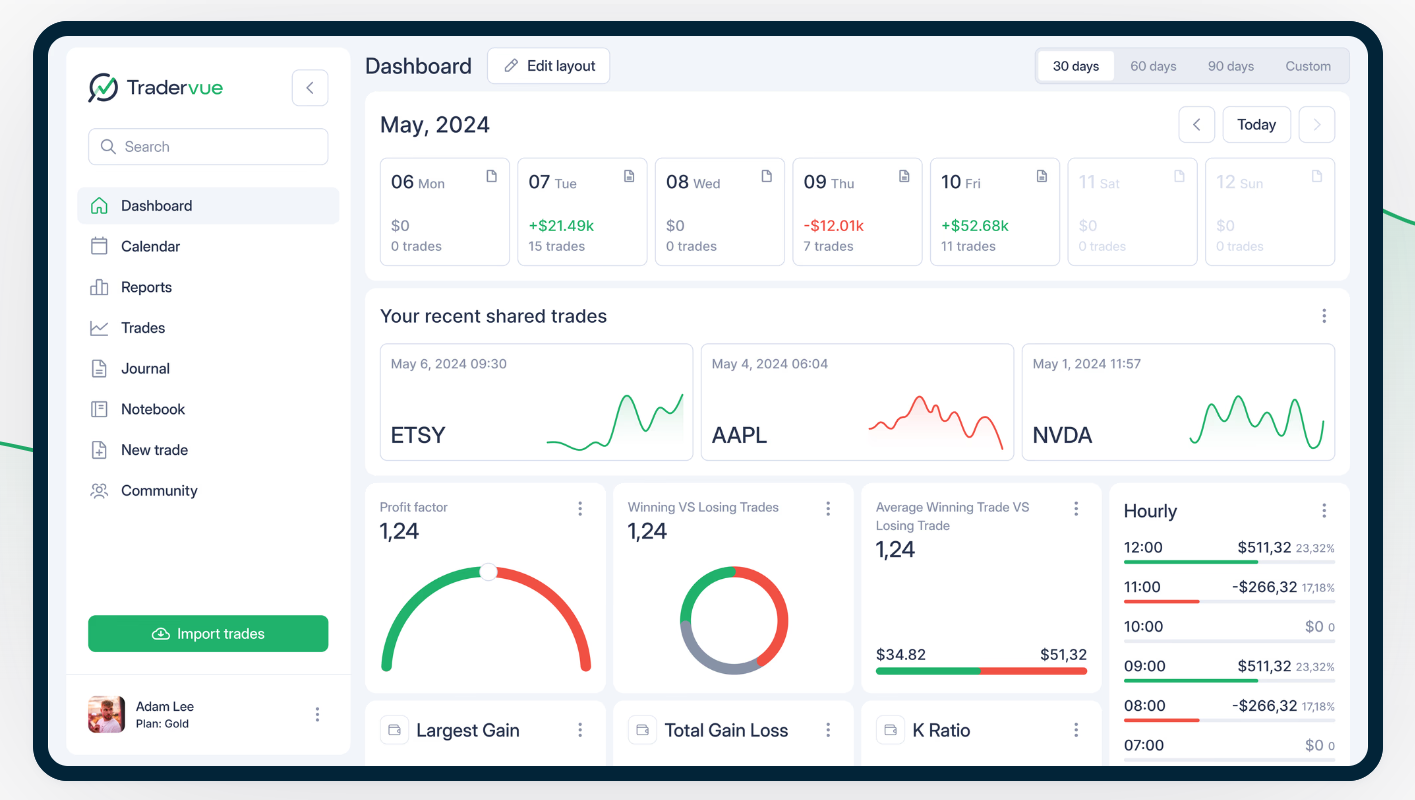
After testing the platform, I found that its greatest strength is how smoothly these features work together.
Automatic trade import: I imported 500+ historical trades and then manually checked a sample of 50 trades against the original broker records. The imported data matched the key entry, exit, and position details in 48 of the 50 trades I checked, while the remaining two required minor adjustments. Once connected, your trades appear in your journal with the key details already filled in, allowing you to spend your time reviewing rather than typing.
Manual trade entry: After manually entering 20 trades, I found the process manageable for occasional use but less appealing for high-volume traders. At roughly 1–2 minutes per trade, manually recording 100 trades could easily turn into a multi-hour task. You can record entry and exit prices, position size, commissions, notes, and other trade details without navigating through complicated forms.
Performance dashboard: The dashboard gives a quick overview of your trading performance, including profit and loss, win rate, average gain, average loss, and other key statistics. I like that the layout stays clean even after importing a large trading history.
Trade tagging: I created 12 custom tags covering four areas: strategy, market condition, time of day, and execution errors. After tagging more than 200 trades, I found the system particularly useful for spotting patterns that were almost impossible to see from the raw trade list alone. You can group trades by strategy, setup, market condition, or any custom category that fits your trading style. This makes reviewing specific patterns much easier later.
Screenshot management: I attached before-and-after screenshots to more than 50 trades during my testing. When I revisited those trades several weeks later, the screenshots made it significantly easier to remember the market context and my original reasoning than relying on notes and numbers alone. During my reviews, I often found the screenshots more valuable than the statistics because they immediately reminded me why I entered or exited a position.
Trading reports: Tradervue offers detailed reports that break down performance by symbol, strategy, tag, time period, and many other filters. Instead of simply showing account growth, the reports help uncover which habits consistently produce better results.
Calendar view: The calendar provides a visual timeline of your trading activity. Over a 3-month sample of 187 trades, I noticed that my trading frequency increased by roughly 30% during losing weeks, which helped me identify overtrading as a potential contributor to poor performance.
Trade sharing: One feature that has always distinguished Tradervue is the ability to share selected trades with mentors, teammates, or trading groups. You remain in control of what gets shared, making collaboration much easier than sending screenshots and spreadsheets separately.
Community feedback: Tradervue also includes community features where traders can receive comments and feedback on shared trades. While I don't think every trader will use this regularly, it's a valuable addition for those learning from mentors or participating in trading communities, as constructive feedback often reveals mistakes that are easy to overlook on your own.
Supported markets & Broker integrations
Tradervue has been around long enough to build support for many of the markets and brokers that active traders use every day. While it doesn't cover every brokerage in the industry, I found the overall compatibility more than sufficient for most retail traders.
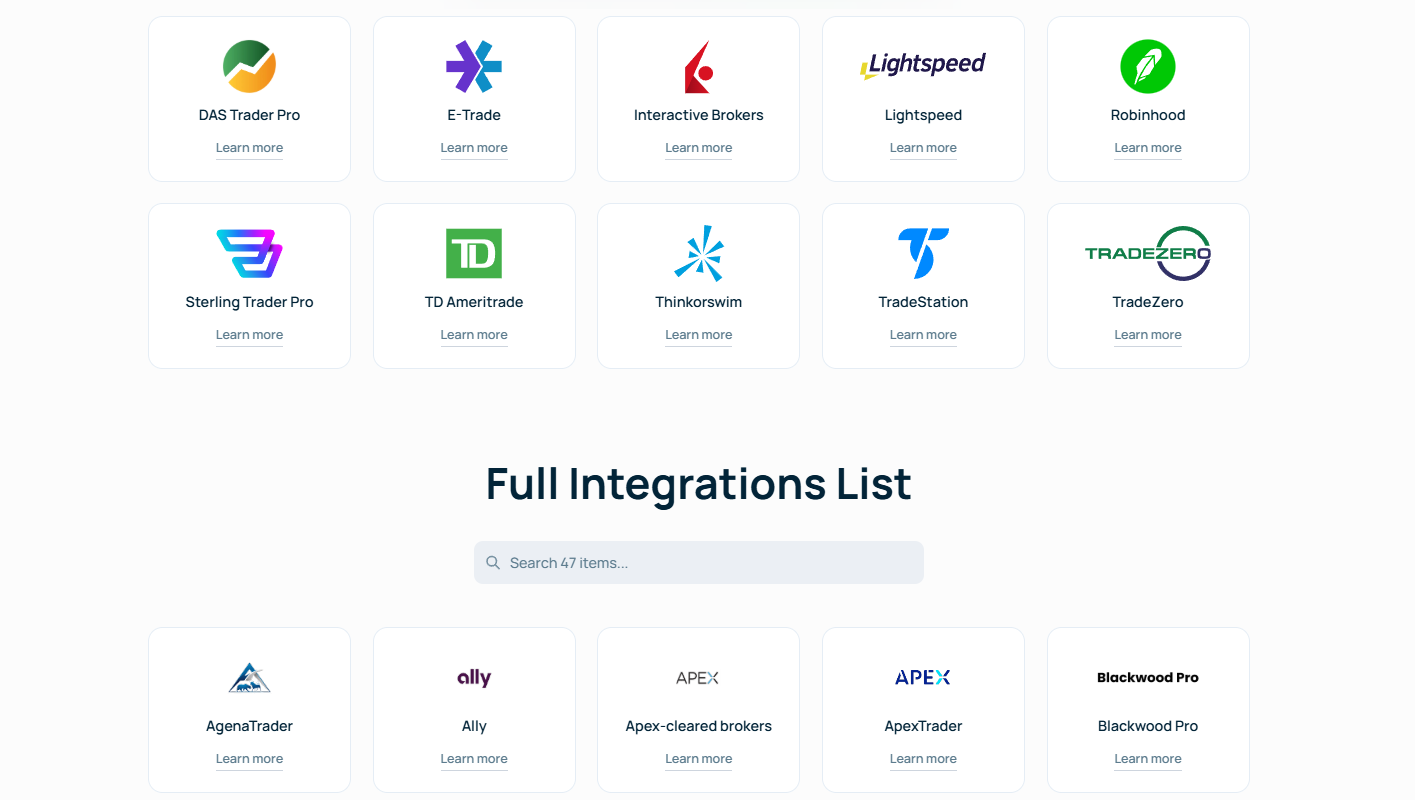
Stocks: Tradervue is particularly well suited for stock traders. Whether you're day trading or swing trading equities, the platform makes it easy to import trades, attach charts, tag setups, and review performance by symbol, strategy, or holding period. This remains one of its strongest use cases.
Options: Options trading is fully supported, allowing you to journal both simple and more advanced positions. You can review profitability, add notes for each trade, and compare different options strategies over time. Although the analytics aren't as specialized as some newer platforms, they're more than adequate for most options traders.
Futures: Futures traders can import their executions, organize trades with tags, and analyze key performance metrics across different contracts. I particularly like how easy it is to filter reports by instrument or trading strategy, making regular reviews much more efficient.
Forex support: Tradervue supports forex traders through compatible broker imports and CSV uploads. Once trades are inside the journal, the review experience is very similar to stocks and futures. You can analyze currency pairs, monitor consistency, and identify recurring execution mistakes without changing your workflow.
Supported brokers: Tradervue integrates with a wide range of popular brokers and trading platforms, making automatic imports straightforward for many users. If your broker is supported, the initial setup usually takes only a few minutes, after which new trades are synchronized automatically.
CSV import: Even if your broker doesn't offer direct integration, you're still able to maintain a complete trading journal using CSV imports. I appreciate this flexibility because it allows traders from smaller brokers or proprietary firms to keep all of their trade history in one place instead of splitting records across multiple tools.
Source: https://www.tradervue.com/site/platforms/
Performance analytics explained
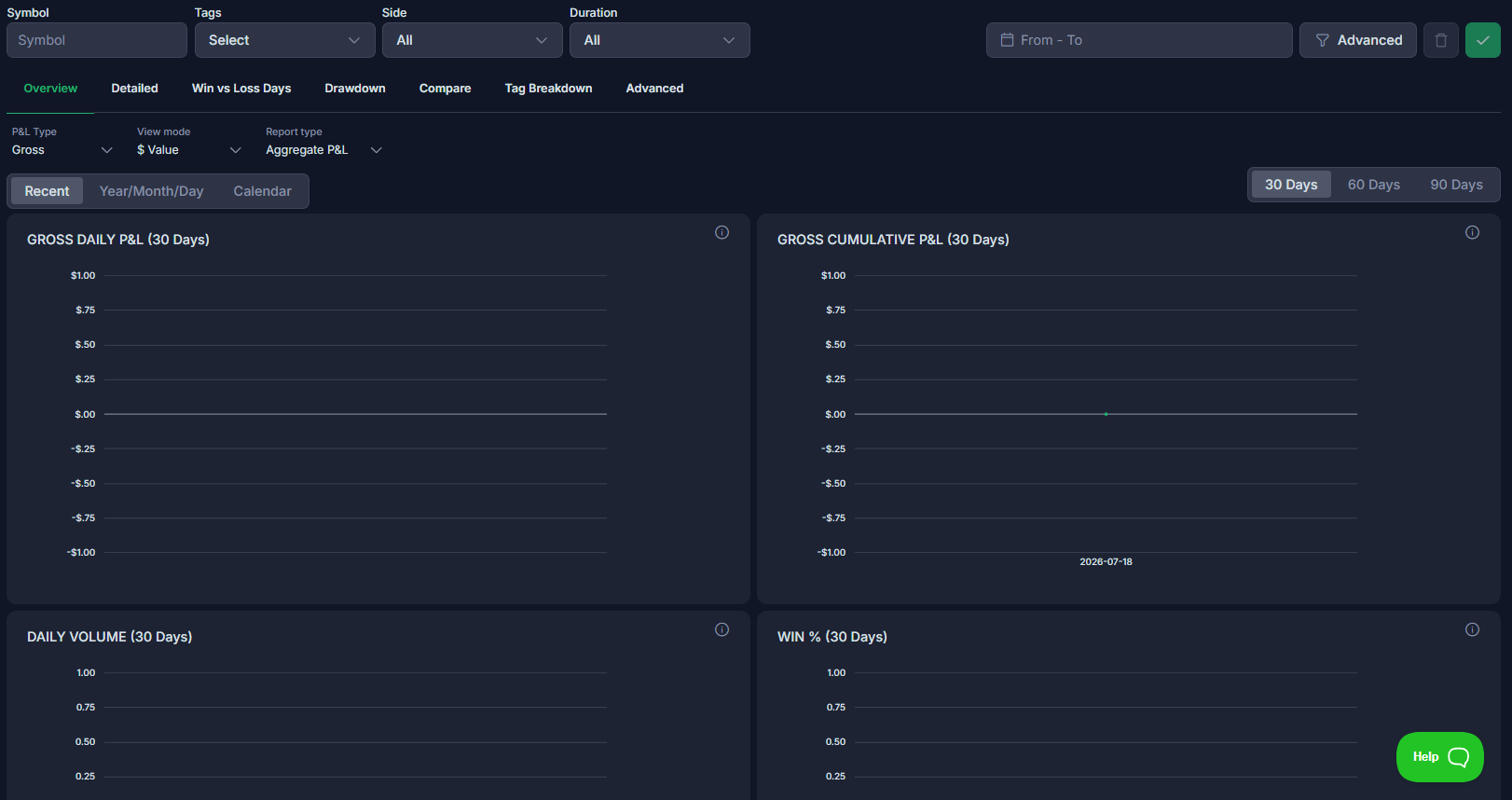
Tradervue may have a simple interface, but its analytics are surprisingly comprehensive. Rather than overwhelming you with dozens of charts, it highlights the metrics that have the biggest impact on long-term trading performance. I found the reports easy to interpret, even after importing a large trading history.
After reviewing more than 200 trades, I found that the most useful insights didn't come from total P&L. The five areas I checked most often were win rate by setup, average winner versus loser, performance by trading session, results by strategy, and drawdown across different periods.
Win rate
Win rate shows the percentage of trades that closed with a profit. It's often the first number traders look at, but I never evaluate it in isolation.
A high win rate doesn't necessarily mean a profitable strategy if losing trades are significantly larger than winning ones. Tradervue makes it easy to track this metric over different time periods and trading setups. One setup won 68% of its trades but still produced a lower overall return than another setup with a 52% win rate. The difference came down to average winner size and loss management.
Profit factor
Profit factor compares your total gross profits with your total gross losses. I like checking this alongside win rate because it provides a better indication of whether a strategy has a sustainable edge. In Tradervue, you can also filter this metric by tags, symbols, or strategies to see where your strongest performance comes from.
Expectancy
Expectancy estimates the average amount you can expect to gain or lose per trade over the long run. This is one of the statistics I review most often because it combines both win rate and average trade outcome into a single number.
After grouping 100+ trades by strategy, I found that the setup with the highest win rate wasn't the one with the highest expectancy.
Average winner vs average loser
This comparison reveals whether your winning trades are large enough to offset your losing ones. During my reviews, I often found this report more insightful than simply looking at total profit. It quickly exposes habits like cutting winners too early or allowing losses to grow unnecessarily.
Maximum drawdown
Maximum drawdown measures the largest decline in your account during the selected period. Tradervue tracks this clearly, making it easier to understand how much risk your strategy has historically required.
I consider this one of the most important metrics when evaluating consistency.
Trade frequency
Trade frequency shows how often you're entering the market. I find this particularly useful because it can reveal periods of overtrading or inactivity. Seeing your trading activity over time often explains changes in performance that aren't immediately obvious from profit and loss alone.
Time-Based performance
Tradervue lets you analyze performance across different days, weeks, months, or even times of the trading session. I like using these reports to identify when I tend to perform best. Sometimes the biggest improvement comes from avoiding low-performing trading periods rather than changing the strategy itself.
Strategy performance
One of Tradervue's strongest reporting features is the ability to compare individual trading strategies.
By grouping trades with tags, you can quickly see which setups consistently generate positive results and which ones need refinement. For me, this transforms the journal from a record-keeping tool into a practical decision-making resource.
Trade sharing & community features
One feature that has helped Tradervue stand out for years is its focus on collaboration. While many trading journals are built primarily for private analysis, Tradervue also makes it easy to share trades with other people.
If you work with a mentor, belong to a trading group, or simply want feedback from experienced traders, this part of the platform can add a lot of value.
How trade sharing works
I tested the sharing workflow with a small batch of 10 trades to see how practical it would be for collaborative review. Instead of sending screenshots, spreadsheets, and lengthy explanations separately, you can provide access to a complete trade record that includes executions, charts, notes, tags, and performance data.
I found this much more efficient because everyone reviewing the trade is looking at the same information.
Sharing trades with mentors
If you work with a trading coach or mentor, Tradervue simplifies the review process considerably. Your mentor can see exactly where you entered and exited, read your notes, review attached charts, and understand the reasoning behind each trade.
That usually leads to more productive discussions because less time is spent gathering information and more time is spent improving decision-making.
Receiving community feedback
Tradervue also supports community interaction, allowing other traders to comment on shared trades. I wouldn't rely on every opinion you receive, but thoughtful feedback can sometimes reveal blind spots that are easy to miss when reviewing your own journal. This is especially helpful if you're still developing your trading process or testing new strategies.
Private vs public journals
One thing I appreciate is that you're not forced to make your trading activity public. Tradervue lets you control who can view your journal and which trades are shared. If you prefer to keep everything private, you can do that.
If you only want to share selected trades with a mentor or small group, that's equally easy to manage. The flexibility makes the feature useful without compromising privacy.
When trade sharing Is most useful
In my experience, trade sharing delivers the greatest value when you're actively trying to improve rather than simply track performance.
It's particularly useful for newer traders learning from experienced mentors, trading teams reviewing setups together, or accountability partners who regularly discuss their trades. If you usually trade alone and never seek outside feedback, you may not use this feature very often. But for collaborative learning, it's one of the areas where Tradervue still distinguishes itself from many competing trading journals.
How Tradervue fits into your trading workflow?
A trading journal only becomes valuable if it fits naturally into your routine. One reason Tradervue has remained popular for so many years is that it doesn't ask you to change the way you trade. Instead, it fits around your existing process and makes post-trade reviews much easier.
Import trades
The workflow begins by importing your trades. If your broker is supported, Tradervue can automatically pull in your executions.
Otherwise, uploading a CSV file only takes a few minutes. I like getting this step done as soon as the trading session ends because it keeps the journal up to date without requiring extra effort later.
Organize and tag trades
Once the trades are imported, I usually add tags, notes, and screenshots before I forget the details behind each decision. This only takes a few minutes, but it makes a huge difference when reviewing trades weeks later.
Instead of looking at a list of numbers, I can immediately remember the setup, market conditions, and the reasoning behind each entry and exit.
Review performance
With everything organized, Tradervue's reports make it easy to evaluate performance from different angles. Rather than focusing only on daily profit and loss, I prefer comparing results by strategy, symbol, or tag.
This often reveals patterns that wouldn't be obvious from individual trades alone and helps me identify which setups deserve more attention.
Learn from past mistakes
The biggest benefit of using Tradervue consistently is seeing recurring mistakes before they become expensive habits. Whether it's entering trades too early, holding losers too long, or breaking my own rules, those patterns become much easier to spot after reviewing several weeks of trading history.
I find that this kind of feedback is far more useful than simply knowing whether a particular trade made money.
Build a weekly review routine
I think Tradervue delivers the most value when it's part of a regular review schedule. At the end of each week, I like to go through my journal, revisit screenshots, compare strategy performance, and write down a few lessons to carry into the following week.
That routine doesn't take long, but it helps turn individual trades into meaningful improvements. Over time, those small adjustments tend to have a much greater impact than constantly searching for new indicators or strategies.
Tradervue pricing
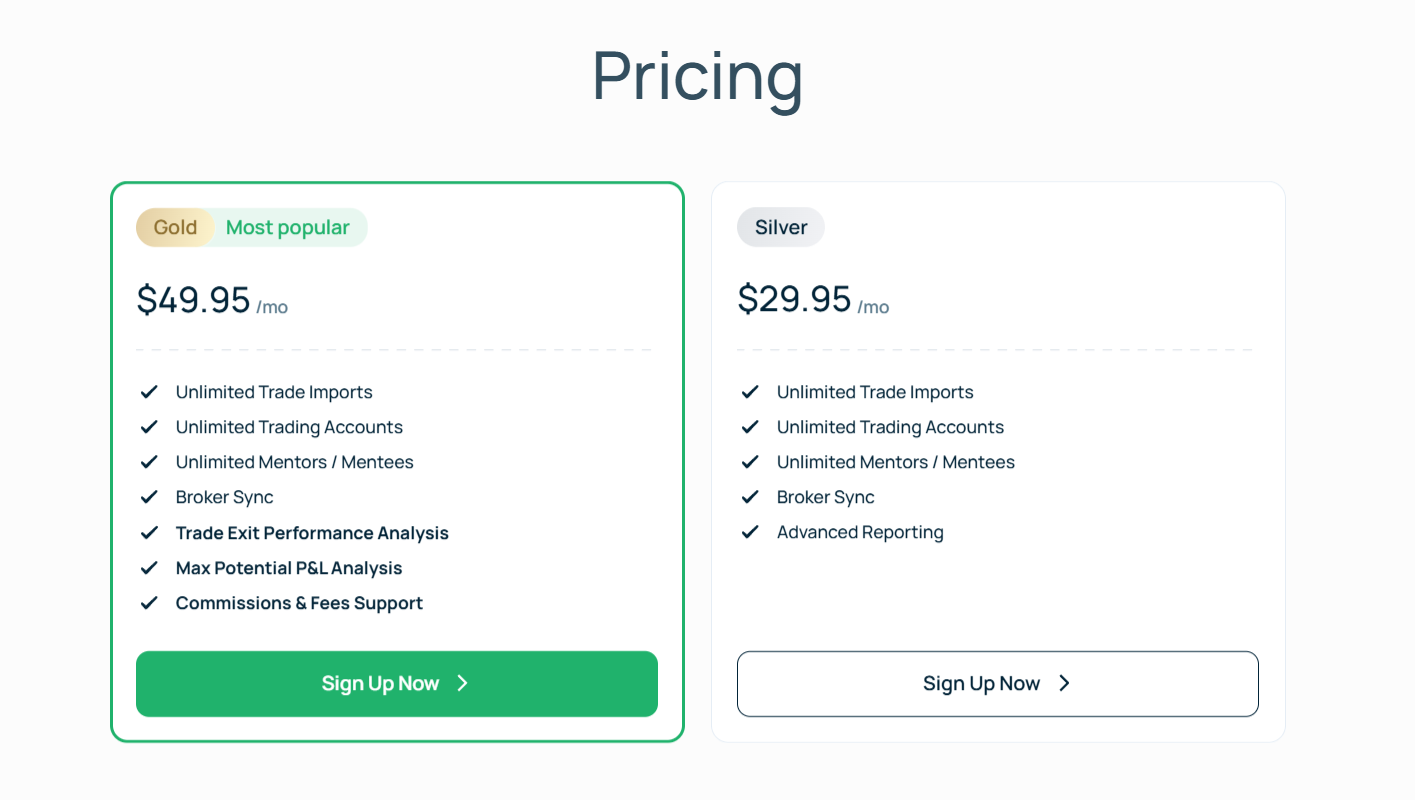
Tradervue keeps its pricing straightforward. Instead of offering a long list of subscription tiers, it provides a free plan for casual users and two paid plans for traders who need unlimited imports and more advanced analytics.
I like this structure because it's easy to understand what you're paying for without comparing dozens of feature checklists. (Source: https://www.tradervue.com/site/pricing/)
Free plan
The free plan is a good starting point if you want to explore the platform before committing to a subscription. It includes the core journaling experience, automatic price charts, tagging, basic reports, and trade sharing.
The main limitation is that you're restricted to 30 imported trades per calendar month, making it more suitable for swing traders or anyone who doesn't trade frequently.
Paid plans
Tradervue offers two premium subscriptions:
Silver – $29.95/month: Includes unlimited trade imports, unlimited trading accounts, broker synchronization, advanced reporting, and all of the features most active traders need for consistent performance reviews.
Gold – $49.95/month: Adds everything in Silver plus advanced exit analysis, maximum favorable/adverse excursion (MFE/MAE) statistics, commission and fee tracking, liquidity reports, expanded image storage, and additional professional reporting tools. If you're deeply focused on execution quality, these extra analytics are genuinely useful.
New users can also start with a free trial of either the Silver or Gold plan before deciding whether to continue with a paid subscription.
Which plan offers the best value?
For most traders, I think Silver offers the best balance between price and functionality. Unlimited imports, broker sync, and advanced reports cover everything needed to maintain a disciplined trading journal. Unless you specifically want detailed exit analysis, commission reporting, or the additional professional reports included in Gold, Silver is likely all you'll need.
I'd only recommend Gold if you're an active day trader who reviews hundreds of trades each month and regularly studies execution quality in detail. For everyone else, Silver delivers nearly all of Tradervue's core strengths at a significantly lower monthly cost.
User review
Tradervue's public reputation on Trustpilot is noticeably different from many of the newer trading journals I've reviewed. At the time of writing, the platform has a TrustScore of 2.4/5 based on 10 reviews. (Source)
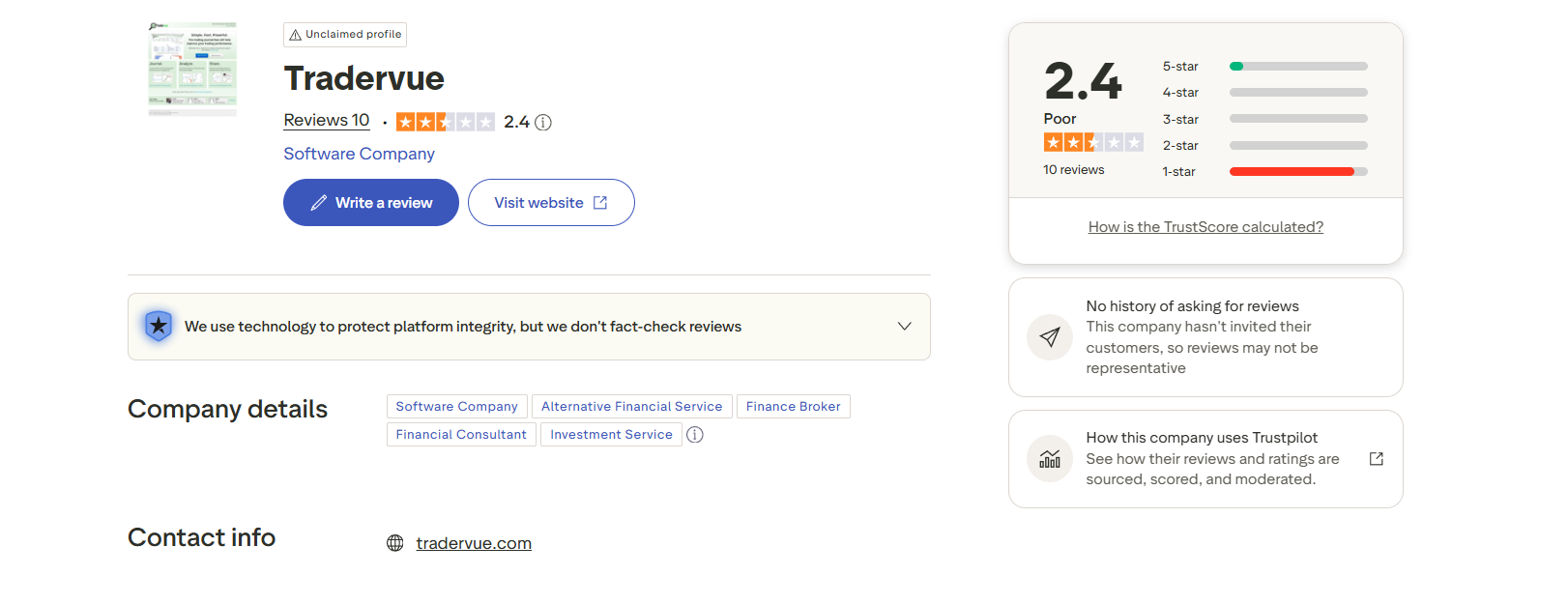
That's a relatively small sample size, so I wouldn't treat it as the definitive measure of the product, but it does reveal several recurring themes that are worth considering before subscribing.
The most common criticism isn't the journaling features themselves. Instead, many reviewers mention billing and subscription management. Several users claim they experienced difficulty canceling subscriptions, unexpected renewals, or delays when requesting refunds. Customer support is another recurring complaint, with some reviewers saying that responses to technical issues or account inquiries took longer than expected or never arrived.
That said, not every review is negative. One detailed five-star review describes Tradervue as a powerful analysis tool that helped the trader upload hundreds of historical trades in minutes and quickly identify weaknesses in their trading process. This user emphasized that the platform offered far more than simple record keeping and considered it a valuable part of improving trading performance.
After comparing those comments with my own experience, I think the feedback paints a balanced picture. The core journaling and reporting features remain solid, which is one reason Tradervue has stayed relevant for so many years. However, the repeated complaints about billing procedures and customer support shouldn't be ignored. If you decide to subscribe, I'd recommend reviewing the renewal terms carefully and keeping an eye on your subscription status.
Overall, I see Tradervue as a platform with a dependable journaling workflow but a mixed public reputation outside of its core product. The software itself can still be a good fit for traders who value straightforward trade reviews, but it's worth weighing both the platform's strengths and the customer feedback before making a long-term commitment.
Tradervue pros and cons
No trading journal is perfect, and Tradervue is no exception. After using the platform and comparing it with newer competitors, I found several areas where it continues to excel, along with a few limitations that are worth considering before subscribing.
Pros
Clean, distraction-free interface that's easy to learn.
Reliable automatic trade imports for many popular brokers.
Excellent tagging system for organizing trades by setup, strategy, or market condition.
Detailed performance reports that help uncover recurring strengths and weaknesses.
Built-in screenshot management makes post-trade reviews much more meaningful.
Trade sharing is one of Tradervue's standout features, especially for traders working with mentors or accountability partners.
Calendar view provides a simple way to review trading activity over time.
Free plan lets you explore the platform before upgrading.
Long track record and a well-established reputation within the trading community.
Cons
The interface feels functional rather than modern when compared with platforms like TradeZella.
No AI-powered trade analysis or automated coaching features.
Doesn't include a strategy documentation system similar to Playbooks.
Advanced customization options are more limited than those offered by some competitors.
The Gold plan may be more expensive than necessary unless you regularly use its advanced reporting tools.
Some newer traders may prefer dashboards with more visual insights and interactive charts.
Broker compatibility is good, but not every broker supports direct synchronization, so some users will still rely on CSV imports.
Overall, I think Tradervue succeeds because it focuses on doing the fundamentals well. It doesn't chase every new trend or feature, but it delivers a dependable journaling experience that's easy to maintain over the long term.
If your priority is building a consistent review routine rather than experimenting with AI features or highly customizable dashboards, its strengths outweigh its weaknesses.
Tradervue for different types of traders
Tradervue isn't built for just one type of trader. While some features naturally appeal to active day traders, I found the platform flexible enough to support several trading styles without making the workflow feel overly complicated.
Day traders: Tradervue is an excellent match for day traders who place multiple trades during each session. Automatic imports, detailed reports, chart attachments, and trade tagging make it easy to review dozens of positions without getting buried in spreadsheets. If reviewing daily execution is part of your routine, Tradervue fits that workflow very well.
Swing traders: Swing traders usually place fewer trades, but each position involves more planning and analysis. Tradervue gives you plenty of space to record trade ideas, attach charts, and revisit your reasoning days or weeks later. I found this especially helpful when evaluating whether a trade followed the original plan.
Futures traders: Futures traders can benefit from Tradervue's performance reports and filtering tools. Comparing results by contract, setup, or trading session becomes straightforward, making it easier to identify where your edge is strongest and where adjustments are needed.
Options traders: Tradervue supports options trading well, particularly for traders who focus on reviewing execution and overall profitability. While it doesn't offer dedicated strategy management like some newer platforms, it still provides enough reporting and organization to evaluate options performance effectively.
Stock traders: Stock traders are probably Tradervue's primary audience. The platform was originally built with equity traders in mind, and it shows. From broker integrations to trade sharing and reporting, almost every part of the workflow feels polished for active stock trading.
Forex traders: Forex traders can also make good use of Tradervue through supported broker integrations and CSV imports. Once trades are imported, the review process is virtually identical to other markets. If your goal is to improve consistency by analyzing currency pairs, trading sessions, and recurring mistakes, Tradervue gives you the tools to do that without adding unnecessary complexity.
Tradervue vs competitors
Every trading journal has a different philosophy. After comparing these platforms side by side, I see Tradervue as the reliable, no-nonsense option for traders who want a proven journaling workflow. TraderSync leans toward automation, TradeZella focuses on strategy development, and Edgewonk places greater emphasis on psychology and self-improvement.
Feature | Tradervue | TraderSync | TradeZella | Edgewonk |
Supported markets | Stocks, options, futures, forex | Stocks, options, futures, forex | Stocks, options, futures, forex, crypto | Multi-asset support |
Automatic trade import | ✔ Yes | ✔ Yes | ✔ Yes | Limited |
Broker integrations | Good selection | Extensive | Extensive and growing | Limited |
Performance dashboard | Clean and easy to understand | Detailed and data-rich | Modern and highly visual | Comprehensive reports |
Trade tagging | ✔ Yes | ✔ Yes | ✔ Yes | ✔ Yes |
Screenshot management | ✔ Yes | ✔ Yes | ✔ Yes | ✔ Yes |
Strategy tracking | Basic | Advanced | Excellent with Playbooks | Strong |
Trade sharing | ✔ Built-in community sharing | Limited | Mentor sharing | No |
Trading psychology tools | Basic | AI-assisted insights | Structured review workflow | Excellent |
AI features | No | ✔ Yes | ✔ Yes | No |
Best for | Traders who value a simple, proven journal | Active traders seeking automation | Traders focused on strategy development | Traders improving discipline and decision-making |
Learning curve | Easy | Moderate | Easy to moderate | Moderate |
Starting price | From $29.95/month | From $29.95/month | From $29/month | One-time license |
Tradervue may not have the newest AI features or the most advanced strategy management, but it remains one of the easiest trading journals to adopt and maintain. If your priority is keeping a consistent review process with reliable reporting and trade sharing, it still competes well.
Traders looking for AI-assisted analysis may prefer TraderSync, while those who build detailed trading systems will likely get more value from TradeZella. If your main goal is strengthening discipline and trading psychology, Edgewonk continues to be one of the strongest alternatives.
Best Tradervue alternatives
Tradervue remains a solid trading journal, but it isn't the only option worth considering. Depending on how you trade and which features matter most, one of these platforms may be a better fit for your workflow:
TraderZully: I got tired of jumping between different platforms just to review my futures and forex setups, so I started routing everything straight into TradeZully. Whenever I want to check why my drawdown spikes on specific setups, I just pull up the custom calendar heatmaps and drawdown maps. It genuinely feels like having a personal risk manager looking over my shoulder during every session. I finally have a clear roadmap for my trading psychology without sorting through messy CSV files.
TraderSync: If automation is your highest priority, TraderSync is probably the closest alternative. It offers extensive broker integrations, automatic trade imports, AI-assisted insights, and detailed performance reports. I'd recommend it to traders who want to minimize manual work while gaining deeper analytical insights.
Edgewonk: Edgewonk takes a different approach by placing greater emphasis on trading psychology and process improvement. Instead of focusing mainly on dashboards, it encourages traders to analyze decision-making, emotional discipline, and consistency. It's a strong choice if your biggest challenge isn't finding setups but following your trading plan.
TradeZella: TradeZella is ideal for traders who want more structure around strategy development. Its Playbooks help document trading setups, while modern dashboards and strategy tracking make it easy to compare performance across different market conditions. If you regularly refine trading systems, I think TradeZella offers more flexibility than Tradervue.
TradesViz: TradesViz is built for traders who enjoy working with data. Its reporting engine is among the most comprehensive I've used, with highly customizable reports and advanced filtering options. The interface isn't quite as streamlined as Tradervue's, but the analytical depth is difficult to match.
Trademetria: Trademetria sits somewhere between a portfolio tracker and a trading journal. It supports multiple asset classes, provides solid performance reporting, and remains easy to navigate. I think it's a good option for traders who want a balanced feature set without committing to a more specialized platform.
» Read more: Best Trading Journal Apps & Software for Forex, Stock, Futures, Crypto (Free & Paid)
What I like most about Tradervue and Where Tradervue could improve
After using Tradervue for an extended period, I understand why it has remained popular despite the arrival of newer competitors. It focuses on the fundamentals of trade journaling and executes them well. At the same time, there are a few areas where the platform feels behind the latest generation of trading journals.
UI, UX: The interface is clean and practical. I rarely had trouble finding the feature I needed, and the overall workflow feels logical. While it doesn't have the visual polish of some newer platforms, it stays out of the way and lets me focus on reviewing trades.
Reporting: Reporting is one of Tradervue's biggest strengths. Filtering trades by strategy, symbol, tag, or time period is straightforward, and the reports provide enough detail to uncover recurring patterns without feeling overwhelming.
Community features: Trade sharing is something I genuinely appreciate. Being able to share trades with mentors or other traders directly through the platform is much more convenient than sending screenshots and spreadsheets back and forth. For collaborative learning, this remains one of Tradervue's standout features.
Simplicity: One reason I kept coming back to Tradervue is that it doesn't try to do everything. The learning curve is relatively short, and most features are useful from day one. If your goal is to build a consistent review habit, that simplicity works in its favor.
Trade review process: Reviewing trades feels natural. I like being able to combine execution data, charts, notes, and tags in one place. Looking back at older trades becomes much easier because the context is preserved alongside the numbers.
Interface feels dated: Although the interface is functional, it clearly reflects a platform that has been around for many years. Compared with TradeZella or TraderSync, the design feels less modern and less interactive.
Mobile experience: After using the mobile browser version for 10 consecutive review sessions, I found it practical for quick journal updates but noticeably less comfortable for deeper analytics. Reviewing reports, charts, and multiple trades is simply more comfortable on a larger screen, and a dedicated mobile experience would be a welcome improvement.
Advanced analytics: The platform covers all of the core performance metrics I expect, but it doesn't offer as many advanced analytical tools as some competitors. Traders who want AI-assisted insights or highly specialized reports may eventually outgrow it.
Customization: I occasionally found myself wishing for more flexibility when organizing dashboards or building custom reports. The default layouts work well, but power users may want greater control over how information is displayed.
Learning resources: I used Tradervue's documentation during my initial setup and referred back to it 20+ times while testing more advanced features. The basic workflow was easy to understand without documentation, but I found the additional guidance more useful when working with specific reporting. More tutorials, workflow examples, and strategy-focused guides would make it even easier for first-time users to get the most from the platform.
Overall, what I appreciate most is that Tradervue never makes journaling feel like extra work. It keeps the review process efficient and organized, which is ultimately the reason most traders use a journal in the first place.
Is Tradervue worth it?
Tradervue has been around for well over a decade, and there's a reason traders continue to recommend it. It doesn't rely on flashy features or AI-powered recommendations. Instead, it helps you build a consistent review process, which is ultimately where long-term improvement comes from.
In my view, the value of Tradervue depends heavily on trading volume. If you're reviewing 100+ trades per month, paying $29.95 for Silver becomes easier to justify because the platform can save hours of manual organization and analysis. If you're making fewer than 10 trades per month, I'd be less convinced that the subscription is necessary unless you specifically value the reporting and trade-sharing features.
I would personally consider Tradervue worth paying for if I were actively reviewing 50–100+ trades every month or regularly working with a mentor. Below that level, I'd compare the subscription cost against a spreadsheet or a lower-cost journal before committing.
Best for beginners
I think Tradervue is a great starting point for beginners who want to move beyond spreadsheets. The interface is easy to understand, the reports aren't overloaded with data, and the learning curve is relatively gentle.
If you've never used a trading journal before, Tradervue makes it easy to develop good review habits without feeling overwhelmed by advanced features.
Best for day traders
Day traders are likely to get the most value from Tradervue. Automatic trade imports, detailed reports, tagging, and chart attachments make it much easier to review a high volume of trades every day. Instead of spending time organizing data manually, you can focus on identifying execution mistakes and refining your setups.
Best for swing traders
Swing traders generally place fewer trades, but each position often involves more planning and patience.
Tradervue works well for this style because every trade can include notes, screenshots, and tags that preserve the full context behind your decisions. Looking back after several weeks gives you a much clearer picture of whether you followed your original plan.
Best for traders who work with mentors
One area where Tradervue still stands out is collaboration. The built-in trade sharing feature makes it simple to review trades with a mentor, coach, or accountability partner.
Rather than sending multiple screenshots or spreadsheets, you can share a complete trade record that includes execution data, charts, and personal notes. That makes feedback far more productive.
Best for performance reviews
If your primary goal is understanding your trading performance rather than finding new strategies, Tradervue remains one of the strongest choices available. Its reporting tools make it easy to analyze results by strategy, symbol, tag, or time period, helping you spot patterns that aren't obvious from individual trades.
In my experience, that's where Tradervue delivers the greatest value. It turns regular trade reviews into a structured process that supports steady improvement over time.
Final verdict
After reviewing Tradervue, I think it still earns its place among the best trading journal platforms, especially if detailed trade reviews matter more to you than flashy visuals.
Its reporting tools and trade-sharing features make it a strong choice for traders who regularly review performance or work with a coach. If you want a more modern interface or deeper automation, other options may fit better. Otherwise, Tradervue remains a dependable journal that's easy to recommend.
Trader Type | Recommendation |
Beginner | ⭐⭐⭐⭐☆ |
Day Trader | ⭐⭐⭐⭐⭐ |
Swing Trader | ⭐⭐⭐⭐☆ |
Futures Trader | ⭐⭐⭐⭐☆ |
Options Trader | ⭐⭐⭐⭐☆ |
Traders Working with Mentors | ⭐⭐⭐⭐⭐ |